Inspiring
Mar 9, 2023 9:42 PM UTC
Question

Trying to understand local/scoping of variables

Hi:

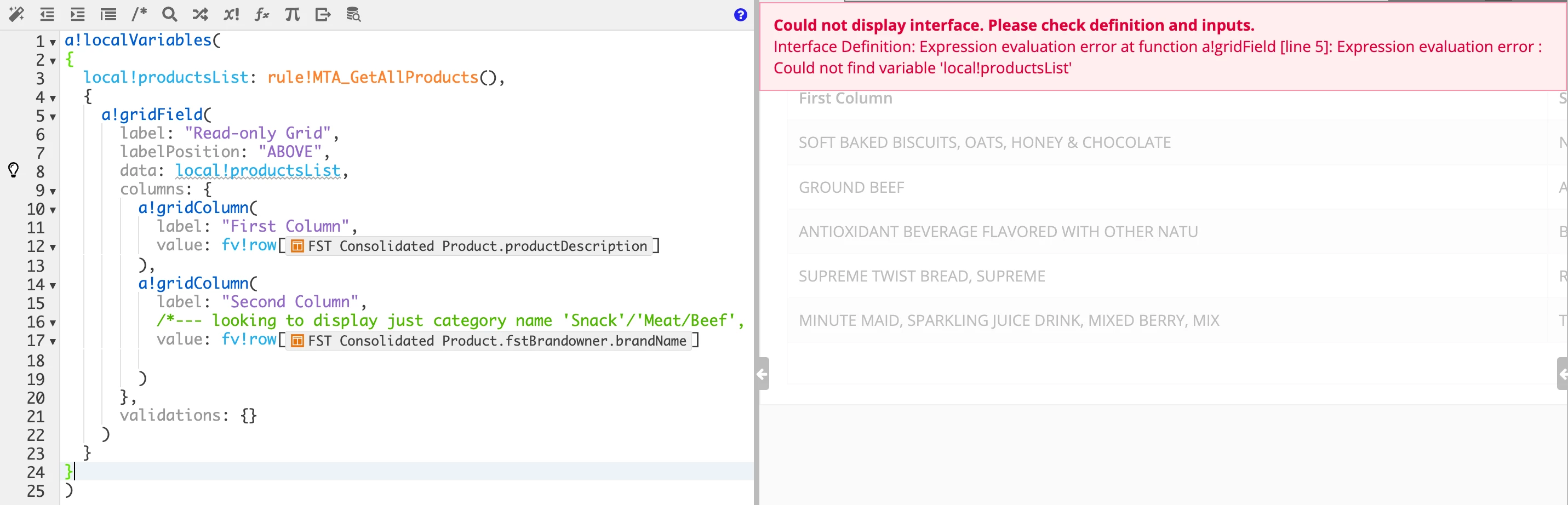
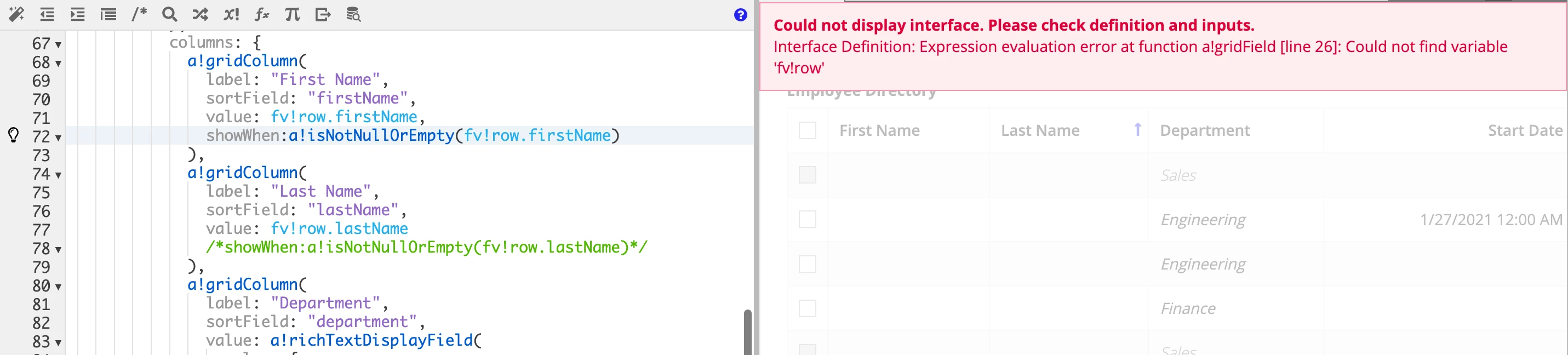
I was experimenting with the Grid example in Appian Tutorials (https://docs.appian.com/suite/help/23.1/Grid_Tutorial.html) and noticed that I had some rows with no firstName and LastName.  So, I thought I would use "fv!row.firstName" as part of the showWhen-attribute to prevent those rows from being show (see image below).  However, I am getting "scoping error" messages.  I know I can use query to filter out those rows but thought I would experiment with this approach because I have had issues with understanding local-variable scoping.  For example, when I use {} right after a!localVariables (), I get scoping error (see second image. 

Any responses to helping me understand local-variables/scoping would be appreciated.

Thank you.

Ma
19 replies

abhayd3663
Brainy
Mar 9, 2023 9:54 PM UTC

Can you post your code using following instead of the image.

man0001Author
Inspiring
Mar 9, 2023 10:06 PM UTC

Abhay,

Here is the code - emblem

a!localVariables(
  local!selection,
  local!selectedEmployees,
  local!showIneligible:true,
  {
    a!checkboxField(
      label: "Checkboxes",
      labelPosition: "COLLAPSED",
      choiceLabels: {"Show ineligible employees"},
      choiceValues: {true()},
      value: if(local!showIneligible, true(),null()),
      saveInto: a!save(
        local!showIneligible,
        if(
          isnull(save!value),
          false(),
          true()
        )
      ),
      validations: {}
    ),
  a!columnsLayout(
    columns: {
      a!columnLayout(
        contents: {
          a!gridField(
            label: "Employee Directory",
            labelPosition: "ABOVE",
            data: a!queryEntity(
              entity: cons!CR_EMPLOYEE_ENTY_CNST,
              query: a!query(
                selection: a!querySelection(
                  columns: {
                    a!queryColumn(
                      field: "id"
                    ),
                    a!queryColumn(
                      field: "firstName"
                    ),
                    a!queryColumn(
                      field: "lastName"
                    ),
                    a!queryColumn(
                      field: "department"
                    ),
                    a!queryColumn(
                      field: "startDate"
                    )
                  }
                ),
                logicalExpression: a!queryLogicalExpression(
                  operator: "AND",
                  filters: {
                    a!queryFilter(
                      field: "department",
                      operator: "<>",
                      value: "Sales",
                      applyWhen: not(local!showIneligible)
                    )
                  },
                  ignoreFiltersWithEmptyValues: true
                ),
                pagingInfo: fv!pagingInfo
              ),
              fetchTotalCount: true
            ),
            columns: {
              a!gridColumn(
                label: "First Name",
                sortField: "firstName",
                value: fv!row.firstName,
                showWhen:a!isNotNullOrEmpty(fv!row.firstName)
              ),
              a!gridColumn(
                label: "Last Name",
                sortField: "lastName",
                value: fv!row.lastName
                /*showWhen:a!isNotNullOrEmpty(fv!row.lastName)*/
              ),
              a!gridColumn(
                label: "Department",
                sortField: "department",
                value: a!richTextDisplayField(
                  value: {
                    a!richTextItem(
                      text: {fv!row.department},
                      color: if(fv!row.department="Sales","SECONDARY",null),
                      style: {
                        "EMPHASIS"
                      }
                    )
                  }
                )
              ),
              a!gridColumn(
                label: "Start Date",
                sortField: "startDate",
                value: if(
                isnull(fv!row.startDate),
                fv!row.startDate,
                datetext(fv!row.startDate, "default")
                ),
                align: "END"
              ),
              a!gridColumn(
                label: "Id",
                sortField: "id",
                value: fv!row.id,
                align: "END"
              )
            },
            initialSorts: {
              a!sortInfo(
                field: "lastName",
                ascending: true
              )
            },
            selectable: true,
            selectionValue: local!selection,
            selectionSaveInto: {
              local!selection,

              /* This save adds the full rows of data for items selected in the most recent user interaction to local!selectedEmployees. */
              a!save(local!selectedEmployees, append(local!selectedEmployees,fv!selectedRows)),
              /* This save removes the full rows of data for items deselected in the most recent user interaction to local!selectedEmployees */
              a!save(local!selectedEmployees, difference(local!selectedEmployees,fv!deselectedRows))
            },
            disableRowSelectionWhen: fv!row.department="Sales",
            validations: {}
          )
        },
        width: "WIDE"
      ),
      a!columnLayout(
        contents: {
          a!richTextDisplayField(
            label: "Selected Employees",
            labelPosition: "ABOVE",
            value: a!forEach(
              items:local!selectedEmployees,
              expression: {
                a!richTextIcon(
                  icon:"user-circle"
                ),
                " " & fv!item.firstName & " " & fv!item.lastName & char(10)
              }
            )
          )
        }
      )
    }
  )
}
)

abhayd3663
Brainy
Mar 9, 2023 10:17 PM UTC

looks like fv!raw can only be used in the value parameter. Remove it from showWhen:a!isNotNullOrEmpty(fv!row.firstName)

Instead do following.

1. Define local variable (e.g. local!data) and capture the query result set into it.

2. Refer local!data into gridField -> data.

3. For showWhen condition Use local!data.firstName = <something>

abhayd3663
Brainy
Mar 9, 2023 10:01 PM UTC

It's simple. The variable is accessible within the block into which it is defined.

See the following to understand it better -

a!localVariables(
  local!a: 1,
  {
    a!localVariables(local!b: 2, local!a),
    local!b
  }
)

man0001Author
Inspiring
Mar 9, 2023 10:15 PM UTC

Abhay,

That was understanding - variable is available within the defined block.  Unless, I am missing something, I don't see why line 8 in my example (second image in my original post) gives an error when the variable is defined on line 3.  However, if I remove the braces on line 2 and 24, the error goes away (see image below).

Madhu

abhayd3663
Brainy
Mar 9, 2023 10:24 PM UTC

Please try to understand the syntax of a!localVariables().

a!localVariables( localVar1, localVarN, expression )

In your image2, you have defined local!productsList without using localVariable() which is violating the syntax because it is the expression portion.

use something like following.

a!localVariables(
  {
    a!localVariables(
      local!productList: rule!abc(),
      a!gridField()
    )
  }
)

See the color coding to understand it better.