February 20, 2025
Question

Names in Charts

  • February 20, 2025
  • 7 replies
  • 0 views

Hi team ,

I am using record data  as source for KPI but the field name in y axis taking lot of spaces.
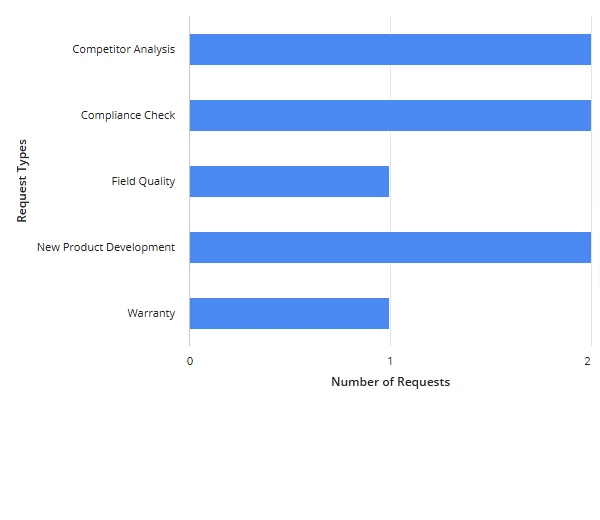
If you see y axis taking lot of spaces ,is there any way to minimize the space

7 replies

February 20, 2025

What do you mean by minimize the space?  Are you hoping to separate each word of the y-axis labels with a newline rather than a space? 

February 27, 2025

The requirement is if you see in the above chart "warranty" taking less space but because of" new product development "the entire graph moving right side .I want the new product development name should come in 3 lines so that it will also take same space as warranty 

venkatrea696188
February 27, 2025

Sorry it's not possible. If you go through my below code I reserved only one third of space in Columns layout for bar chart . .So it adjusted itself (Titles and Bars) to utilize the space. The result is New Product development came as two lines. If i didn't have that restriction it would look like your screenshot

{
  a!columnsLayout(
    columns: {
      a!columnLayout(
        contents: 
    a!barChartField(
    label: "Bar Chart",
    labelPosition: "ABOVE",
    categories: {"Competitor analysis", "Compliance Check", "Field Quality", "New Product Development","Warranty"},
    series: {
      a!chartSeries(label: "Chart Series", data: {1, 2, 3,2,3})
    },
    stacking: "NONE",
    showLegend: true,
    showTooltips: true,
    allowImageDownload: true,
    colorScheme: "RAINFOREST",
    height: "MEDIUM",
    xAxisStyle: "STANDARD",
    yAxisStyle: "STANDARD"
  ),
  width: "3X"
  ),
    a!columnLayout(
      width: "3X"
    ),
    a!columnLayout(
      width: "7X"
    )}
  )
}

venkatrea696188
February 20, 2025

Are you referring to spaces between bars?? It's something to do with space that you reserved for this column chart /bar chart on interface (Responsive UI).No, you can't determine the spaces between it 

venkatrea696188
February 20, 2025

I saw your other thread ,the answer remains the same it depends on space reserved for entire chart. Here is an example screenshot , I used column chart with two columns (So name auto adjusted itself with in the reserved space)

February 21, 2025

maybe you can wrap the text