

afiyanm6332
July 5, 2024
Question

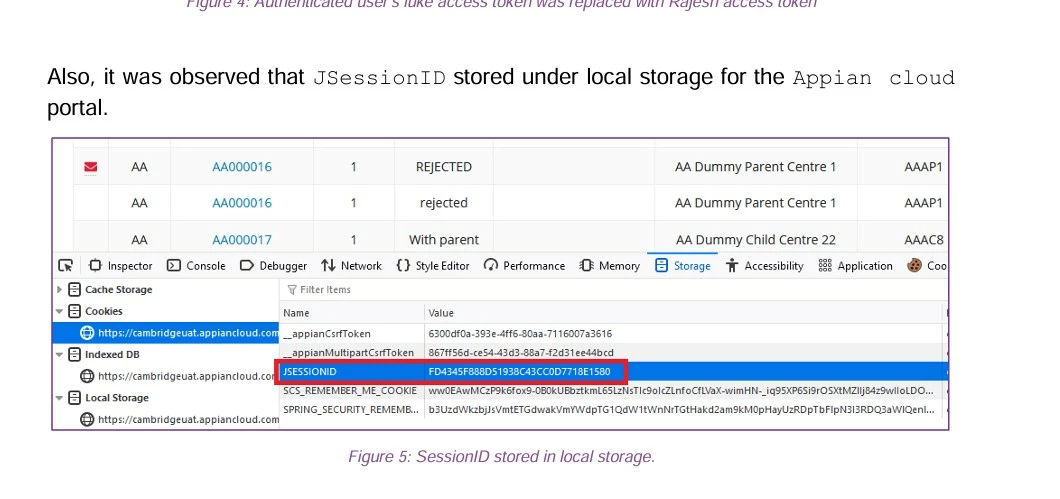
JSessionID Visible in Appian Cloud Portal creating security concern in Pen Testing

  • July 5, 2024
  • 4 replies
  • 0 views

Hi Appian Community,

[mention:5357deb643314f689f0553cc98556414:23b05a61c3e5445190d9bfa00453bce4] 

[mention:a11f77a729fb4db2af76b09948583328:e9ed411860ed4f2ba0265705b8793d05] [mention:92ac9d4559ff43edb28eaa01ed77691b:e9ed411860ed4f2ba0265705b8793d05] 

In our recent Pen testing report it was found that JSessionID is Visible in the browser's Developer tools under Inspect functionalities. Creating Security concerns in pen testing report .

Anyone had previously been with such issue or Have any Idea how to handle the scenario.
  

4 replies

stefanhelzle0001
July 5, 2024

I suggest to contact Appian do discuss that. From the past, I remember such conversations and, at the end of the day, it was no issue.

afiyanm6332
July 5, 2024

Thanks [mention:a11f77a729fb4db2af76b09948583328:e9ed411860ed4f2ba0265705b8793d05] , already planned to do that

Also if anything comes up to you update would be very helpful.

July 5, 2024
AFAIK, If the following two attributes are set for JSessionID cookie, then there is no security issue.
1. httpOnly
 The JavaScript code can't read cookie
 
2. HTTPS
  • The browser won’t attach this cookie in the HTTP request
  • The HTTPS request will be encrypted so cookies will be safely sent
  • When sent over HTTPS, all data will be encrypted from the browser and sent to the network. The attacker won’t be able to get the raw data
 
As suggested by [mention:a11f77a729fb4db2af76b09948583328:e9ed411860ed4f2ba0265705b8793d05] , you can check with Appian.
davidj137213
July 5, 2024

Are you sure there is a security problem? Does the test show a specific problem or does it just say that maybe there is a problem?

I did some tests in the past, and I think it's not possible for you to get anywhere with that JSESSIONID.

In any case, contact Appian if you prefer to be sure about it