What is SAML Signing Certificate Signing option for Appian Application?
I've configured Azure AD SAML SSO for Appian application.
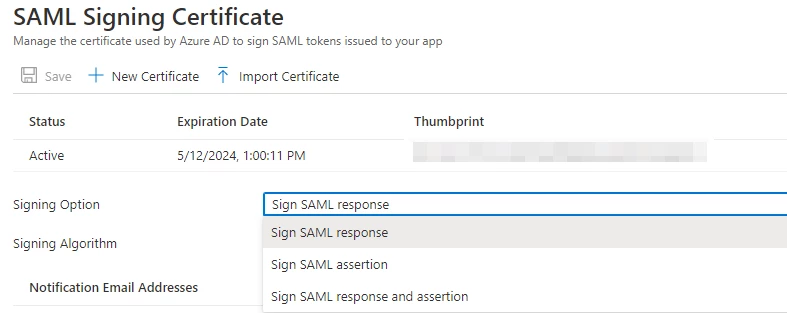
In Azure AD SSO, SAML Signing Certificate setup, will have to provide the Signing option and Signing algorithm as shown below.
There are three different signing option available on Azure AD, not sure which one is the right choice for Appian App?
I tried every option from the list, unfortunately every option is returning an error as shown below. - Could someone please suggest where to find the signing option on Appian application?.
Sign SAML assertion
2021-05-12 12:03:32 [ajp-nio-0.0.0.0-8009-exec-232] ERROR com.appiancorp.security.auth.saml.SamlTestServlet - Unexpected exception during SAML authentication test: Signature was either invalid or signing key could not be established as trusted
org.opensaml.messaging.handler.MessageHandlerException: Signature was either invalid or signing key could not be established as trusted
Sign SAML Response and assertion
2021-05-12 19:52:03,795 [ajp-nio-0.0.0.0-8009-exec-280] ERROR com.appiancorp.security.auth.saml.SamlTestServlet - Unable to determine return url for SAML request, using default value instead
java.lang.IllegalStateException: Idp Entity Id not stored on session or request
Sign SAML response
2021-05-12 20:01:01,007 [ajp-nio-0.0.0.0-8009-exec-284] INFO com.appiancorp.security.auth.saml.SamlFilter - Authentication Error: Error while trying to authenticate the token: com.appiancorp.security.auth.saml.SamlAuthToken@633da8b7: Principal: null; Credentials: [PROTECTED]; Authenticated: false; Details: AuthenticationDetails[ts=2021-05-12 20:01:00., entryPoint=PORTAL, clientIpAddress=, clientUserAgent=Mozilla/5.0 (Windows NT 10.0; Win64; x64) AppleWebKit/537.36 (KHTML, like Gecko) Chrome/90 Safari/537.36, requestUrl=https://xyzth-dev.appiancloud.com:443/suite/saml/AssertionConsumer]; Not granted any authorities
org.springframework.security.authentication.AuthenticationServiceException: Error while trying to authenticate the token: com.appiancorp.security.auth.saml.SamlAuthToken@633da8b7: Principal: null; Credentials: [PROTECTED]; Authenticated: false; Details: AuthenticationDetails[ts=2021-05-12 20:01:00.985, entryPoint=PORTAL, clientIpAddress=, clientUserAgent=Mozilla/5.0 (Windows NT 10.0; Win64; x64) AppleWebKit/537.36 (KHTML, like Gecko) Chrome/90 Safari/537.36, requestUrl=https://xyzth-dev.appiancloud.com:443/suite/saml/AssertionConsumer]; Not granted any authorities