June 18, 2025
Question

Error when using "Box" Plug-ins

  • June 18, 2025
  • 7 replies
  • 0 views

Dear anyone,

I am currently trying to execute Box API that uses JWT,

But the following issue occurred when executing the Box API to obtain an access token.

If someone else has sent about the same issue and it has been resolved,

or alternative solutions you may suggest would be highly appreciated.


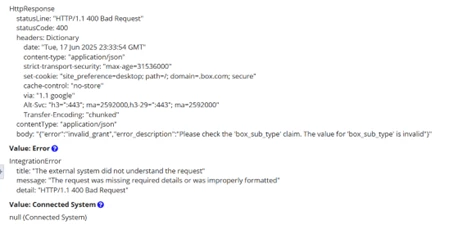
[Error details] *This is written in the body of the HTTP response.

"{"error":"invalid_grant","error_description":"Please check the 'box_sub_type' claim. The value for 'box_sub_type' is invalid"}"


[Procedure]

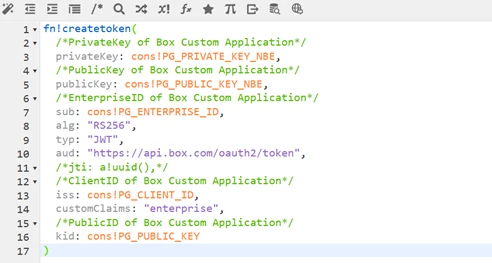
1.Obtain a JWT using the createtoken() function of the “Box” Plug-ins.

2.Execute the Box API to obtain Box's Access Token.   *An error occurs here.


[Already Confirmed]

1.Applications created in Box have been approved by the Box administrator.

2.'box_sub_type' and 'sub' classifications must match.


Thank you very much in advance for your assistance.

Best regards,


・HTTP Responese
・Component of  Procedure 1 (ExpressionRule)
 

 ãƒ»Component of  Procedure 2 (Integration Object)
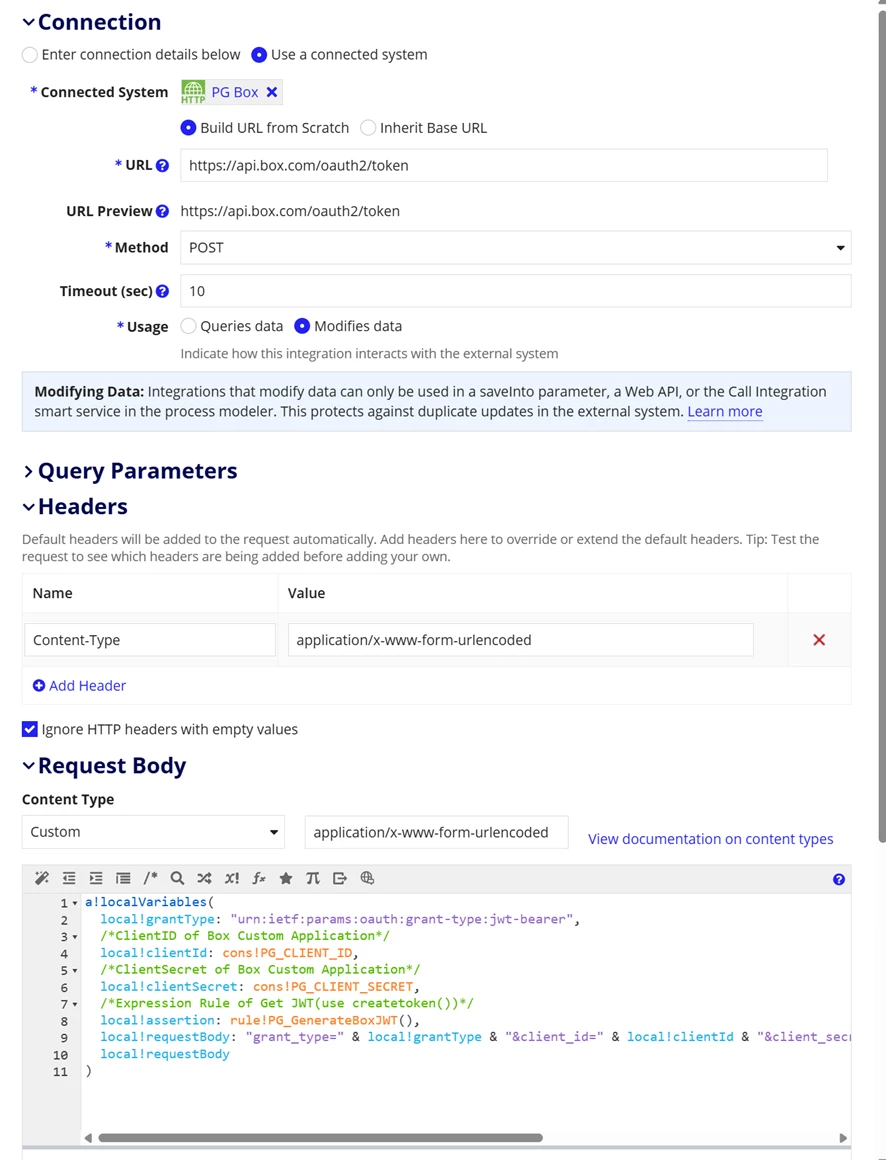
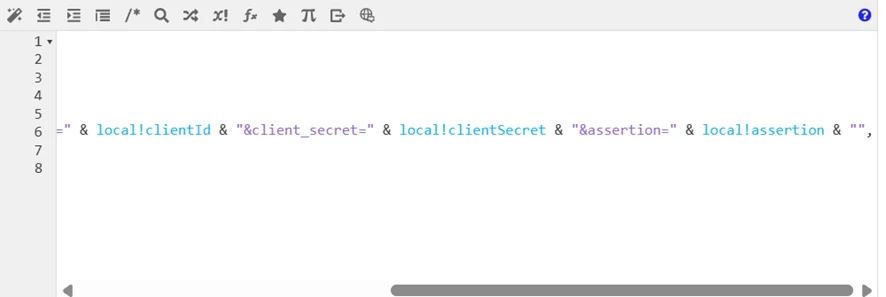
The "URL" is the Box API endpoint for obtaining an access token.

7 replies

harshas2775
June 19, 2025

The error indicates an issue with the 'sub' claim in the JWT payload, specifically related to the 'box_sub_type' parameter. The 'box_sub_type' must be correctly set to either "user" or "enterprise". If it's set to "user", the 'sub' claim must be a valid Box user ID. If it's set to "enterprise", the 'sub' claim must be a valid Box enterprise ID. To resolve this, verify that the 'box_sub_type' value is correct (either "user" or "enterprise") and that the corresponding 'sub' claim value is a valid Box ID for that type.

So just confirm if the 'box_sub_type' is 'enterprise' for 'sub' to have an enterprise id (line 7 in your expression rule) else you will need to adjust these two parameters to complement each other. 

June 20, 2025

Hi, Harsha

Thank you for answer.
I have confirmed that 'box_sub_type' and 'sub' are Enterprise and EnterpriseID.

I tried the same thing with the ’user’ type, but the result was the same.

varuntejg243705
June 19, 2025

Hi [mention:09def98cea664ff8b2b1b4e8d229ac58:e9ed411860ed4f2ba0265705b8793d05] ,

If Appian's createtoken() doesn't let you set box_sub_type:

Use custom HTTP integration in Appian with a manually crafted JWT (you can use an external system like Node.js, or a small Java module) or raise a support request to Appian for plugin customization or use [Appian RPA] to script the JWT externally and fetch the token.

The "sub" claim in the JWT should always be a Box ID, and depending on box_sub_type, be either a user ID or enterprise ID.

follow the below steps, try with them:

  • Log into the Box Developer Console, locate both User IDs and Enterprise IDs.

  • Update your Appian integration or RPA logic to use proper matching values.

  • Re-run the createtoken() or your custom HTTP call.

June 20, 2025

Hi, Varun

Thank you for answer.

I use user ID or enterprise ID of Box Custom Application, but the result was error as per my post.

I have'nt use RPA, so I serch the way.

Thank you.

steven.miccile
Employee
June 19, 2025

You can always try analyzing what your JWT output looks like within jwt.io

A common issue I see with developers calling plugin functions is that they require arguments to be passed in the correct order and do not honor keywords:

https://docs.appian.com/suite/help/25.1/passing-arguments.html#by-position

For example, I believe createtoken() expects the custom claims as the 4th position and your screenshot has it 8th.

June 20, 2025

Hi, Steven

Thank you for answer.

I tried switching the position and the error type changed.

[Error] *Body of HTTP Response

body: "{"error":"invalid_grant","error_description":"Signature verification failed"}"

The generated JWT seems invalid, and when I checked it on jwt.io, it said that the public key was missing.

But, I set public_key_ID in 'kid'.

If you know, please let me know.

steven.miccile
Employee
June 20, 2025

It looks like you have the private key constant in the public key field