
Appian Community and Appian Academy are being upgraded. As a part of the upgrade, Appian Community is currently in read-only mode, and user registration is disabled until August 3. We apologize for any inconvenience this may cause, but a more secure, stable, and performant Community experience is coming soon!

The new Appian Community launches August 3, followed by Appian Academy on August 7. During the migration, Appian Community Edition, Appian Academy, Documentation, Certifications, Instructor-led Customer Training, Partner Sales Training & Accreditation, and Forum (for Appian Partners and Customers only) will remain available.

eSignature in embedded PDF

We are looking to achieve an in-app eSignature function within our Appian workflow process. Is this available?

DocuSign integrations are available in the AppMarket, but all seem to route the user outside of Appian to the DocuSign platform to capture the approver's signature.

Adobe Sign Utility & Sign PDF Document both seem to be more in line with our request, but I would like to confirm if either are feasible.

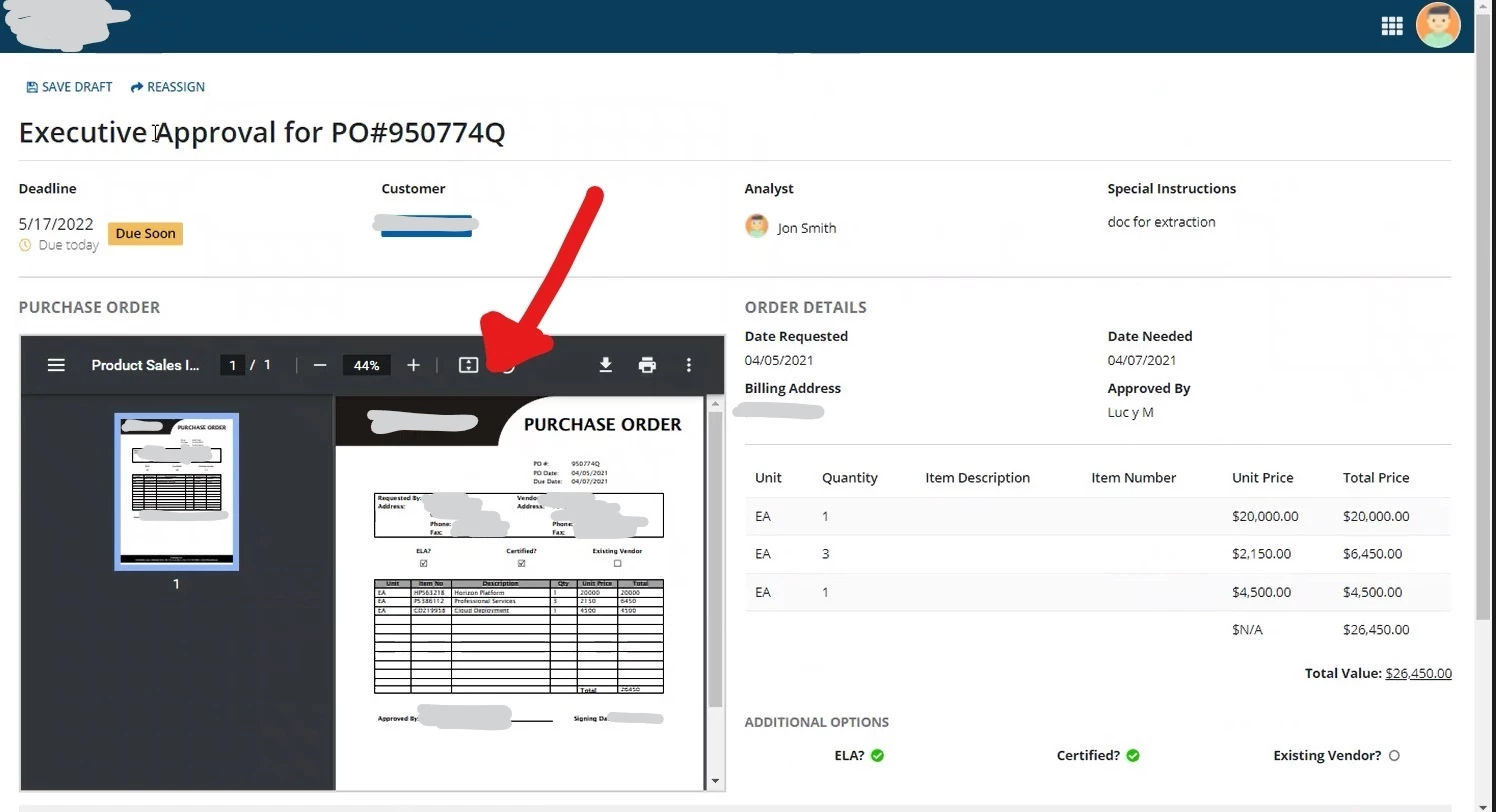
Screenshot below shows the PDF embedded in the review pane where we would like to capture the eSignature directly within Appian. 
  Discussion posts and replies are publicly visible

Parents
  • +1
    Certified Lead Developer

    I currently work with a system using the Adobe Sign integration.  Overall it works well.  The main issue we keep running into (which is more of a User Training issue, and more of an issue with Adobe Sign itself than with Appian), is that when the user gets their Appian task containing a portal to fill and/or sign their Adobe Sign document, the Adobe Sign integration contains its own "Complete" or "Submit" button, and the users will merely do that and then close the Appian task without hitting any Submit button.  This, of course, prevents the Appian process from proceeding which is critical.

    This still happens (if somewhat less) even after we've added large, bold, obvious instruction text on the form header explaining that they absolutely must press the button OUTSIDE the integration pane labelled "send to reviewer" (etc).  AFAIK there would still be the same type of issue regardless of the type of integration used.  For now we're just doubling down on the "user training" angle to solve this issue.

Reply
  • +1
    Certified Lead Developer

    I currently work with a system using the Adobe Sign integration.  Overall it works well.  The main issue we keep running into (which is more of a User Training issue, and more of an issue with Adobe Sign itself than with Appian), is that when the user gets their Appian task containing a portal to fill and/or sign their Adobe Sign document, the Adobe Sign integration contains its own "Complete" or "Submit" button, and the users will merely do that and then close the Appian task without hitting any Submit button.  This, of course, prevents the Appian process from proceeding which is critical.

    This still happens (if somewhat less) even after we've added large, bold, obvious instruction text on the form header explaining that they absolutely must press the button OUTSIDE the integration pane labelled "send to reviewer" (etc).  AFAIK there would still be the same type of issue regardless of the type of integration used.  For now we're just doubling down on the "user training" angle to solve this issue.

Children