
February 25, 2021
Question

Appian Permanent License(K3.lic and K4.lic) to run Appian in docker

  • February 25, 2021
  • 2 replies
  • 0 views
I am trying to install Appian in docker.
I have used the temporary licenses(k3.lic and k4.lic) to run Appian in docker containers. 
But for requesting a permanent license I followed the documentation.
I followed these steps:

To generate the q output, navigate to the following location:

  • Linux: <APPIAN_HOME>/data-server/engine/bin/q/l64/
  • Windows: <APPIAN_HOME>\data-server\engine\bin\q\w64\

Use the following commands to run the executable:

  • Linux: QHOME=.. ./q
 
and got the output as
'2021.02.25T07:08:27.915 appian.app
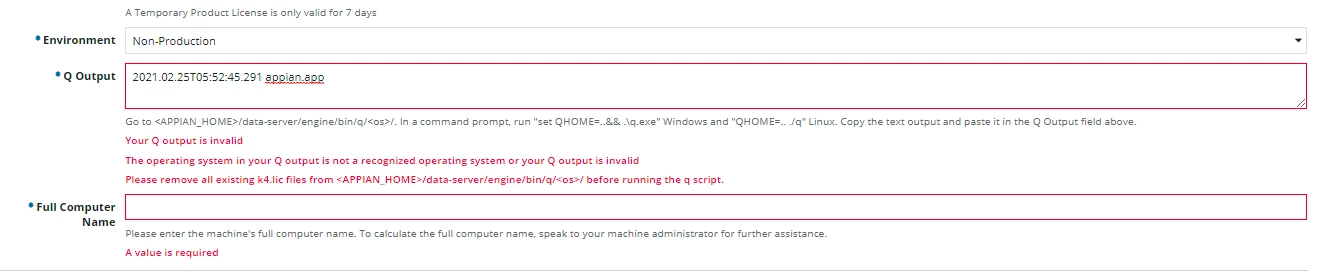
when i pasted it for requesting license i got this ERROR. attaching the image of the error.
Please say the process for getting permanent license for my docker conatiners.
    2 replies

    February 25, 2021

    Take a look at the last error message for "Q Output". You can move your temporary license files to a different folder or rename them. That way you'll get a valid output. See docs.appian.com/.../Requesting_and_Installing_a_license.html

    February 15, 2023

    has this worked for anyone? I am having same issue, I am attempting to install appian on kubernetes locally in my docker-desktop.  I applied the temporary licenses. then went into the data-server container and ran the QHOME=.. ./q path  <APPIAN_HOME>/data-server/engine/bin/q/l64/ Got this output ''2023.02.15T19:15:28.629 appian.app   which also did not work when attempting to request for the permanent keys. according to the doc https://docs.appian.com/suite/help/20.4/Requesting_and_Installing_a_license.html#generating-the-q-output.  I tried to rename, mv and even delete the license but keep getting 'cannot remove ‘k4.lic’: Device or resource busy'  any thoughts or guidance as to how to proceed?