

sanjuktab2257
June 25, 2025
Solved

Can't Update Value in Nested Dictionary Inside List and get the same list structure with updated value

  • June 25, 2025
  • 2 replies
  • 0 views

In the below piece of code, I'm attempting to update "id" value to 567.

The output expected is the same as what is in local!groupEndpointResponse with the updated value of id.

a!localVariables(
  local!groupsEndpointResponse:{
  {totalResults: 1, 
  startIndex: 1, 
  itemsPerPage: 100, 
  schemas: {"schema1"}, 
  Resources: {
    {meta: {created: fn!datetime(2024, 12, 8, 3, 12, 45, 350), lastModified: fn!datetime(2024, 12, 8, 3, 12, 46, 910), resourceType: "Group"}, 
    displayName: "Abc", 
    members: {{display: "Joe", 
    value: "123"}}, 
    externalId: "null", 
    id: 2}}}, 

    {totalResults: 1, 
    startIndex: 1, 
    itemsPerPage: 100, 
    schemas: {"schema2"}, 
    Resources: {
      {meta: {created: fn!datetime(2024, 12, 8, 3, 12, 45, 690), lastModified: fn!datetime(2024, 12, 8, 3, 12, 46, 770), resourceType: "Group"}, 
      displayName: "lmn", 
      members: {{display: "Sam", value: "789"}}, 
      externalId: "null", 
      id: 2}}}}, 
      
      a!forEach(
        items: local!groupsEndpointResponse,
        expression:a!update(index(fv!item.Resources, 1, null),"id", "567"))
      )

Expected Output:
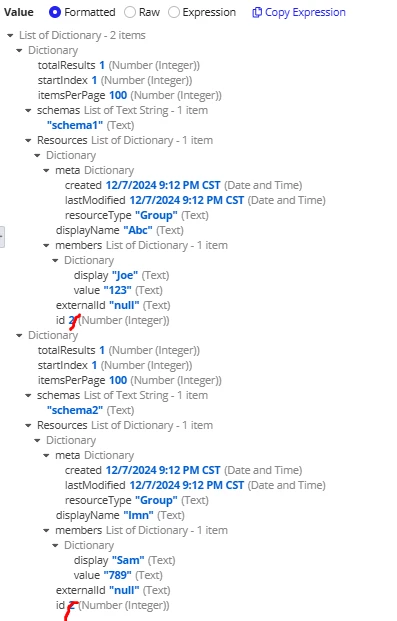
Crossed id values should be 567.

Output I'am getting:
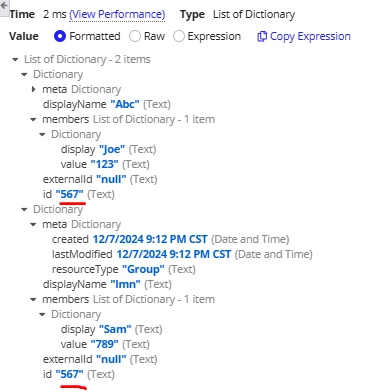

What is the best approach to achieve this.

Best answer by stefanhelzle0001

This is how I do it. A nested a!update.

a!localVariables(
  local!groupsEndpointResponse: {
    {
      totalResults: 1,
      startIndex: 1,
      itemsPerPage: 100,
      schemas: { "schema1" },
      Resources: {
        {
          meta: {
            created: fn!datetime(2024, 12, 8, 3, 12, 45, 350),
            lastModified: fn!datetime(2024, 12, 8, 3, 12, 46, 910),
            resourceType: "Group"
          },
          displayName: "Abc",
          members: { { display: "Joe", value: "123" } },
          externalId: "null",
          id: 2
        }
      }
    },
    {
      totalResults: 1,
      startIndex: 1,
      itemsPerPage: 100,
      schemas: { "schema2" },
      Resources: {
        {
          meta: {
            created: fn!datetime(2024, 12, 8, 3, 12, 45, 690),
            lastModified: fn!datetime(2024, 12, 8, 3, 12, 46, 770),
            resourceType: "Group"
          },
          displayName: "lmn",
          members: { { display: "Sam", value: "789" } },
          externalId: "null",
          id: 2
        }
      }
    }
  },
  a!forEach(
    items: local!groupsEndpointResponse,
    expression: a!update(
      data: fv!item,
      index: "Resources",
      value: a!update(
        data: fv!item.Resources,
        index: 1,
        value: a!update(
          data: fv!item.Resources[1],
          index: "id",
          value: 567
        )
      )
    )
  )
)

2 replies

stefanhelzle0001
June 25, 2025

This is how I do it. A nested a!update.

a!localVariables(
  local!groupsEndpointResponse: {
    {
      totalResults: 1,
      startIndex: 1,
      itemsPerPage: 100,
      schemas: { "schema1" },
      Resources: {
        {
          meta: {
            created: fn!datetime(2024, 12, 8, 3, 12, 45, 350),
            lastModified: fn!datetime(2024, 12, 8, 3, 12, 46, 910),
            resourceType: "Group"
          },
          displayName: "Abc",
          members: { { display: "Joe", value: "123" } },
          externalId: "null",
          id: 2
        }
      }
    },
    {
      totalResults: 1,
      startIndex: 1,
      itemsPerPage: 100,
      schemas: { "schema2" },
      Resources: {
        {
          meta: {
            created: fn!datetime(2024, 12, 8, 3, 12, 45, 690),
            lastModified: fn!datetime(2024, 12, 8, 3, 12, 46, 770),
            resourceType: "Group"
          },
          displayName: "lmn",
          members: { { display: "Sam", value: "789" } },
          externalId: "null",
          id: 2
        }
      }
    }
  },
  a!forEach(
    items: local!groupsEndpointResponse,
    expression: a!update(
      data: fv!item,
      index: "Resources",
      value: a!update(
        data: fv!item.Resources,
        index: 1,
        value: a!update(
          data: fv!item.Resources[1],
          index: "id",
          value: 567
        )
      )
    )
  )
)

sanjuktab2257
June 25, 2025

Hi [mention:a11f77a729fb4db2af76b09948583328:e9ed411860ed4f2ba0265705b8793d05] , That was helpful. It worked !! Thank you!