
April 16, 2024
Question

Email Sending Process: Issue with Displayed Sender Address

  • April 16, 2024
  • 7 replies
  • 0 views

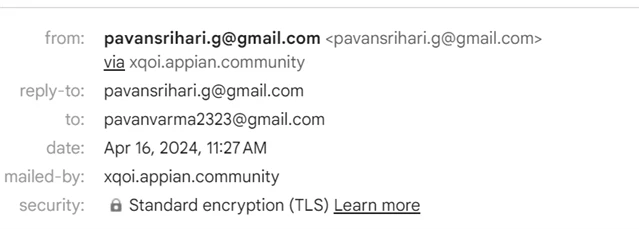
We have a process responsible for sending emails to the client company from two different domain email addresses. I'm utilizing a custom sender, and replies are also directed to this from address. However, in the mail properties, the 'mailed_by' field still displays the Cloud Environment URL and the from as well it is showing Via cloud Url. Is there any workaround for this issue? Ideally, the receiver should only see the 'From' address in all instances.
 

    7 replies

    karumurua531442
    April 16, 2024

    Hi [mention:3a3343a371904c5bb84f4b9bada8af02:e9ed411860ed4f2ba0265705b8793d05]  i think so you are using community edition.  you can go through this link :  custom sender  email regarding more information on custom sender email

    April 16, 2024

    Thanks Abhishek for your answer . We added our mail domain names in the Admin console email setup with that we can only element Via or on behalf based on the receiver SMTP protocols . It is not controlling the mailed by field 

    shubhama926776
    April 16, 2024

    Hello [mention:3a3343a371904c5bb84f4b9bada8af02:e9ed411860ed4f2ba0265705b8793d05] 
    I know This can be confusing for recipients who may not understand why the email appears to be coming from two different addresses.
    When using a custom sender email in Appian Cloud, the "mailed-by" field still shows the Cloud URL

    No perfect solution, but try contacting Appian Support for workarounds.

    You can try going to this documentation once if matches your requirement:-
    This document explains the process of customizing the FQDN (Fully Qualified Domain Name) of your Appian Cloud environment. By using a custom domain for your emails, the recipient will only see your chosen domain name in the "From" address and hide the Appian Cloud URL entirely.
    https://docs.appian.com/suite/help/24.1/Using_a_Custom_Domain_in_Appian_Cloud.html

    April 16, 2024

    Hello shubham Thank you for providing your inputs on this . FQDN is a single domain name or we can have multiple conditional domain names for cloud env ?  .In my case we are two companies while sending emails to the client. Based on the client requirement we use any of the company domain for example while sending email

    client 1 : from address is pavanSupport@techwise.com

    client 2 : from address is srihariSupport@solutions.com .

    So the the domain should be dynamic based on the client data .

    shubhama926776
    April 17, 2024

    [mention:3a3343a371904c5bb84f4b9bada8af02:e9ed411860ed4f2ba0265705b8793d05] 
    You can have multiple conditional domain names based on the client and dynamically set the "From" address based on client data.
    In your case, you can create two aliases: pavanSupport@techwise.com and srihariSupport@solutions.com.
    Utilize a gateway node or similar logic to determine the client company. Based on the chosen client, dynamically construct the "From" address string using the appropriate alias.
    For example, if the client is "Client 1" the "From" address would be set to "pavanSupport@techwise.com".


    Try doing this and let me know if that works for you.

    srmm0001
    April 17, 2024
    1. Configure a custom domain for your Appian Cloud emails. This hides the Appian Cloud URL and displays your chosen domain in the 'From' address.

    2. Add your mail domain names in the Admin console's email setup to eliminate 'via' or 'on behalf of' text, depending on the receiver's SMTP protocols.

    3. For using multiple conditional domain names, Appian's out-of-the-box capabilities might be limited. You typically cannot dynamically change the 'mailed-by' field as this is set by the sending mail server.

      Note: Currently, Appian Cloud environments may not support multiple dynamic 'mailed-by' domains directly.