September 20, 2024
Solved

Error 403 - Forbbiden

  • September 20, 2024
  • 7 replies
  • 0 views

Hello team,

We have configured a white list in customer environments and some users are receiving error 403 - forbbiden while trying to access appian.

In my opinion, I believe that these users are not in the IP range configured in the white list.

Knowing this, I would like to identify in the logs the IPs of these users who are having access denied when they try to enter the environment link to compare with the white list that we configured, and if this IP is not there, report this information to the client.

Is there any way I can view this? Where?

Thanks

Best answer by davidj137213

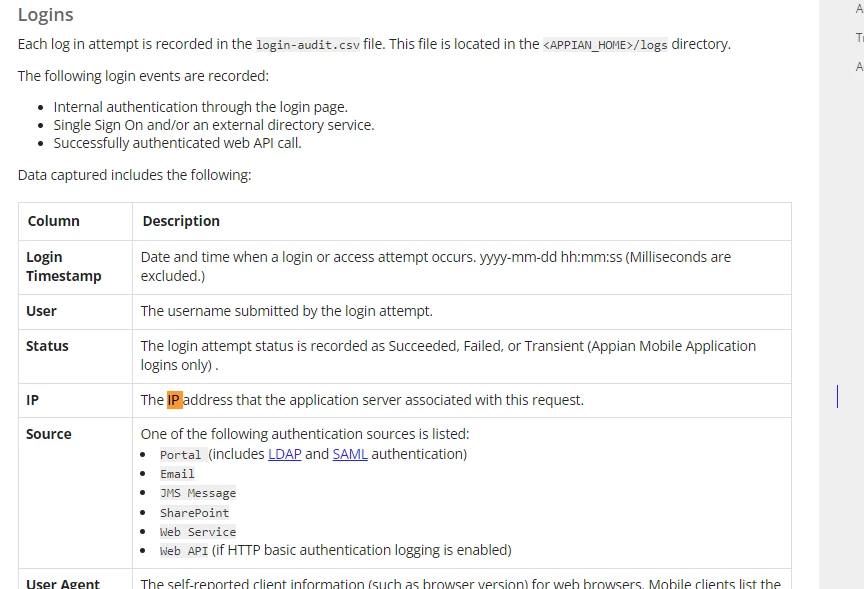
Check  login-audit.csv file in system logs.

7 replies

davidj137213
September 23, 2024

Check  login-audit.csv file in system logs.

September 23, 2024

Thanks David

somasundaram.d
September 23, 2024

Try accessing "login-audit.csv" 

You will have the following columns User | Status | IP | Source and try the following combination Username | Failed | XXX.XXX.XX.XX | Portal

Try to match the details with actual user who may have faced the 403 error to check if it works

September 23, 2024

Thanks Soma

stefanhelzle0001
September 23, 2024
We have configured a white list in customer environments and some users are receiving error 403 - forbbiden while trying to access appian.

What exactly does this mean? Where is this whitelist configured, and which system returns that error message?

September 23, 2024

The white list was configured on the appian side, which means that users can only log in the environment if they are in the range specified by the customer. The customer opened a support case to add this range to the appian environment as a security layer. The system that returned the error was probably the web server.

stefanhelzle0001
September 23, 2024

OK. Then you have to sort this out with Appian.