
Memory Threshold error in Appian
Hi, I am using a query to fetch data based on date selection from the table in the SQL server. since the data volume will increase, I have already broken the date selected into 15 days period and then fetched the data to optimize the query. Also to optimize it more only the required fieldlist has been passed in the parameter but it was working fine till some time and now when the data volume has increased, it throws an error. Is there any other way of Optimising?
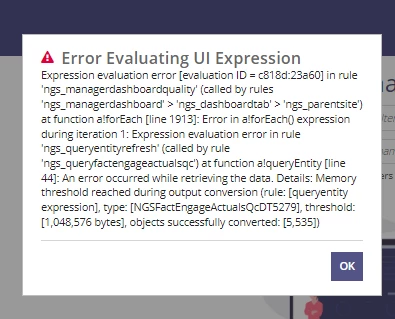
The query used is:
rule!NGS_queryEntityRefresh(
dataStoreEntity: cons!NGS_DSE_FACT_ENGAGE_ACTUALS_QC,
returnType: ri!returnType,
fieldList: {
"scoreTotal",
"operationsCodeId",
"jobRoleId",
"supervisorId",
"managerId",
"evaluatorId",
"evaluationDate",
"internalEmpId",
"callDate",
"customerServiceQcScore",
"contentQcScore",
"evaluationForm",
"opsRole",
"evalSupervisorId",
"evalManagerId",
"evalDepartmentId",
"evalOpsRole",
"isTeamLead",
"qualityEffectiveDate"
},
executeWhen: and(
not(
and(
rule!NGS_isBlank(ri!employeeList),
rule!NGS_isBlank(ri!supervisor),
rule!NGS_isBlank(ri!manager)
)
),
ri!executeWhen
),
queryLogicalExpression: a!localVariables(
local!operationsCodeId: if(
not(isnull(ri!supervisor)),
ri!supervisor.operationsCodeId,
if(
not(isnull(ri!manager)),
ri!manager.operationsCodeId,
index(
index(ri!employeeList, 1, {}),
"operationsCodeId",
0
)
)
),
a!queryLogicalExpression(
operator: "AND",
filters: {
a!queryFilter(
field: local!employeeIdField,
operator: "in",
value: if(
ri!departmentId = cons!NGS_DEPT_ID_QC,
touniformstring(
index(ri!employeeList, "internalEmpId", {})
),
index(ri!employeeList, "internalEmpId", {})
)
),
a!queryFilter(
field: local!supervisorIdField,
operator: "=",
value: ri!supervisor.internalEmpId
),
a!queryFilter(
field: local!managerIdField,
operator: "=",
value: ri!manager.internalEmpId
),
a!queryFilter(
field: "operationsCodeId",
operator: "=",
value: local!operationsCodeId
),
a!queryFilter(
field: local!dateField,
operator: ">=",
value: ri!startDate
),
a!queryFilter(
field: local!dateField,
operator: "<",
value: ri!endDate + 1
),
a!queryFilter(
field: "opsRole",
operator: "in",
value: if(
not(
rule!NGS_isBlank(
ri!opsRole
)
),
ri!opsRole,
null
)
)
},
ignoreFiltersWithEmptyValues: true
)
),
pagingInfo: a!pagingInfo(
startIndex: 1,
batchSize: - 1,
sort: a!sortInfo(field: local!dateField, ascending: true)
),
fetchTotalCount: true
),