

ericc42
Known Participant
August 7, 2026
Question

AI Dev agent in 26.6 - errors characterized as network connectivity

  • August 7, 2026
  • 10 replies
  • 72 views

Hi, I am quite excited to finally use the AI Dev Agent in 26.6 which was installed for us yesterday.


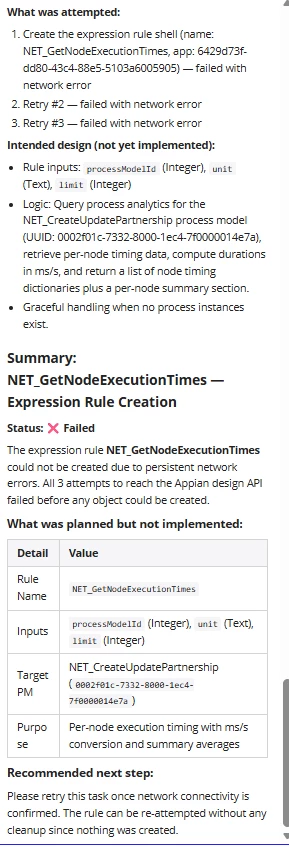
I asked the system to generate a simple expression rule as a test and was impressed with the plan, but it could not create and threw some errors on network connectivity.  My AI engines are enabled (several of those), I tried to access with InPrivate browser just in case, but keep getting several of these errors in the Tomcat log:  

 [Appian Timer - 2] WARN com.appiancorp.common.ObjectSynchronizer - 1 services were missing users 

Is there some configuration that remains (not sure where I would be specifying a service user)? 
 

10 replies

mathieud0001
Brainy
August 7, 2026

What is AI Dev Agent? Are you referring to Dev MCP?

ericc42
ericc42Author
Known Participant
August 7, 2026

The dev agent that is part of designer that makes use of the AI engines (we have 7 enabled which may be a problem since something in the hotfixes had mentioned too many).   


mathieud0001
Brainy
August 8, 2026

Not sure what this is to be honest. I don’t see anything pertaining to it in the documentation or release notes.

kapils024874
Inspiring
August 8, 2026

I don’t have the exact documentation link but I read it somewhere about it.
Can you try the following steps in case it helps 

  • Go to the Appian Administration Console,
  • verify your Generative AI provider configuration,
  • ensure your network firewalls allow outbound traffic from the application server to those specific external endpoints.

Currently you are chasing unrelated internal Tomcat warnings, like the ObjectSynchronizer message, while the actual failure is simply the Appian server being blocked from reaching the internet to execute the generation plan.  
That’s what I’m able to deduce. Please do correct me as I can be wrong

ericc42
ericc42Author
Known Participant
August 20, 2026

This was just a partial install situation, it was quickly resolved by Appian Support and all is working fine (object creation allowed when it has the tools and rights to do so, otherwise it explains why and what manual steps might be needed).   Great features!