
November 17, 2021
Question

Error in Query Entity due to large data in Database

  • November 17, 2021
  • 8 replies
  • 0 views

Hi All,

I tried to fetch data from Database using queryEntity in expression rule.

But due to large data in database(6278),it shows me the below error.
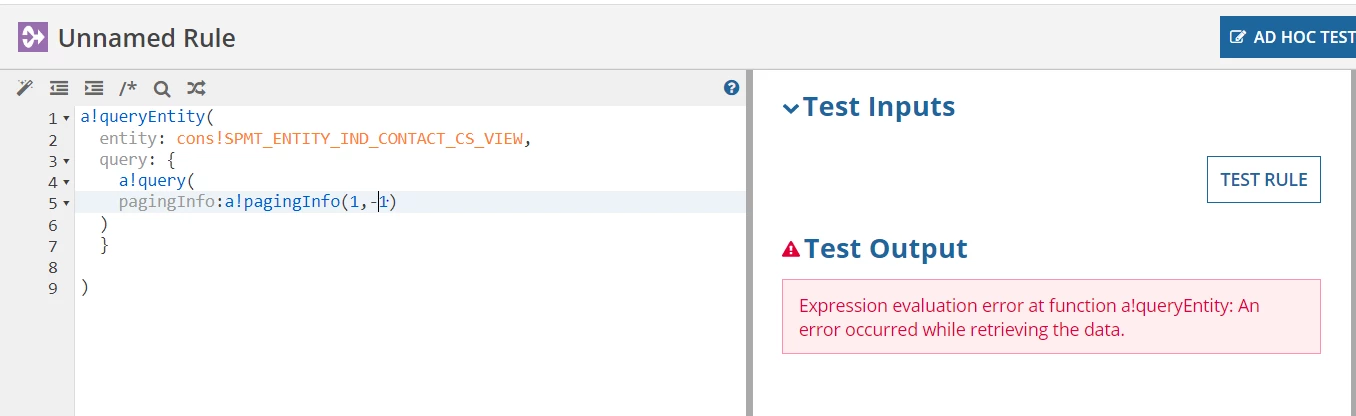
Could you please help me to sort this issue.

Thanks in advance.

    8 replies

    stewart.burchell
    November 17, 2021
    1.  That error message is generic and there are other causes. Are you sure it's related to the volume of data?
    2. If it is, then you can use the paging capability to fetch the data in smaller batches. Setting the 'batchSize' to -1 will indeed attempt to fetch all of the data, and you can mitigate this by adding one or more filters, and/or change the 'batchSize' to a number like 10, or 50, or whatever makes sense in the context of your solution
    csteward
    November 17, 2021

    As an example for Stewart's #2, this is typically how I will batch from a!queryEntity() when I need to return a data set larger than a single query can handle:

    a!localVariables(
      local!batchSize: 3000,
      local!totalCount: 
      a!queryEntity(
        entity: cons!YOUR_DS_HERE,
        fetchtotalcount: true,
        query: a!query(
          pagingInfo: a!pagingInfo(1,1)
        )
      ).totalCount,
      local!batchCount: ceiling(local!totalCount/local!batchSize),
    
      a!flatten(
        a!forEach(
          items: 1+enumerate(local!batchCount),
          expression: a!localVariables(
            local!startIndex: fv!item+((fv!index-1)*local!batchSize)-(fv!index-1),
            a!queryEntity(
              entity: cons!YOUR_DS_HERE,
              fetchtotalcount: false,
              query: a!query(
                pagingInfo: a!pagingInfo(local!startIndex,local!batchSize)
              )
            ).data
          )
        )
      )
    )

    With average amounts of columns I can typically batch 5000 rows at a time, however if your column count grows you may have to lessen this value since the maximum is related to data size, not row count.

    This example is designed for a database view which contains the necessary filters built in, however you can add your filters to the a!query() calls on lines 7 and 21 (add the same filter sets for each).

    stefanhelzle0001
    Brainy
    November 17, 2021

    Interesting example. There is a pretty hard limit on how much memory an expression can eat up. I highly recommend to never try to load "EVERYTHING" into memory. It will break sooner or later. Rethink your design.

    csteward
    November 17, 2021

    Agree to avoid this scenario whenever possible (loading ALL data into memory)! 

    In my use case, this builds a CDT to provide a daily Excel export for executive leadership which needs to contain 30k rows.  Since the Excel file must contain formatting (charts), we are prevented from utilizing the Export DSE to Excel service and unfortunately (until I have another way), using the deprecated Export CDT to Excel service.