June 25, 2025
Solved

How to compare whether two objects are the same

  • June 25, 2025
  • 11 replies
  • 0 views

I have a structure of record type A like this:

{id:

other business field:,

relationships:

record Type2: {

id,

A_id,

other business field

}

recordType3: 

{

id,

A_id,

other business field

}

},

After user change the data, I want to check whether the business field is actually modified. What I thought is to traverse the list of this record and construct new objects using the business field, use the new objects to compare. I want to know is this the only way to solve my problem? Is there any easy way can solve this.

 

Best answer by mikes0011

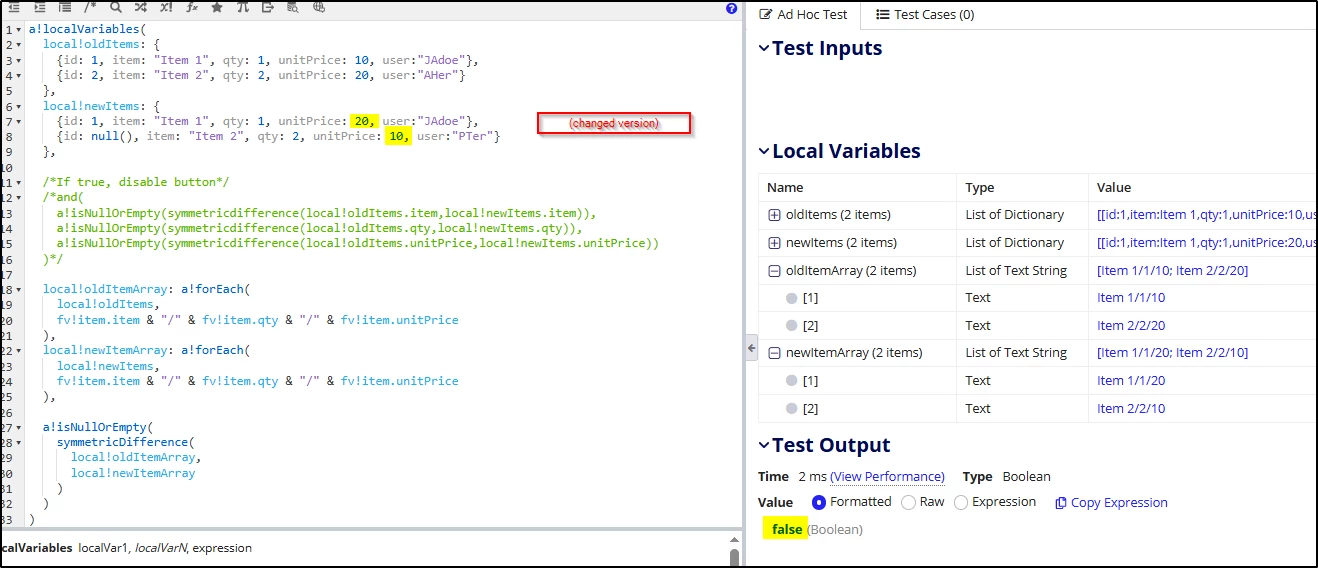
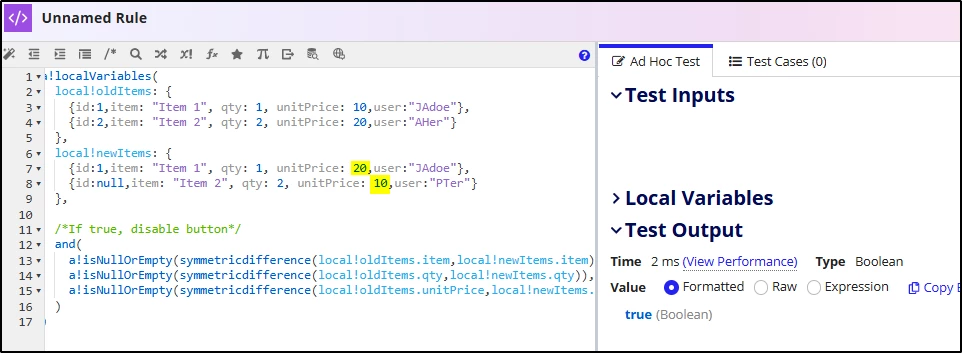
I'd like to note an important corner case here - if the user swaps two values between rows but otherwise makes no changes, such as changing the Unit Price of row 1 to 20, and for row 2 to 10 - the Symmetric Differences will all still turn up the same, and the form will thus (incorrectly) assume changes have not been made.

Edit: to solve this, you could take a similar approach but instead of comparing merely the original arrays in a manner that ignores positional context of individual data items, you could easily assemble easy-to-compare arrays of text items, where each text item in the array holds all the data we care about.  Then when any update is made, including an identical swap of data between rows, it's reflected in the symmetricDifference() result:

11 replies

June 25, 2025

 [mention:c175878b6d0741989dcd8272751de6f9:e9ed411860ed4f2ba0265705b8793d05] What I understand is that you want to verify if the business field has been changed. Before saving the data into the table, you are comparing the old field value with the newly added values from Appian. Is that correct?

June 25, 2025

yes that what I want to say.

stefanhelzle0001
June 25, 2025

I think this is a good way of doing it. In the end, the meaning of "record has changed" very much depends on business requirements. Not every field in a record is affected.

June 25, 2025

yes, the requirement is just a CRUD for a table. But user's behavior may be like this, remove a row, and add a new row, but the new row's data same as the deleted one. the reason I want to compare the data is if the user's behavior like I mentioned, I will make the submit button disable, not allow user to submit.

shubhama926776
June 25, 2025

For detecting business field changes in your record, store the original record when the form loads, then use direct field comparison. Simply compare original.otherBusinessField <> current.otherBusinessField for each business field you care about. This is much more efficient than traversing and reconstructing objects. You can wrap this in a reusable rule that returns true/false for whether any business fields changed.
For real-time tracking, add change flags in your saveInto parameters. Avoid object reconstruction - direct comparison is faster, simpler, and more maintainable.
Give it a try..

June 25, 2025

both the original data and new data are list, I want to use symmetricdifference() to compare the original data and the new data, so I try to reconstruct the objects,

shubhama926776
June 25, 2025

I'm having a hard time understanding this. Since you only need to find out whether the business field has been modified or not (true/false), you can directly use symmetricDifference() for this. Why are you traversing and constructing a new object?

length(
  symmetricdifference(
    local!originalArray,
    local!updatedArray
  )
) <> 0

harshas2775
June 25, 2025

Instead of creating new objects you can simply compare the business fields for similarity and depending on output disable/enable the submit button. 

Keep the data before any changes are made in a variable and keep one variable to do comparison of old data with variable having changes due to user interaction. The output of this variable can build the logic to manage the submit button. Below is an example for reference, 

a!localVariables(
  local!oldItems: {
    {id:1,item: "Item 1", qty: 1, unitPrice: 10,user:"JAdoe"},
    {id:2,item: "Item 2", qty: 2, unitPrice: 20,user:"AHer"}
  },
  local!newItems: {
    {id:1,item: "Item 1", qty: 1, unitPrice: 10,user:"JAdoe"},
    {id:null,item: "Item 2", qty: 2, unitPrice: 20,user:"PTer"}
  },
  /*If true, disable button*/
  and(a!isNullOrEmpty(symmetricdifference(local!oldItems.item,local!newItems.item)),
  a!isNullOrEmpty(symmetricdifference(local!oldItems.qty,local!newItems.qty)),
  a!isNullOrEmpty(symmetricdifference(local!oldItems.unitPrice,local!newItems.unitPrice)))
)

mikes0011
mikes0011Answer
Brainy
June 26, 2025

I'd like to note an important corner case here - if the user swaps two values between rows but otherwise makes no changes, such as changing the Unit Price of row 1 to 20, and for row 2 to 10 - the Symmetric Differences will all still turn up the same, and the form will thus (incorrectly) assume changes have not been made.

Edit: to solve this, you could take a similar approach but instead of comparing merely the original arrays in a manner that ignores positional context of individual data items, you could easily assemble easy-to-compare arrays of text items, where each text item in the array holds all the data we care about.  Then when any update is made, including an identical swap of data between rows, it's reflected in the symmetricDifference() result:

mikes0011
Brainy
June 25, 2025

This is a little hacky, but I have eventually settled on doing something like this: 

local!areChangesMade: not( exact( tostring(local!originalSavedValue), tostring(local!userEditableValue) ) ), 

/* evaluates to true or false, catches changes as small as changed capitalization */