
August 21, 2025
Solved

HTML Template in expression rule

  • August 21, 2025
  • 5 replies
  • 0 views

Hi Community,

i have a requirement to create a html template using expression rule to create a table.

i am able to create a table but i am unable to generate borders for each row and headers. please prefer below code snippet.
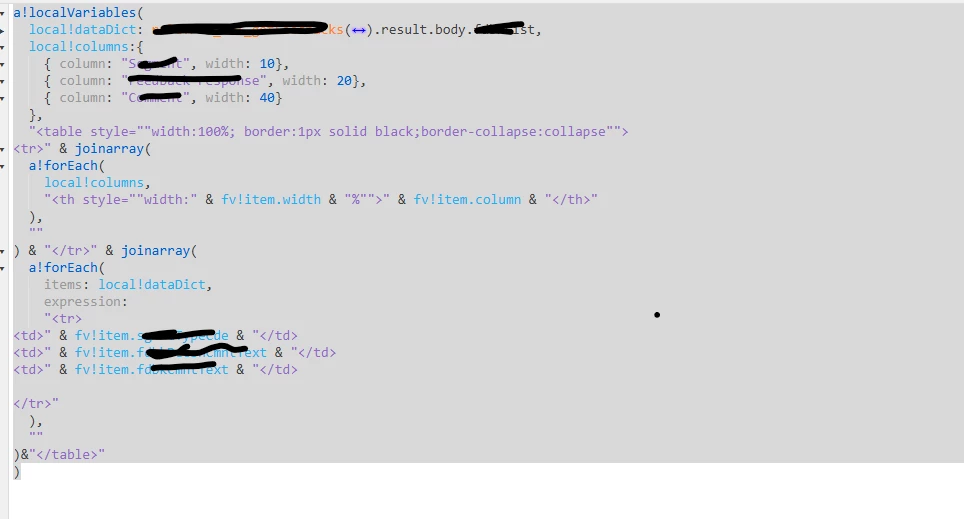
TIA

[mention:a11f77a729fb4db2af76b09948583328:e9ed411860ed4f2ba0265705b8793d05] 

Best answer by harshas2775

You can try the below

a!localVariables(

  local!dataDict:{
    {
      name:"ABCD",
      age:25,
      company:"AS"
    },
    {
      name:"QWER",
      age:27,
      company:"AT"
    },
    {
      name:"SDFG",
      age:28,
      company:"Ay"
    }
  },  
  local!columns:{
    { column: "name", width: 10},
    { column: "age", width: 20},
    { column: "company", width: 40}
  },
  "" & joinarray(
  a!forEach(
    local!columns,
    ""
  ),
  ""
) & "" & joinarray(
  a!forEach(
    items: local!dataDict,
    expression: 
    ""
  ),
  ""
)&"
" & fv!item.column & "
" & fv!item.name & " " & fv!item.age & " " & fv!item.company & "
" )

5 replies

harshas2775
August 21, 2025

Just like you added style in table you can use border-bottom in the style tags of header (th) and row (tr). Below is an example

Fruit
Apple
Mango

August 21, 2025

Hi Harsha,

Thanks for your response can you please do it in below code snippet i am getting error while doing the same.

It will be very helpful for me.

a!localVariables(

  local!dataDict:{
    {
      name:"ABCD",
      age:25,
      company:"AS"
    },
    {
      name:"QWER",
      age:27,
      company:"AT"
    },
    {
      name:"SDFG",
      age:28,
      company:"Ay"
    }
  },  
  local!columns:{
    { column: "name", width: 10},
    { column: "age", width: 20},
    { column: "company", width: 40}
  },
  "" & joinarray(
  a!forEach(
    local!columns,
    ""
  ),
  ""
) & "" & joinarray(
  a!forEach(
    items: local!dataDict,
    expression: 
    ""
  ),
  ""
)&"
" & fv!item.column & "
" & fv!item.name & " " & fv!item.age & " " & fv!item.company & "
" )

stefanhelzle0001
August 21, 2025

What kind of error do you get?

shubhama926776
August 21, 2025

Try this
Update values as per your need.

a!localVariables(
  /* Sample data - replace with your actual data source */
  local!dataDict: {
    {id: 1, name: "John Doe", department: "Engineering", salary: 75000},
    {id: 2, name: "Jane Smith", department: "Marketing", salary: 65000},
    {id: 3, name: "Bob Johnson", department: "Sales", salary: 70000},
    {id: 4, name: "Alice Brown", department: "HR", salary: 60000}
  },

  /* Column definitions */
  local!columns: {
    {column: "ID", width: 10, field: "id"},
    {column: "Employee Name", width: 30, field: "name"},
    {column: "Department", width: 30, field: "department"},
    {column: "Salary", width: 30, field: "salary"}
  },

  /* Generate HTML Table - Choose one of the options below */

  /* Option 1: Fixed width (800px) */
  "" &

  /* Option 2: Maximum width with auto sizing */
  /* "
" & */ /* Option 3: Percentage width (80% of container) */ /* "
" & */ /* Option 4: Full width (current behavior) */ /* "
" & */ /* Table Header */ "" & joinarray( a!forEach( local!columns, "" ), "" ) & "" & /* Table Body */ joinarray( a!forEach( items: local!dataDict, expression: "" & "" & "" & "" & "" & "" ), "" ) & "
" & fv!item.column & "
" & fv!item.id & "" & fv!item.name & "" & fv!item.department & "" & "$" & text(fv!item.salary, "#,##0") & "
" )