
June 23, 2025
Question

I want to return true as an output from the suggestion function if the entered code doesn’t match any existing ones, so I can use it as an output.

  • June 23, 2025
  • 5 replies
  • 0 views

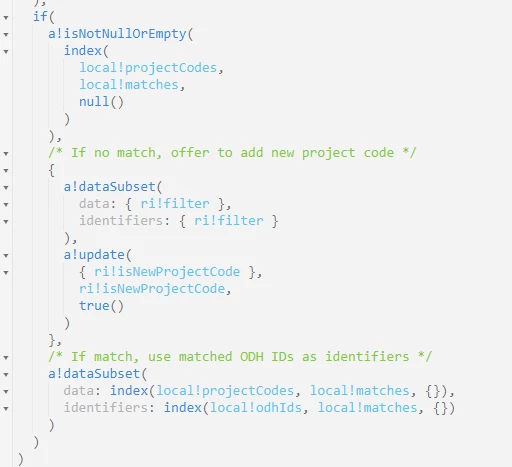
I'm encountering an issue where I need my suggestion function to return both a dataSubset and an output value (like a flag). The goal is to allow users to enter a new project code if it doesn't exist and make dependent fields editable. I need a way to pass that output from the rule back to the interface
 Trying with a!update
    5 replies

    June 23, 2025

     [mention:5a0f9d73b8c74eecb139520cc74a29b2:e9ed411860ed4f2ba0265705b8793d05]  Could you please provide more details, such as the code and the exact issue you are facing? If possible, include a screenshot. It's difficult to understand the issue with the given details

    June 23, 2025


    I'm using a custom picker for the Project Code field. If the user enters a new value not found in existing data, dependent fields should become editable. So I need the rule to return both the suggestion dataset and a flag indicating it's a new entry.

    This is my code in interface code

    venkatrea696188
    June 23, 2025

    Need more details on the requirement but wrote a simple code to enable/disable dependent  fields based on user entered value . I am checking the entered value against data in my local variable you can optimize this with your real time data

    a!localVariables(
      local!existingCodes: { "ABC", "DEF", "GHI" },
      local!var1,
      local!isvar1present: a!refreshVariable(
        value: if(
          a!isNullOrEmpty(local!var1),
          false,
          contains(local!existingCodes, local!var1)
        )
      ),
      {
        a!cardLayout(
          contents: {
            a!textField(
              label: "Text",
              labelPosition: "ABOVE",
              value: local!var1,
              saveInto: { local!var1 },
              refreshAfter: "UNFOCUS",
              validations: {},
              instructions: if(local!isvar1present,"Entered Value is already present","")
            )
          },
          height: "AUTO",
          style: "TRANSPARENT",
          marginBelow: "STANDARD"
        ),
        a!textField(
          label: "Text",
          labelPosition: "ABOVE",
          saveInto: {},
          disabled: if(
            a!isNullOrEmpty(local!var1),
            true,
        local!isvar1present
          ),
          refreshAfter: "UNFOCUS",
          validations: {}
        ),
        a!textField(
          label: "Text",
          labelPosition: "ABOVE",
          saveInto: {},
          disabled: if(
            a!isNullOrEmpty(local!var1),
            true,
           local!isvar1present
          ),
          refreshAfter: "UNFOCUS",
          validations: {}
        ),
        a!textField(
          label: "Text",
          labelPosition: "ABOVE",
          saveInto: {},
          disabled: if(
            a!isNullOrEmpty(local!var1),
            true,
           local!isvar1present
          ),
          refreshAfter: "UNFOCUS",
          validations: {}
        )
      }
    )

    harshas2775
    June 23, 2025

    You can't use the picker field as a text field to enter new values. You can instead provide a value as 'New' or 'Other' in your project code list and when user selected Other then show rest of fields to get new entry details. 

    stefanhelzle0001
    June 23, 2025

    Create new items using a picker? Here: appian.rocks/.../