October 11, 2024
Question

Ignore Hypen while searching in the search grid

  • October 11, 2024
  • 12 replies
  • 0 views

How to ignore hypens while searching in the grid 
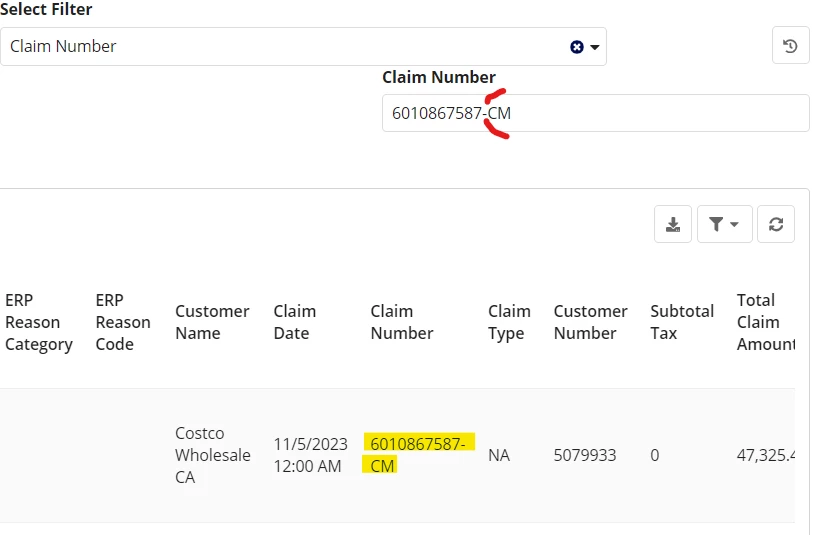
In the above image, while searching in the grid after removing hypen also below data needs to be come..

    12 replies

    stefanhelzle0001
    October 11, 2024

    What do you mean with "ignore"?

    What result do you expect when searching like this?

    You could try to split the search term by the dash symbol and then combine two filters in an AND.

    October 11, 2024

    Please help me on this ....Here we getting the result after entering into the the assignment number with hypen like this 6430-860726425, But i need same result  without hypen also 6430860726425 .... After not searching or not adding hypen in the search field also result should come .

    stefanhelzle0001
    October 11, 2024

    So you want to see all items that match the term, either with the included hyphen OR without it. Is that correct?

    As you did not share any code, I can just guess .... you use some sort of query and some queryfilters.

    a!queryFilter(
      field: "assignment",
      operator: "in",
      value: {
        local!assignmentSearch,
        cleanwith(local!assignmentSearch, "0123456789")
      }
    )
    

    That's just a rough idea and you will have to adapt it to your specific situation.

    somasundaram.d
    October 12, 2024

    If you are using Sync time evaluation, you can create a custom record field and use stripwith(rv!record[field],"-"), and then run the query on this field.

    But AFIK you cannot achieve it if you are using real time evaluation as it has limited number of custom record function