
raulg0001
Inspiring
June 17, 2023
Solved

reconcilied task error

  • June 17, 2023
  • 7 replies
  • 0 views

I am testing the new version of appian and the AI ​​elements, specifically when I create an extraction model for an invoice, the document appears like this and I cannot map the data correctly. Does anyone know why?
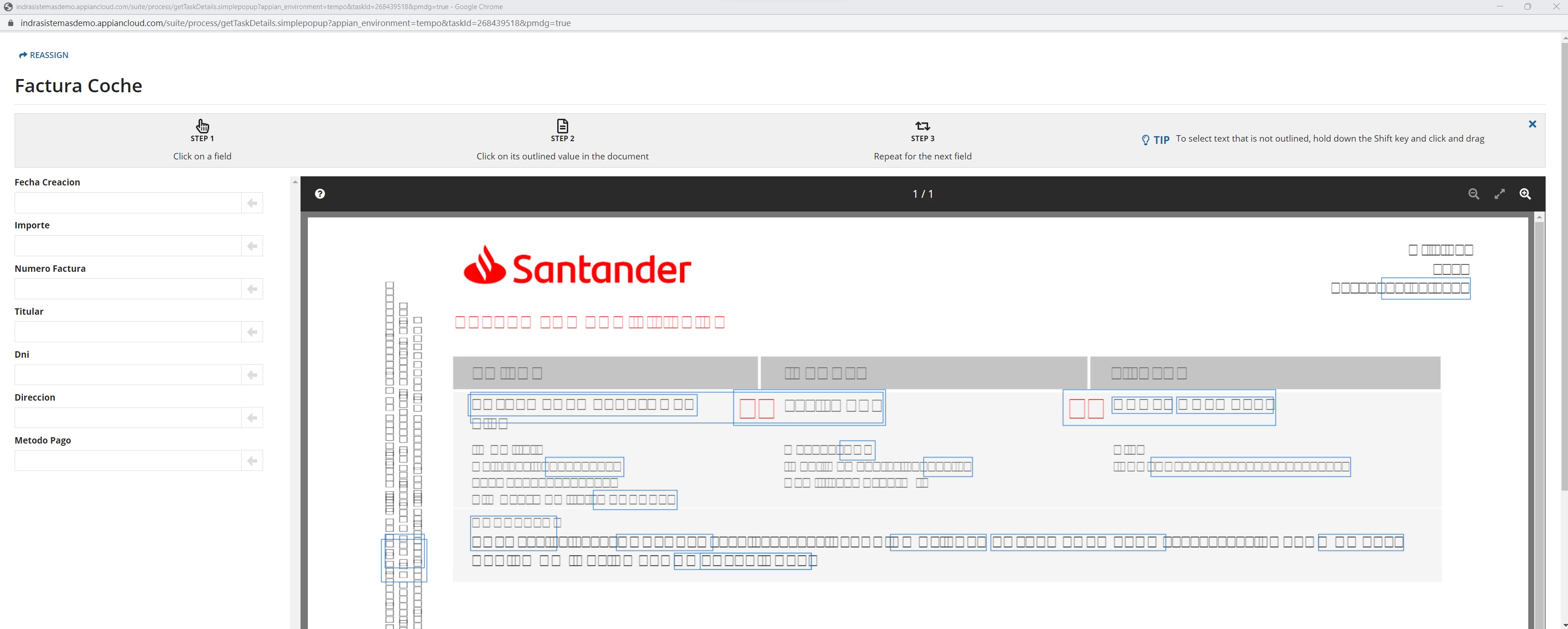

    Best answer by raulg0001

    After talking with appian, they tell me that the error will be corrected in version 22.4

    7 replies

    stefanhelzle0001
    June 18, 2023

    I see a similar behaviour for some of the characters visible as boxes only. I suggest to open a support case.

    [mention:6b9f80ff18f9420082d13ef2d5121d56:e9ed411860ed4f2ba0265705b8793d05], do have any ideas?

    raulg0001
    raulg0001Author
    Inspiring
    June 18, 2023

    The strange thing is that I have created 3 types of documents and two of them appear with this error, but a third type does show it correctly. All 3 types are in pdf, I don't see anything different between them.

    matthew.shutt
    June 26, 2023

    Are you opening the reconciliation task via Tempo/Sites or within the monitoring view of a process model? We have seen this issue before when opening via monitoring view of a process model. I recommend adding those details in the support case, and also trying to open the task via Tempo/Sites.