
April 29, 2021
Solved

RPA Upload Document Error code APNX-1-4530-021

  • April 29, 2021
  • 8 replies
  • 0 views

Hi,

I have a RPA that takes files from my local machine and upload them into an Appian folder with the Upload Document module provided in Appian Services..
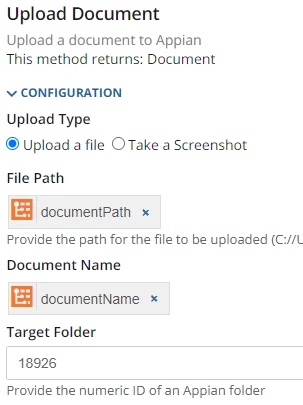
When I run the RPA within the Appian RPA console it works perfectly fine.

I want to trigger this RPA from an Appian Process Model that uses the Robotic Process Smart Service but when I do so the RPA start fine but then I have an error that I can't solve so far... (looks like it's about the Target Folder).


Error code APNX-1-4530-021 with message "docFolderUuid query paramter is not found." found for resource /api/v1/uploadDoc

Can anyone help me?

Thanks,

Jeremy.

    Best answer by danny.verb

    Can you verify that your user or the connected system service account has editor access to the Appian folder?

    8 replies

    danny.verb
    April 29, 2021

    Can you verify that your user or the connected system service account has editor access to the Appian folder?

    jrmyg0001Author
    April 29, 2021

    Thanks, actually I didnt have the Service Account with an acces to the folder...

    June 12, 2024

    Hi [mention:a74757ba4f304229897a4c78b0095fa3:e9ed411860ed4f2ba0265705b8793d05:label=J%C3%A9r%C3%A9my%20Geneste%20%28jrmyg0001%29%2C] 

    Could you please help me on how to move the file from local system folder to Appian folder?

    June 13, 2024

    Hii [mention:a3d380ff8e4a4332b6b856b7af8bfbf3:e9ed411860ed4f2ba0265705b8793d05] 

    What is your requirement?

    Can you elaborate.

    June 13, 2024

    Hi [mention:7da09a91ebba452c82a6b899cb44d590:e9ed411860ed4f2ba0265705b8793d05] ,

    My requirement is to save the file from system folder to Appian folder.