

KB-2131 CDT fails to save with "The following types cannot be used, because they do not have a definition in the Appian data source" error
Symptoms
Saving the top level of a double nested CDT, similar to the example below, fails with the following error:
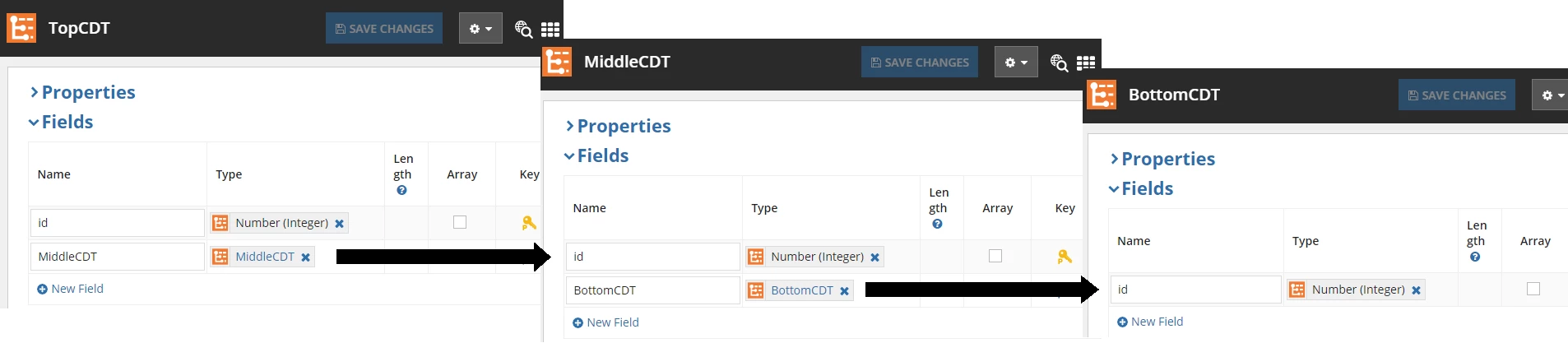
The following types cannot be used, because they do not have a definition in the Appian data source: [TopCDT (id=<ID>)]
A similar error message is also found in the application server log:
ERROR com.appiancorp.type.config.xsd.EcoreModelPersister - Error detected by Ecore save preview.
java.lang.IllegalArgumentException: The type {urn:com:appian:types}BottomCDT is referenced, but is not defined in the XSD.
Cause
This issue has been reported to the Appian Product Team. The reference number for this issue is AN-128273.
Workaround
- Remove any field(s) referenced in the application server log error message and save the CDTs. In the error example above, the
BottomCDTfield would be removed fromMiddleCDT. - Save the CDT referenced in the UI error. In the example above,
TopCDTwould be saved. - Add back the field(s) removed in step 1 and save the CDTs. Based on the example in step 1, add back the
BottomCDTfield inMiddleCDT.
Affected Versions
This article applies to all versions of Appian.
Last Reviewed: June 2020