February 23, 2023
Solved

Column to store 100 Phone Numbers

  • February 23, 2023
  • 15 replies
  • 0 views

Hi Experts,

I have a requirement where I need to store 100 phone numbers in a given field, i.e Targets for now. And then to filter the data on all the columns considering if user searches with 555 then 2nd record should be returned

Currently I was using a single table with structure as shown below

TargetID (num) OrderID (num) Targets(varchar)
1 1 +91-9999999999
+91-9999999999
+91-8888888888
2 1 +91-9999999999
+91-9999999999
+91-8888888888
+91-5555555555

Now, due to some performance issues, we need to get that targets column to be moved to a separate table and store all the phone numbers as a separate row, as shown in below tables

TargetID OrderID
1 1
2 1

id TargetID Targets
1 1 +91-9999999999
2 1 +91-9999999999
3 1 +91-8888888888
4 2 +91-9999999999
5 2 +91-9999999999
6 2 +91-8888888888
7 2 +91-5555555555

Kindly suggest as how this can be implement, do we need to use nested CDT or if there is any other way possible.

Thanks,

Gaurav Singh
    Best answer by nareshs945

    Hi,

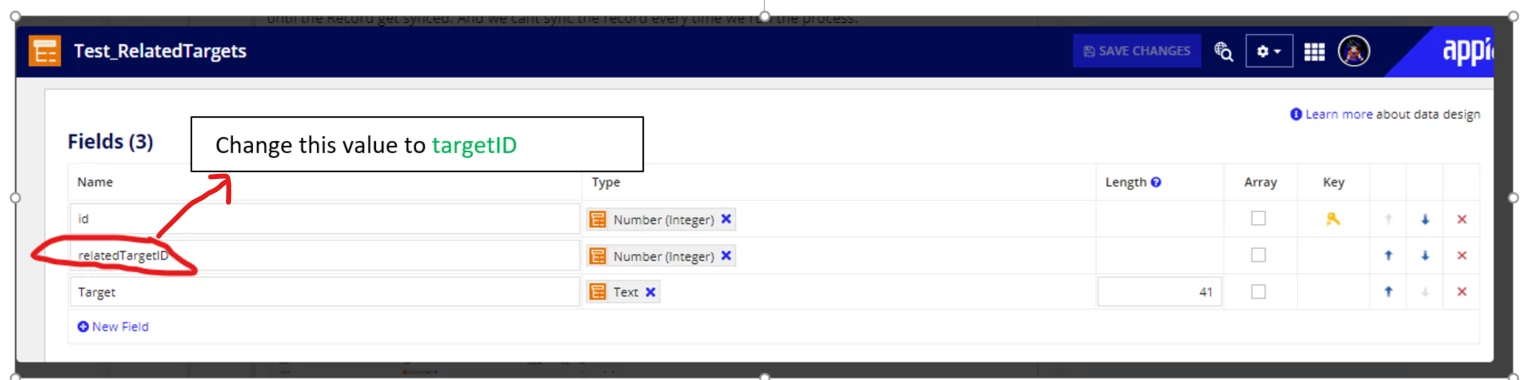
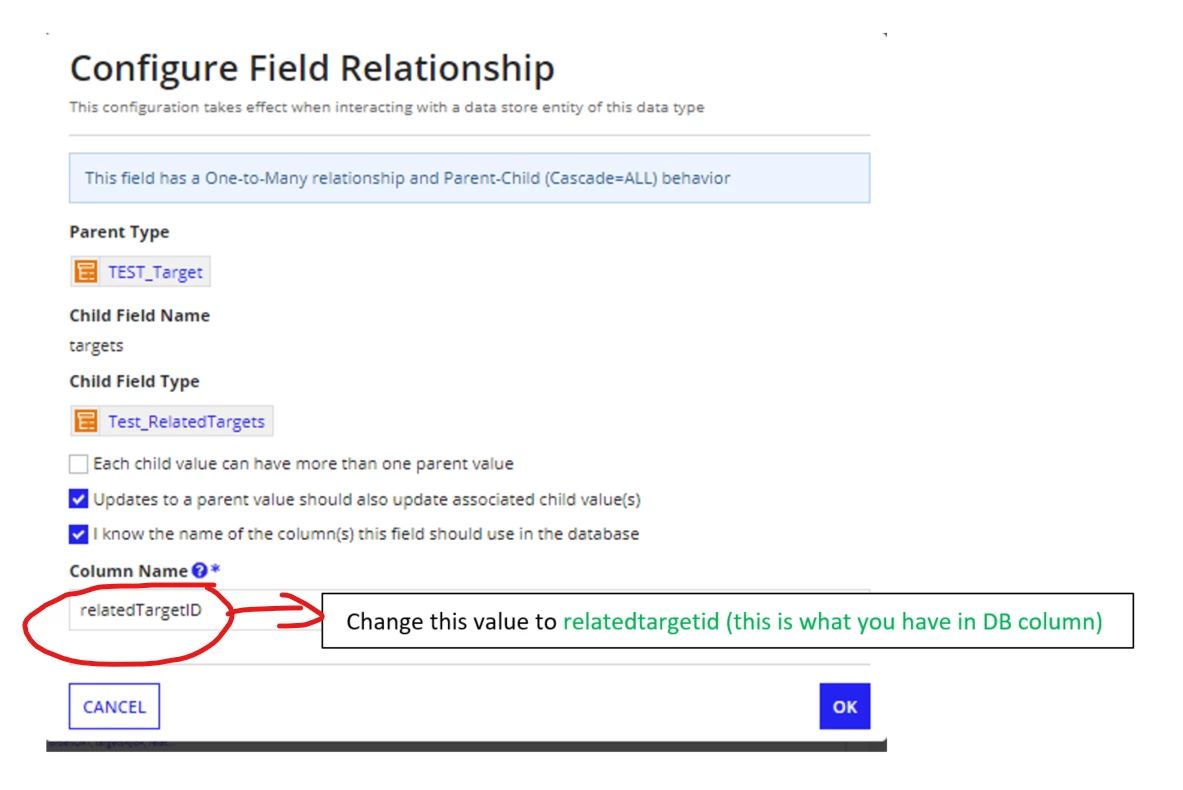
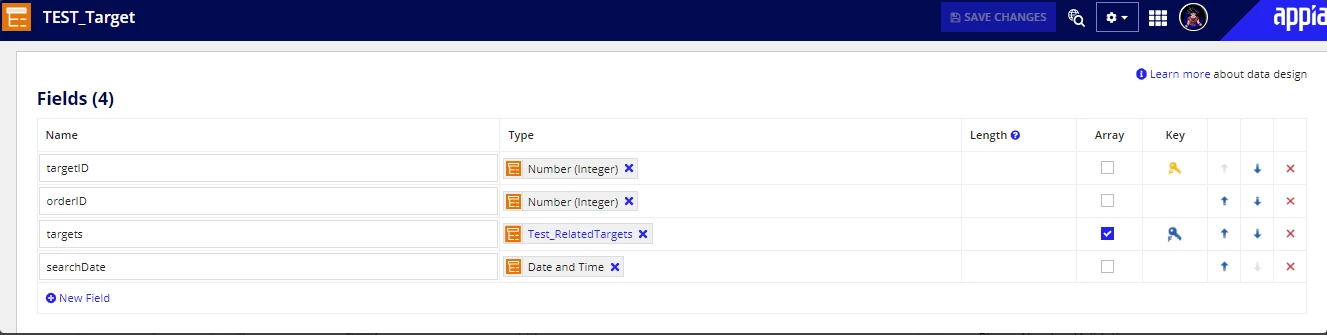
    I see an issue with your nesting configuration. The DB column is not matching the name that you provided in nested configuration.

    Try with this configuration

    hopefully this will work for you

    15 replies

    abhayd3663
    February 24, 2023

    If there is no further use case other than just ability to search. You may save multiple phone numbers separated by ";" in single text field in DB and retrieve them and split them using the split(). Use contains operator to search the desired substring.

    filter: a!queryFilter(
    field: "phone",
    operator: "includes",
    value: ri!value
    )

    February 24, 2023

    Hi Abhay,

    I'm foreseeing the challenge of Query timeout in Production that may arise if the data count gets increased at a subsequent period of time. Currently we are storing the data with ";" separated values in the same column.

    During design review with Appian team , they asked to put it in a separate column with one row for each targets.

    The only challenge I'm facing is getting this implemented using the nested cdt, where TargetID is yet not generated when we are entering the multiple numbers.

    stefanhelzle0001
    February 24, 2023

    This is a good idea. Do not store multiple values in a single field.

    For the design of the data model, I suggest to follow these guidelines

    docs.appian.com/.../data-modeling-with-appian-records.html

    February 24, 2023

    Hi Stefan,
    Thanks for your response, The above guideline will lead us to redesign the whole process.


    Currently we are using the CDT for target with below structure.

    {
    'type!{urn:com:appian:types:TEST}TEST_Target'(

    targetID:" ",

    'orderID': 1,

    'targets': "123;3422;23443",

    'searchDate': fn!datetime(2023, 2, 18, 0, 0, 0, 0)

    )
    }

    How can we redesign this so that 'targets' column could be array of cdt itself like as shown below.

    {

    'type!{urn:com:appian:types:TEST}TEST_Target'(

    targetID:" ",

    'orderID': 1,

    'targets': {

    'type!{urn:com:appian:types:TEST}Test_RelatedTargets'( targetID:' ', 'Target': "123" ),

    'type!{urn:com:appian:types:TEST}Test_RelatedTargets'( targetID:' ', 'Target': "3422" ),

    'type!{urn:com:appian:types:TEST}Test_RelatedTargets'( targetID:' ', 'Target': "23443" )

    }

    'searchDate': fn!datetime(2023, 2, 18, 0, 0, 0, 0)

    )

    }

    stefanhelzle0001
    February 24, 2023

    Appian Records do not support nesting. Create two separate records and relate them.