
shukurs0001
March 25, 2022
Question

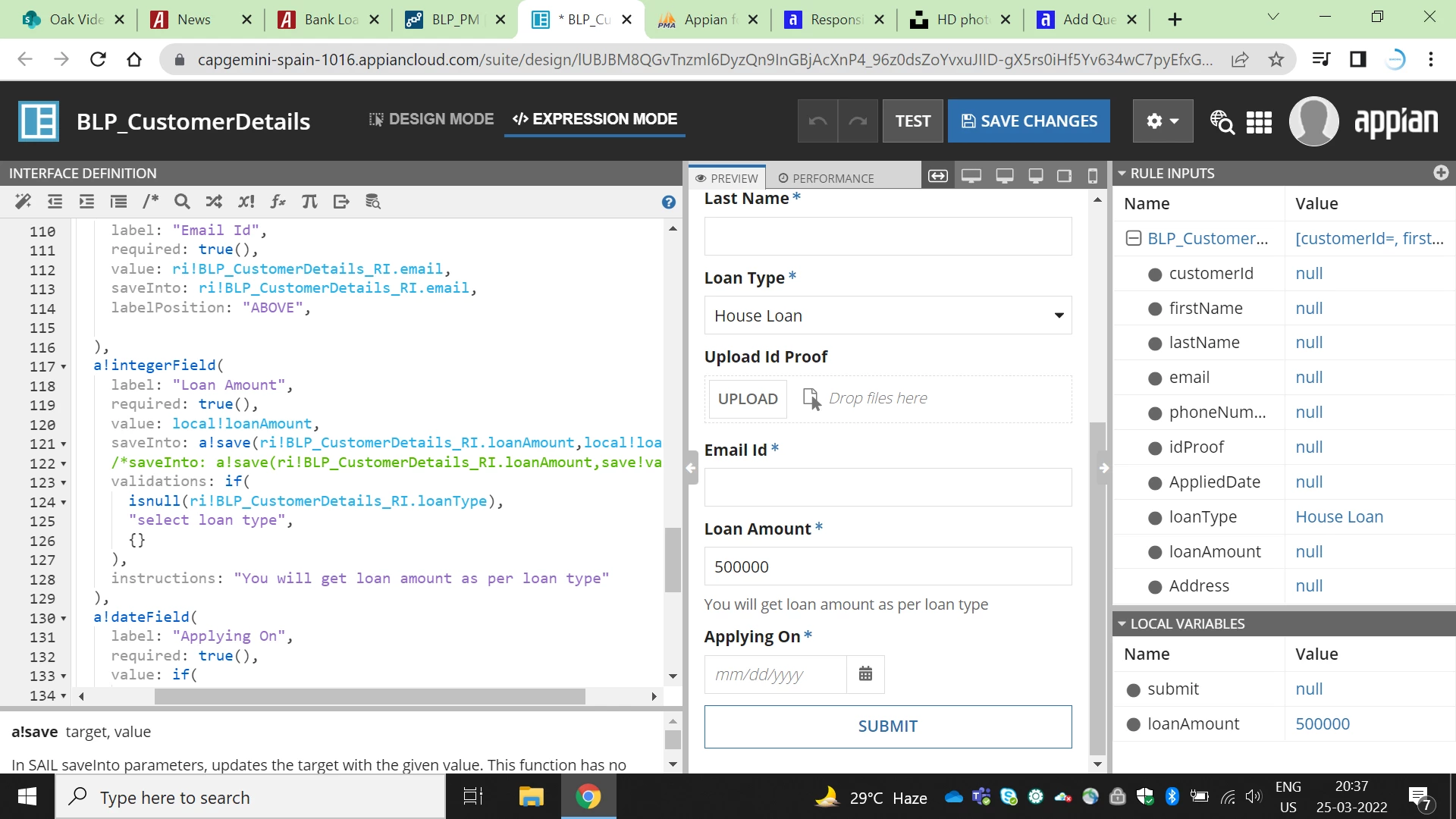
Why local variable value is not going into the rule input
  • March 25, 2022
  • 5 replies
  • 0 views

You can see in the above image that Loan amount of rule input showing null even passing the value.
Can anyone check it?

5 replies

mikes0011
Brainy
March 25, 2022

If your saveInto is only "a!save(ri!myCdt.loanAmount, local!loanAmount)", this will not cause local!loanAmount to be set, and therefore, won't cause the (new) value of local!loanAmount to get saved into your ri! variable.

I'm not sure why you're even using local!loanAmount - but if you really need to use it, and also want the value to be simultaneously saved into your CDT field, the simple and standard way is to use a list of saves in your saveInto parameter.

saveInto: {
  local!loanAmount,  /* saves the field value directly into local!loanAmount */
  a!save(
    ri!myCdt.loanAmount,  /* saves the (new) value of local!loanAmount into the RI value */
    local!loanAmount
  )
},

shukurs0001
March 25, 2022

First of all thank you for your revert.

I have tried what you suggested, however it is not reflecting in rule input.

see the local!loanAmount value in the image.

mikes0011
Brainy
March 25, 2022

Ok, you hadn't mentioned that local!loanAmount is populated directly in its local variable definition.

This is an instance where it would have been helpful to give some details of your desired functionality overview in the original post. 

So, can you tell us a bit more about the use case you're trying to implement?  For example, is the loan amount supposed to be specified only by the Loan Type selected?  In that case you should have the Loan Type selection dropdown perform the Save into the loan amount CDT property, and not allow the Loan Amount field to be edited.