December 2, 2025
Question

Appian UI Error: getfontawesomefriendlynamebyid_appian_internal Invalid Icon ID

  • December 2, 2025
  • 5 replies
  • 0 views

Hello Community,

I am encountering an issue when trying to access my application. The error details are as follows:
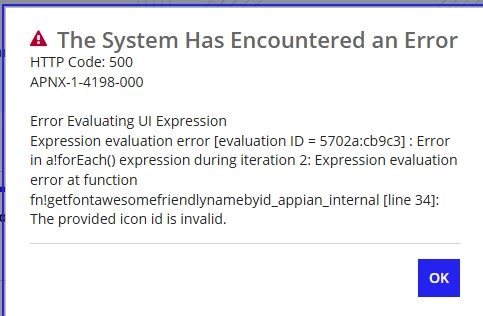

    5 replies

    bhavanai654706
    December 2, 2025

    Hello [mention:dd4e3df57faf4fe292523730712924a1:e9ed411860ed4f2ba0265705b8793d05]    ,

    During the second iteration of the a!forEach() loop, the icon value is either:

    • not a valid  icon name ,

    • incorrectly formatted (e.g., "fa-home" instead of "home"), or

    • null/empty, which Appian cannot process.

    To fix this issue 

    • Validate all icon names used in the list. - refer this link: docs.appian.com/.../Appian_Icons.html

    • Ensure no null, empty string, or unsupported icon identifiers are included.

    • Use proper icon names

    December 2, 2025

    The actual issue for [mention:dd4e3df57faf4fe292523730712924a1:e9ed411860ed4f2ba0265705b8793d05] he was able to access other application but when he was trying to access one specific application, he is getting the above error we can understand the above fix but in which expression we have to fix this we have tried by global search with expression, but we couldn't figure out the culprit. 

    bhavanai654706
    December 2, 2025

    Hi [mention:9cb6d1e02c63434bb29a6d87a26a87e6:e9ed411860ed4f2ba0265705b8793d05] — thanks for clarifying the context that the error only happens for one specific application.

    • The error getfontawesomefriendlynamebyid_appian_internal → “invalid icon id” means that somewhere in that app’s UI code (interface, rule, site, or dashboard), there’s an icon component referencing an invalid or unsupported icon ID.

    • Because other applications work fine, the invalid icon reference is local to that one application — maybe in a landing page, site page, record view, or a nested component.

    • Try doing a global search inside that application for icon:, richTextIcon, or any variable like iconName. If search doesn’t reveal anything, open the interfaces one by one — the wrong icon reference will trigger the error when that interface loads.

      Once found, replace the invalid icon name with a valid one (as per Appian’s icon list), or add fallback logic to prevent invalid or null icon values.

    shubhama926776
    December 2, 2025


    AFAIK, Replace the invalid icon value at line 34 with a valid icon name like "user" or "home".

    fn!getfontawesomefriendlynamebyid_appian_internal() is the internal function.
    Can you share code snippet for same(If this does not work)?

    January 30, 2026

    I encountered this issue after rearranging the page menus in the Application's Site configuration.  I was able to resolve the issue this way:

    1. Edit each menu item for pages that were generated by Appian Composer
      1. Select a glyph icon (they will be empty)
      2. Scroll to the bottom and set Visibility to "Always Show" instead of "Only show when..." since the expression is empty
      3. [Done]