
olalekana0448
May 26, 2021
Question

Auto Generated Symbol inside barcodeField

  • May 26, 2021
  • 13 replies
  • 0 views

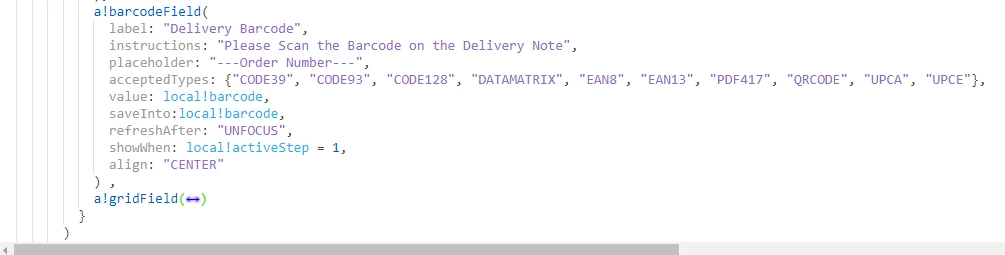
Who knows how to get rid of this auto generated symbol inside barcodeField? It creates false sense of available data thereby affecting my coding logics. The screenshots of both the Interface and  expression are attached.
    13 replies

    mikes0011
    Brainy
    May 26, 2021

    That looks like the "infinity" symbol that's sometimes displayed when you attempt to display an integer data type that's too large (which doesn't take much).  What do you have the value of "local!barcode" set to?  I'm not incredibly familiar with how this field functions but it seems it might be relevant here.  Also I suppose you should double check that the value isn't null, since (just guessing) that might cause wacky results too.

    The Expression Guru
    olalekana0448
    May 27, 2021

    I am very happy for your willingness to help. People like you make the world a better place. It looks like an infinity symbol. The value will change dynamically based on the user input. It is stored in a local variable only for now. Just wish I could stop the symbol from auto generating

    olalekana0448
    May 27, 2021

    Thanks to all. I have figured out what the bug is. The value is set to a local variable and this is automatically loaded with the application. The screenshot is attached in case someone runs into the same issue in the future. 

    mikes0011
    Brainy
    May 27, 2021

    So out of curiosity, what was the auto-loaded value of the local variable?  I was able to reproduce approximately the same effect last night when I tried, by setting the value to a typecast integer and entering too long of a number; though by default it wanted to save the entered value as text, which did not produce that error.

    The Expression Guru
    olalekana0448
    May 27, 2021

    The auto-loaded value is 12-digit numbers, just something to represent a barcode. "Though by default it wanted to save the entered value as text, which did not produce that error". I need clarification here because I will still like to save the value. Or can  I just save it into a Rule Input and not in the local variable ?

    vinitaj0002
    May 28, 2021

    Hi olalekana0001

    I tried the same thing that you did and  the barcode component seems to be working fine without any infinity error through the local variables. But yes it is not working correctly if you are using rule input of type integer. Adding screenshots. So your solution here would be to use local variables it will not cause any issue unless you are casting it to an integer or you can also use rule input of type text which should also work absolutely fine.

    Using Local variables:

    Using Rule input of type integer:


    olalekana0448
    May 28, 2021

    Hi Vinita,

    you are the best! Thanks a bunch. Your solution was correct. I didn't implement before I replied. I thought u assumed I said the barcode didn't work.

    Thanks once again:)