sanjuktab2257
July 24, 2025
Solved

Auto-Provisioning and Group Syncing for Multiple Applications in Appian

  • July 24, 2025
  • 7 replies
  • 0 views

We have multiple applications within the Appian platform. Could someone provide guidance on how to implement auto-provisioning and group syncing in a way that maintains separation between these individual applications?

    Best answer by harshas2775

    Appian has the ability to inspect a SAML login response and synchronize a user's group memberships based on an assertion in the response.

    In application you need to have group types for the groups you want to sync. The sync happens when user signs in based on the group type and SAML assertion value.
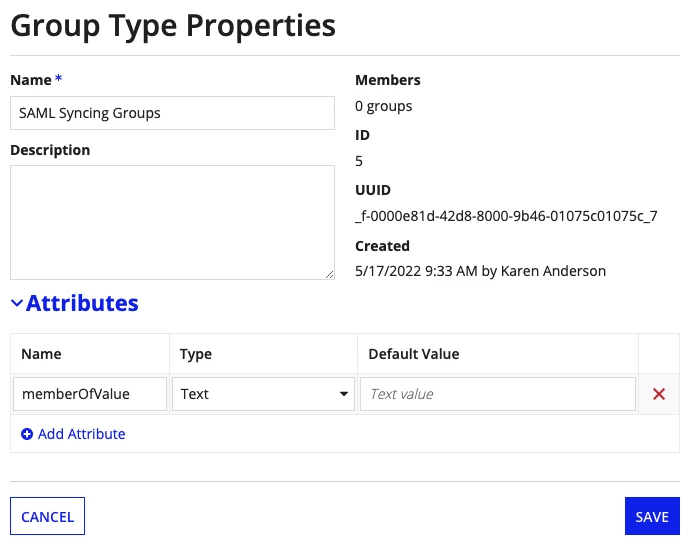
    the assertion value in SAML should match the value in the memberOfValue attribute of the group type. So different groups will have different values in this memberOfValue attribute. During sign in based on users group membership in the identity provider the SAML attributes are matched with memberOfValue of group types. Users are added or removed based on that. For more details you can refer this documentation

    docs.appian.com/.../SAML_for_Single_Sign-On.html

    7 replies

    harshas2775
    July 25, 2025

    Appian has the ability to inspect a SAML login response and synchronize a user's group memberships based on an assertion in the response.

    In application you need to have group types for the groups you want to sync. The sync happens when user signs in based on the group type and SAML assertion value.

    the assertion value in SAML should match the value in the memberOfValue attribute of the group type. So different groups will have different values in this memberOfValue attribute. During sign in based on users group membership in the identity provider the SAML attributes are matched with memberOfValue of group types. Users are added or removed based on that. For more details you can refer this documentation

    docs.appian.com/.../SAML_for_Single_Sign-On.html

    shubhama926776
    July 25, 2025

    You can enable auto-provisioning through SAML or LDAP sync in Admin Console. For application separation, create prefixed groups (APP1_Users, APP2_Users) and map external identity provider groups to these groups during sync. Apply security at the application level using these dedicated groups, ensuring users only access their authorized applications. This provides automated user management while maintaining strict application boundaries.

    For more detailed information, you can check out existing community discussion
    https://community.appian.com/discussions/f/administration/18470/auto-provisioning-a-user-with-saml-when-an-authentication-group-is-specified-in-saml-idp

    sanjuktab2257
    July 25, 2025

    Need a little clarity on the difference in attributes that we will associate with Custom Group Types and Groups? Are both same?

    What I understand is if we have an assertion claim from the IdP/ Entra ID like:

    
      Appian-Finance
      Appian-HR


    We have created the Custom Group Type with values:

    • Group Type Name: External Synced Group
    • Attribute Field: externalGroupId 

    And created 2 Groups:

    • Group1: Finance Team

      • Group Type: External Synced Group
      • Group Attribute (externalGroupId): Appian-Finance
    • Group2: HR Team

      • Group Type: External Synced Group
      • Group Attribute (externalGroupId): Appian-HR

    Are Appian-Finance and Appian-HR are the Entra ID group names?

    shubhama926776
    July 25, 2025

    Custom Group Types are used to add extra metadata fields (like externalGroupId) to groups. Groups are the actual security objects that get assigned these types and field values. For SAML/Entra ID integration, values like "Appian-Finance" and "Appian-HR" in the SAML assertion should exactly match the externalGroupId of your Appian groups.
    This allows users to be auto-assigned to the correct Appian groups based on their Entra ID group membership. So, Custom Group Types define structure, Groups use that structure, and the attribute values must match what’s sent from Entra ID for syncing to work.

    https://docs.appian.com/suite/help/25.2/Group_Management.html

    stefanhelzle0001
    July 25, 2025

    Find some tips and tricks in my blog post

    https://appian.rocks/2024/03/25/saml-group-sync/


