
November 15, 2024
Question

Button Click Boolean not getting captured property in Process Model Process Variable
  • November 15, 2024
  • 8 replies
  • 1 view


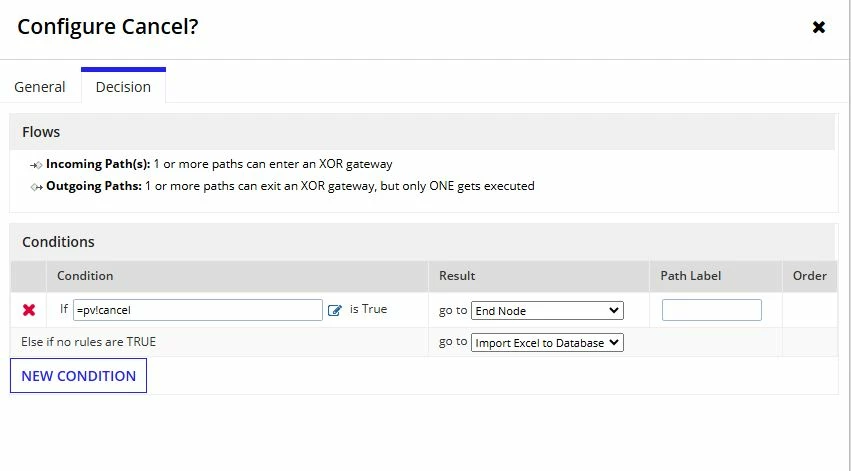
I have an Interface with Cancel and Submit button. This interface also has Rule Inputs defined for Cancel and Submit. I also had defined a process model for this Interface. I have kept the process model screenshot as well to this. When I am testing the Process Model, program always goes to "Import Excel to Database node", this happens even when I hit Cancel button the Interface. I feel the button clicks are not sending/capturing the correct values onto process model. Can you please let me what am I doing wrong here?

    8 replies

    karumurua531442
    November 16, 2024

    hi [mention:f715d2a5beee447f95815c5be14799c3:e9ed411860ed4f2ba0265705b8793d05]  In your submit and cancel buttons, you must assign a value to the parameter. The value will be saved in your `ri!` variable when you click the button. I have included the code for reference. Depending on your saving rule input type, the value parameter can either be a text value or a boolean.

    a!buttonWidget(
          label: "submit",
          value: "Submit",
          saveInto: ri!submit,
          submit: true()
        ),
        a!buttonWidget(
          label: "cancel",
          value: "Cancel",
          saveInto: ri!cancel,
          submit: true()
        )

    November 18, 2024

    Thank you Abhishek.

    karumurua531442
    November 19, 2024

    Hi [mention:f715d2a5beee447f95815c5be14799c3:e9ed411860ed4f2ba0265705b8793d05]  if your query is resolved , please verify the answer and close this thread

    kumara0180
    November 17, 2024

    Buttons work differently then input fields. In Input fields you enter a value which gets saved in parameter passed in saveinto. Same value gets displayed when you pass that parameter in value part

    For Buttons you pass the value which gets save into paramater set in saveinto,

    In your case, you would only need one ruleinput, which is ri!cancel

    code should look like this 

    a!buttonWidget(
          label: "submit",
          value: false,
          saveInto: ri!cancel,
          submit: true()
        ),
        a!buttonWidget(
          label: "cancel",
          value: true,
          saveInto: ri!cancel,
          submit: true(),
          //Validate as false so that you can avoid checking required fields validation/
          validate:false
          
        )

    This way in your xor gate you can use pv!cancel to determine which path to take.

    November 18, 2024

    Thank you Kumar, your suggestion worked.

    kumara0180
    November 21, 2024

    if it has helped, please upvote the answer so that it can help others

    gayatria0439
    November 19, 2024

    Hi [mention:f715d2a5beee447f95815c5be14799c3:e9ed411860ed4f2ba0265705b8793d05] , I have reviewed your code and noticed that you have used a rule input in place of the value. Instead, you should provide a value that can either be a text(string format) (e.g., 'Cancel' or 'Submit') or a Boolean value (True/False), depending on your requirements. This value will be saved in your rule input as soon as the button is clicked. So, You can then implement the logic, such as: if Cancel = true, proceed to the end node, or if Cancel = 'Cancel', proceed to the end node.

    November 19, 2024

    Thank you [mention:0bc4c4bef9ec41cd9ea711bb76538c5d:e9ed411860ed4f2ba0265705b8793d05] . Appreciate the help here.