
November 7, 2023
Question

Can you suggest how schedule a Process?

  • November 7, 2023
  • 6 replies
  • 0 views

Hi, 

I'm trying to schedule a process using start node. Below is the screen shot.
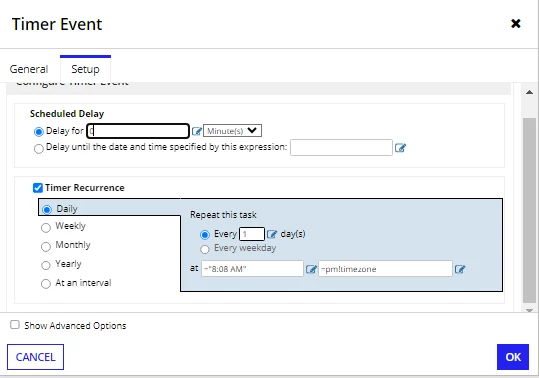
If I use pp!timezone I'm getting below.

Problem: An error has occurred in evaluation of an expression for a Start Event.
Details: ERROR:EVAL:@reason=Domain pp is valid only in execution
Recommended Action: Examine and correct the expressions on the Start Event's Event Properties.

If I'm using pm!timezone I'm getting a problem. The clients are at US and I'm working from India. If schedule 1 AM it is not executing correctly.

I want to schedule a process at 1 AM at US time zone.

How to schedule it. Please suggest.

6 replies

stefanhelzle0001
November 7, 2023

I did a but of research and came up with a nice idea.

The plugin "Content Tools" provides a function to retrieve some details about a process model. Including the timestamp of the last publish.

You can add an initial XOR node to check whether that date is more than 5 minutes in the past. This way, you skip the first process initiation.

a!localVariables(
  local!details: split(getprocessmodeldetailsbyuuid(ri!uuid), ", "),
  local!lmo: index(
    local!details,
    a!forEach(
      items: local!details,
      expression: if(
        find("Last Modified on", fv!item),
        fv!index,
        {}
      )
    ),
    ""
  ),
  local!splitLmo: split(local!lmo, ": "),
  if(
    count(local!splitLmo) <> 2,
    error("Cannot extract last modified date: " & local!details),
    todatetime(local!splitLmo[2])
  )
)

mikes0011
Brainy
November 7, 2023

I would literally pay the author(s) of Content Tools $20 in cash right now if they'd make these functions return a Map / Dictionary / JSON string instead of whatever stupid, arbitrary, unorganized, cobbled-together values they currently return [emoticon:9d27520b879541edb4dc3688e695ae44]

mikes0011
Brainy
November 7, 2023

The pattern I most commonly settle on for this is to allow the process to be launched anyway (using the basic setup you have pictured already), then immediately after the start node, have an XOR node that checks whether the instance's start time matches the desired launch time, and if not, exit immediately.

abdurrahimi5760
May 28, 2025

Hi, I've a similar problem. My Process Model General Properties for timezone has "Asia/Hong" with override disabled.

I configured Start Node Timer as "09:00" - pm!timezone. 

The process triggers at 08:00 AM (HK time) instead of 09:00 AM. What could be the issue?

abdurrahimi5760
May 28, 2025

Hi, I've a similar problem. My Process Model General Properties for timezone has "Asia/Hong" with override disabled.

I configured Start Node Timer as "09:00" - pm!timezone. 

The process triggers at 08:00 AM (HK time) instead of 09:00 AM. What could be the issue?