
Question
Change date format
Anyone know how can I change from this format: "mm/dd/yyyy h:m PM" to this format: "dd/mm/yyyy h:m PM".
I only want to switch the order for the day and month.
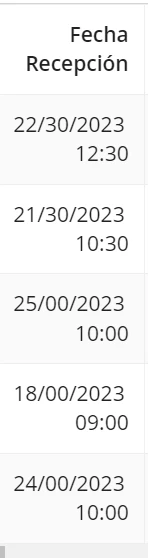
I have tried the following expression, however this way it doesn´t show PM/AM.
a!gridColumn(
  label: "Fecha Recepción",
  sortField: 'recordType!{b6fc6108-1f5d-4cbe-9c5c-08da4b1d58f3}CPF Maestro Recepciones.fields.{4fa92044-3c8b-438b-b77e-30bf88efbae3}FechaRecepcion',
  value: if(
    isnull(
      fv!row['recordType!{b6fc6108-1f5d-4cbe-9c5c-08da4b1d58f3}CPF Maestro Recepciones.fields.{4fa92044-3c8b-438b-b77e-30bf88efbae3}FechaRecepcion']
    ),
    fv!row['recordType!{b6fc6108-1f5d-4cbe-9c5c-08da4b1d58f3}CPF Maestro Recepciones.fields.{4fa92044-3c8b-438b-b77e-30bf88efbae3}FechaRecepcion'],
    datetext(
      fv!row['recordType!{b6fc6108-1f5d-4cbe-9c5c-08da4b1d58f3}CPF Maestro Recepciones.fields.{4fa92044-3c8b-438b-b77e-30bf88efbae3}FechaRecepcion'],
      "dd/mm/yyyy hh:mm"
    )
  ),
  align: "END"
)
The result shown when using the previous expression is the following:
Any help would be useful. Thanks!