
Default Appian JSON Format Not Compatible With External System in Integration
Hello.
I am making calls with an integration to an external system and I am unable to use Appian's built-in JSON formatter to do so. As far as I have read on the documentation, I am also unable to do the type of string manipulation necessary to dynamically construct the JSON from scratch so that it is compatible. I am only able to statically send text as JSON for it to work.
Here are the bodies and results for a success and failure:
Body (Content Type: JSON):
"[
{
""startPublicationDate"": ""2021-09-05"",
""endPublicationDate"": ""2021-09-05""
}
]"
Result:


Body (Content Type: JSON):
concat(
"[
",
a!toJson(
value: a!map(
startPublicationDate: concat(
text(ri!startPublicationDate, "yyyy"),
"-",
text(ri!startPublicationDate, "mm"),
"-",
text(ri!startPublicationDate, "dd")
),
endPublicationdate: concat(
text(ri!endPublicationDate, "yyyy"),
"-",
text(ri!endPublicationDate, "mm"),
"-",
text(ri!endPublicationDate, "dd")
)
)
),
"
]"
)
Result:
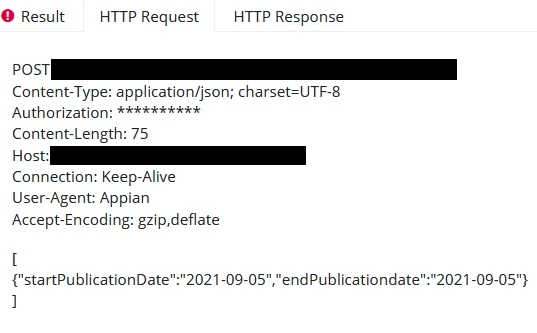

Again, the default Appian JSON format does not work (a!toJSON) and both bodies are validated JSON. How can I manipulate a string that contains quotes such as a JSON? If that is not possible, how else could I dynamically construct the JSON so that the external system accepts it?
Thanks.