
Display Calendar with Meeting conflicts
HI,
I have a requirement to display Week Calendar with Meeting conflicts., Used event time line with details pattern and managed to design below calendar
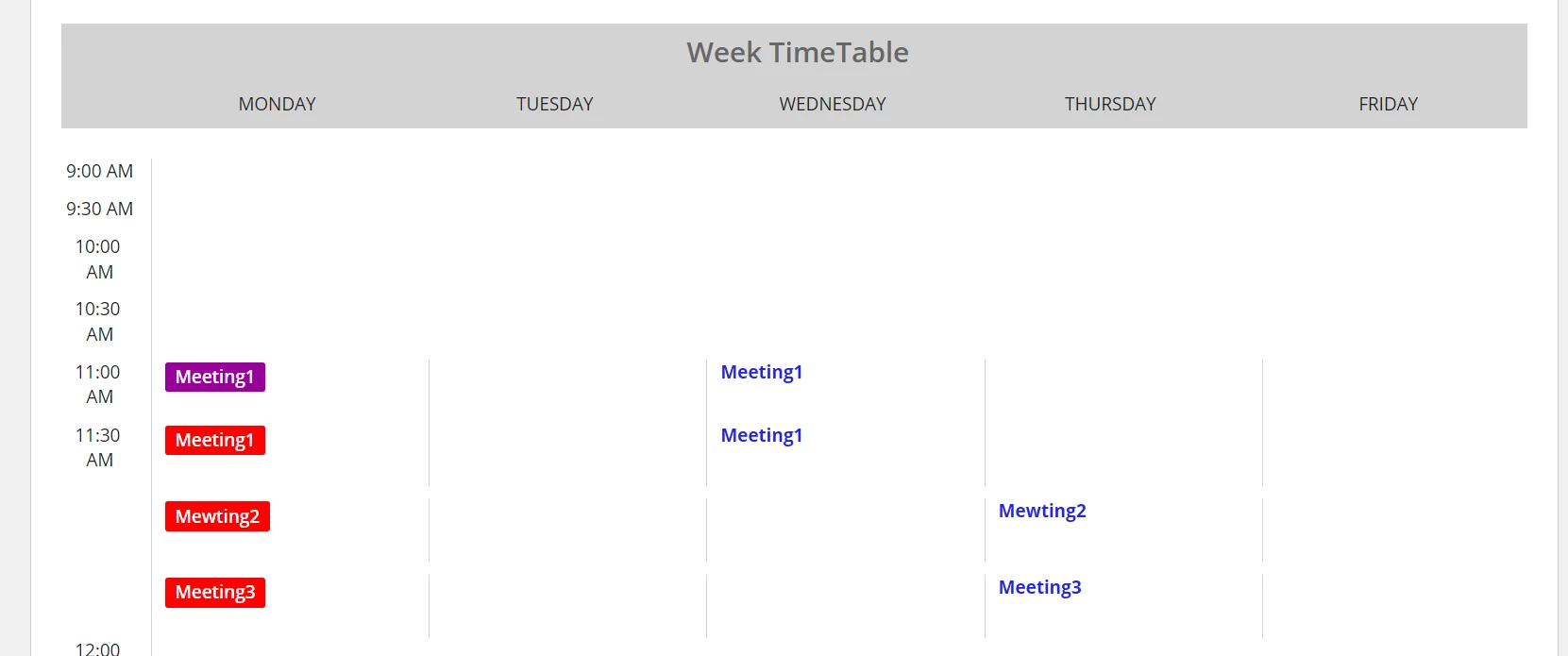
Calendar timeline divided into 30 min sections as meeting possibility 1 or 1.30hr etc.
the issue here is meeting one starts at 11 am and end at 11.30 , it should show meeting tag starts from 11 am and end at 11.30 but it showing two different tags for meeting1, one at 11 am and another at 11.30.
if there is another meeting same time meeting2, it should show beside to that, and both should be in red.
since i have divided timeline into 30 min blocks , i am not sure how to combine two meeting tags if meeting falls for more than 30 min?
Below is the code:
a!columnLayout(
contents: {
a!forEach(
items: local!CalenderTime,
expression: a!columnsLayout(
columns: {
a!columnLayout(
contents: {
a!richTextDisplayField(
labelPosition: "COLLAPSED",
value: fv!item.updatedTime,
align: "CENTER"
),
a!richTextDisplayField(labelPosition: "COLLAPSED")
},
width: "EXTRA_NARROW"
),
a!columnLayout(
contents: {
a!forEach(
items: index(
local!MeetingData,
wherecontains(fv!item.updatedTime, local!MeetingData.starttime)
),
expression: a!columnsLayout(
columns: {
a!columnLayout(
contents: {
if(
contains(fv!item.daysofWeek, "Mon"),
{
if(fv!itemCount>1,
a!tagField(
labelPosition: "COLLAPSED",
tags: {
a!tagItem(
text: fv!item.MeetingName ,
backgroundColor: "#FF0000",
textColor: "#ffffff"
),
},
size: "STANDARD"
),
a!tagField(
labelPosition: "COLLAPSED",
tags: {
a!tagItem(
text:fv!item.MeetingName,
backgroundColor: "#990099",
textColor: "#ffffff"
)
},
size: "STANDARD"
)
)
}
,
{}
)
},
width: "NARROW"
),
)
should i use any functions or all together i have to change my approach?
any help/thoughts would be appreciated.
Thanks in advance.