
April 10, 2024
Solved

Editable Grid - Paging controlling number of records displayed per page

  • April 10, 2024
  • 27 replies
  • 0 views

Hi All,

Is it possible to limit the number of rows displayed by an editable grid? I currently implemented paging but I doesn't do anything to the actual grid it keeps showing all the records. Basically I would like to do like a read only grid - show only 5 records then next page the 5 next following records like that. Is this possible?
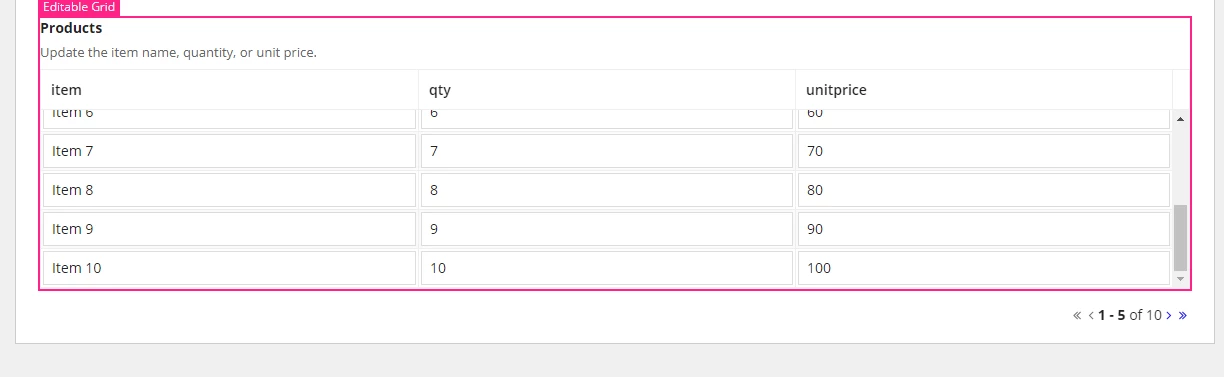
thanks again

Best answer by mikes0011

1) show your data in a read-only grid

2) add an icon-size column which contains an "edit" icon (for instance), which is a link

3) clicking on the "edit" icon copies that row's data temporarily into a local variable, and this is displayed in a section below the grid, in editable fields (also the "edit" icons in the original grid are disabled)

4) after edits are completed and the user clicks something (in that local section) to save their edits, the data is populated back to the database and the section closes, and links in the original grid become active again

27 replies

karumurua531442
April 10, 2024

hi [mention:0ab51f6183f24275bb64f62a11054752:e9ed411860ed4f2ba0265705b8793d05]  yes you can implement pagination to editable grid, If your  data is modified what you can do is show initially all the rows as read only have edit in your grid column when you click enable specific row that will allow data for modification, if it is read only data you can go for read only grid 

April 10, 2024

thanks ! could you advise how to do this? maybe if you can give me an example with this editable grid code:

a!localVariables(
  local!items: {
    {item: "Item 1", qty: 1, unitPrice: 10},
    {item: "Item 2", qty: 2, unitPrice: 20},
    {item: "Item 3", qty: 3, unitPrice: 30},
    {item: "Item 4", qty: 4, unitPrice: 40},
    {item: "Item 5", qty: 5, unitPrice: 50},
    {item: "Item 6", qty: 6, unitPrice: 60},
    {item: "Item 7", qty: 7, unitPrice: 70},
    {item: "Item 8", qty: 8, unitPrice: 80},
    {item: "Item 9", qty: 9, unitPrice: 90},
    {item: "Item 10", qty: 10, unitPrice: 100}
  },
  a!gridLayout(
    label: "Products",
    instructions: "Update the item name, quantity, or unit price.",
    headerCells: {
      a!gridLayoutHeaderCell(label: "Item"),
      a!gridLayoutHeaderCell(label: "Qty"),
      a!gridLayoutHeaderCell(label: "Unit Price"),
      a!gridLayoutHeaderCell(label: "Total", align: "RIGHT")
    },
    columnConfigs: {
      a!gridLayoutColumnConfig(width: "DISTRIBUTE", weight: 5),
      a!gridLayoutColumnConfig(width: "DISTRIBUTE"),
      a!gridLayoutColumnConfig(width: "DISTRIBUTE"),
      a!gridLayoutColumnConfig(width: "DISTRIBUTE", weight: 2)
    },
    rows: a!forEach(
      items: local!items,
      expression: a!gridRowLayout(
        contents: {
          a!textField(
            value: fv!item.item,
            saveInto: fv!item.item
          ),
          a!integerField(
            value: fv!item.qty,
            saveInto: fv!item.qty
          ),
          a!floatingPointField(
            value: fv!item.unitPrice,
            saveInto: fv!item.unitPrice
          ),
          a!textField(
            value: dollar(tointeger(fv!item.qty) * todecimal(fv!item.unitPrice)),
            readOnly: true,
            align: "RIGHT"
          )
        }
      )  
    ),
    height: "SHORT",
    rowHeader: 1
  )
)

karumurua531442
April 10, 2024

Could you try this code 

a!localVariables(
  local!items: {
    {item: "Item 1", qty: 1, unitPrice: 10},
    {item: "Item 2", qty: 2, unitPrice: 20},
    {item: "Item 3", qty: 3, unitPrice: 30},
    {item: "Item 4", qty: 4, unitPrice: 40},
    {item: "Item 5", qty: 5, unitPrice: 50},
    {item: "Item 6", qty: 6, unitPrice: 60},
    {item: "Item 7", qty: 7, unitPrice: 70},
    {item: "Item 8", qty: 8, unitPrice: 80},
    {item: "Item 9", qty: 9, unitPrice: 90},
    {item: "Item 10", qty: 10, unitPrice: 100}
  },
  local!pagingInfo: a!refreshVariable(
    value: a!pagingInfo(
      startIndex: 1,
      batchSize: 5,
      sort: a!sortInfo(field: "item", ascending: false())
    )),
    local!dataSubset:todatasubset(local!items,local!pagingInfo),
  

 { a!gridLayout(
    label: "Products",
    instructions: "Update the item name, quantity, or unit price.",
    headerCells: {
      a!gridLayoutHeaderCell(label: "Item"),
      a!gridLayoutHeaderCell(label: "Qty"),
      a!gridLayoutHeaderCell(label: "Unit Price"),
      a!gridLayoutHeaderCell(label: "Total", align: "RIGHT")
    },
    columnConfigs: {
      a!gridLayoutColumnConfig(width: "DISTRIBUTE", weight: 5),
      a!gridLayoutColumnConfig(width: "DISTRIBUTE"),
      a!gridLayoutColumnConfig(width: "DISTRIBUTE"),
      a!gridLayoutColumnConfig(width: "DISTRIBUTE", weight: 2)
    },
    rows: a!forEach(
      items: local!dataSubset,
      expression: a!gridRowLayout(
        contents: {
          a!textField(
            value: fv!item.item,
            saveInto: fv!item.item
          ),
          a!integerField(
            value: fv!item.qty,
            saveInto: fv!item.qty
          ),
          a!floatingPointField(
            value: fv!item.unitPrice,
            saveInto: fv!item.unitPrice
          ),
          a!textField(
            value: dollar(tointeger(fv!item.qty) * todecimal(fv!item.unitPrice)),
            readOnly: true,
            align: "RIGHT"
          )
        }
      )  
    ),
    height: "SHORT",
    rowHeader: 1
  ),
  rule!customPaginationRule(
    pagingInfo: local!pagingInfo,
    totalCount: local!dataSubset.totalCount.
  )}
)

mikes0011
Brainy
April 10, 2024

I recommend against this design approach in almost all cases.  The reason is that even if you manually implement paging in your data that you load to show on the current editable grid "page", it gets VERY complicated to manage *updated* data when the paging controls are used.

Usually I will strongly recommend that if you need a PAGED grid, then you use a READ ONLY grid and add a control onto each row to open it SEPARATELY for editing (like in a small section below the grid), where the user can complete and SAVE edits prior to moving on to a different entry.

The Expression Guru
karumurua531442
April 10, 2024

Yes [mention:b45a4f6a20b14a008e4e0ec732a8bf98:e9ed411860ed4f2ba0265705b8793d05]  agree with you, it is very complicate to handle and update the data. unless any rare requirement