
September 1, 2021
Question

Generate Document with Dynamic Table

  • September 1, 2021
  • 2 replies
  • 0 views

Hi All,

we want to display table in below order for each customer. Could you please suggest me how we can display customer details in single column and if we get multiple customers we have to display as mentioned below. We are using dynamic docx document using a template docx & I am able to achieve Dynamic Table in Word document when customer details are displayed in row wise .But I couldn't able to display record details in column wise. Any help is appreciated.
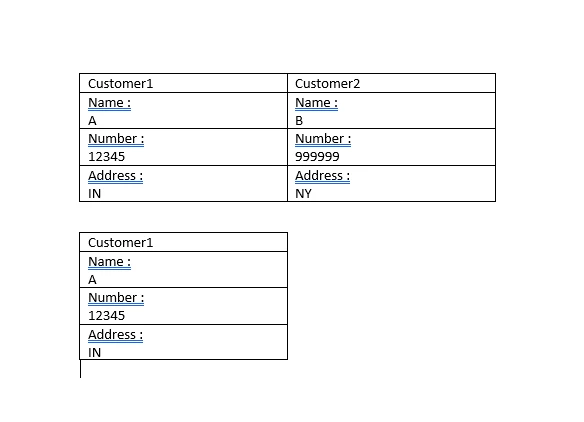


Thanks

    2 replies

    harshas2775
    Brainy
    September 1, 2021

    Create an expression with HTML tags in appian so as output is as per your requirement and pass that to ###variable### in your document. Personally, I find HTML expressions in appian the easiest way to generate dynamic tables.

    September 1, 2021

    Hi Harsha,

    We have to create dynamic document if we use HTML we need CSS for styling and all. We have to display table not in grid style. We are doing dynamic table generation using XML but we can't able to achieve single column as record. We can achieve this with XSL FO but we have existing template using template we want to display record details in single column if we get 10 records 10 columns ( each represents as one table )