

mollyn6512
September 10, 2024
Question

gridLayout: Unable to save selected rows in gridRowLayout to a local variable

  • September 10, 2024
  • 4 replies
  • 1 view

Hi everyone,

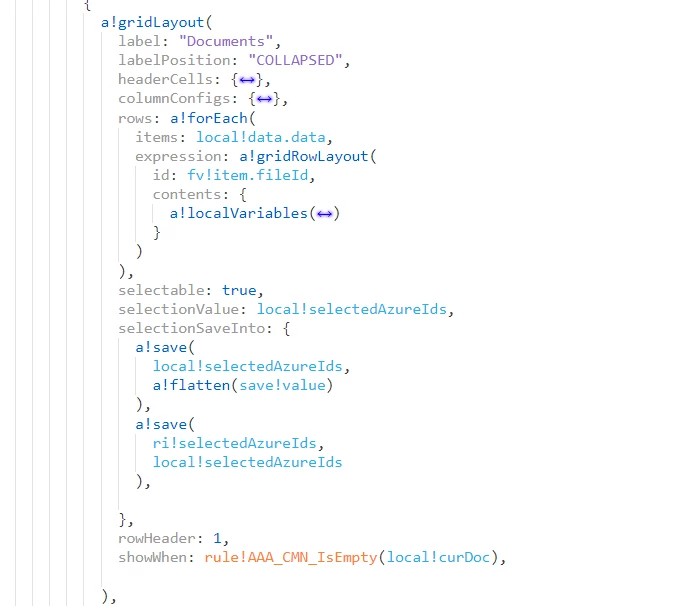
Please help check whether I'm doing anything wrong in below code. I'm having an editable grid with data source is a data subset local variable. In gridRowLayout I already provided the id for identifying, and save the selected ID into a blank local variable. But when I select each row, it's value is not stored into my local variable. I also tried with fv!index but that did not work either. 
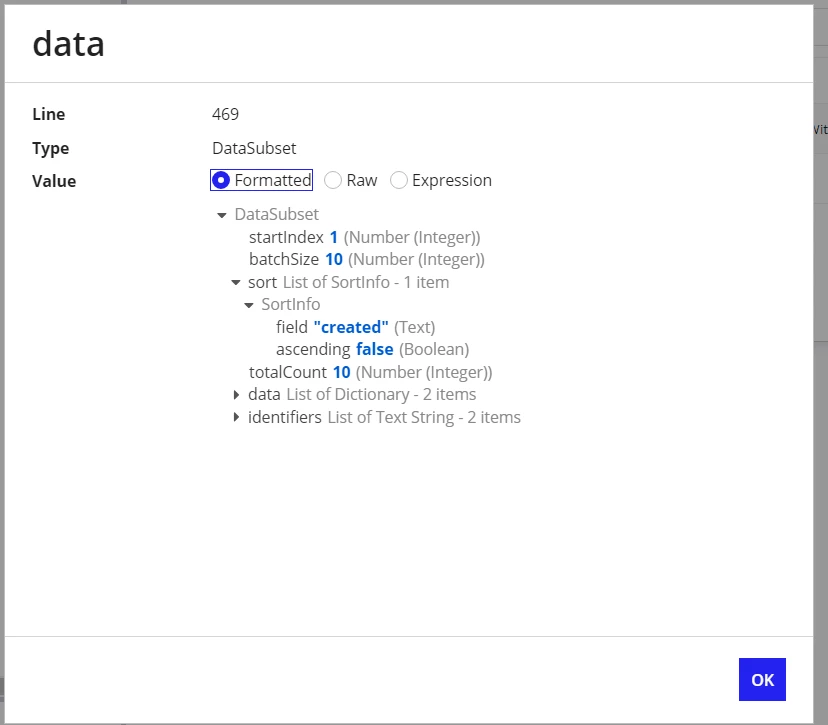
Below is the data subset local variable. I indexed into it's data.fileId field. 
    4 replies

    gayatria0439
    November 25, 2024

    Hi [mention:b18d9a2f367a407ca0cf8a9b71bef972:e9ed411860ed4f2ba0265705b8793d05] ,

    I am unable to see your complete code, particularly in areas such as the expression under the gridRowLayout, as some content appears to have been minimized in the screenshot you provided. I hope you have found a solution to this. If not, I am attaching the code below for your reference. Please review it at your convenience. (Regarding the Id and data, you can use either fv!item.id or fv!index and index or .data)


    November 28, 2024

    Hi [mention:b18d9a2f367a407ca0cf8a9b71bef972:e9ed411860ed4f2ba0265705b8793d05] ,

    I tried the same and it seems to be working for me.

    The data is returning "2" items, but the total count is showing "10". Are there any conditions being applied in the local variables that could be affecting this?

    Could you please provide the relevant code snippet to help us understand the situation better?

    mollyn6512
    November 29, 2024

    I finally found the issue, it is a long story how I traced it down, but if you try this simplified code you will understand the situation: 

    a!localVariables(
      local!data: 'type!{http://www.appian.com/ae/types/2009}DataSubset'(
        'startIndex': 1,
        'batchSize': 10,
        'sort': { null },
        'totalCount': 10,
        'data': {
          {
            fileId: "123"
          },
          { fileId: "456" }
        },
        'identifiers': {
          "123",
          "456"
        }
      ),
      local!selectedAzureIds,
      a!gridLayout(
        label: "Documents",
        labelPosition: "COLLAPSED",
        headerCells: { a!gridLayoutHeaderCell(align: "CENTER") },
        columnConfigs: { a!gridLayoutColumnConfig(weight: 4) },
        rows: a!forEach(
          items: local!data.data,
          expression: a!gridRowLayout(
            id: fv!item.fileId,
            contents: {
              a!richTextDisplayField(
                value: {
                  a!richTextIcon(
                    icon: "download",
                    size: "MEDIUM",
                    color: "ACCENT",
                    linkStyle: "STANDALONE",
                    link: a!safeLink(uri: datetext(now(), "yyyymmddHms"))
                  )
                },
                align: "CENTER"
              )
            }
          )
        ),
        selectable: true,
        selectionValue: local!selectedAzureIds,
        selectionSaveInto: {
          a!save(local!selectedAzureIds, save!value),
    
        },
        rowHeader: 1
      )
    ),

    And this is how I fixed it, just wrap the URL link into a local variable and use its output

    a!localVariables(
      local!data: 'type!{http://www.appian.com/ae/types/2009}DataSubset'(
        'startIndex': 1,
        'batchSize': 10,
        'sort': { null },
        'totalCount': 10,
        'data': {
          {
            fileId: "123"
          },
          { fileId: "456" }
        },
        'identifiers': {
          "123",
          "456"
        }
      ),
      local!selectedAzureIds,
      a!gridLayout(
        label: "Documents",
        labelPosition: "COLLAPSED",
        headerCells: { a!gridLayoutHeaderCell(align: "CENTER") },
        columnConfigs: { a!gridLayoutColumnConfig(weight: 4) },
        rows: a!forEach(
          items: local!data.data,
          expression: a!gridRowLayout(
            id: fv!item.fileId,
            contents: {
              a!richTextDisplayField(
                value: {
                  a!richTextIcon(
                    icon: "download",
                    size: "MEDIUM",
                    color: "ACCENT",
                    linkStyle: "STANDALONE",
                    link: a!safeLink(uri: a!localVariables(
                      local!url: datetext(now(), "yyyymmddHms"),
                      local!url))
                  )
                },
                align: "CENTER"
              )
            }
          )
        ),
        selectable: true,
        selectionValue: local!selectedAzureIds,
        selectionSaveInto: {
          a!save(local!selectedAzureIds, save!value),
    
        },
        rowHeader: 1
      )
    ),

    Even though I was able to fix it, I still don't know why it does not work, if someone can explain me that would be great :/

    November 29, 2024

    The issue in the first code is on line 36, where you're using the DateText function. The DateText function converts a date or datetime into a string. If you use the text() function instead This will work as expected.