
October 8, 2024
Solved

How can I validate the document uploaded by user and disable the upload button if there is error with the document

  • October 8, 2024
  • 6 replies
  • 0 views

Hi,

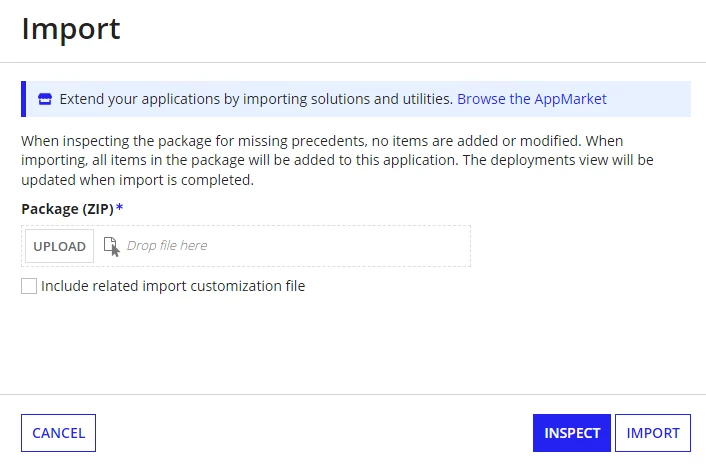
I need to have a document upload form like this package import form, and have a validate button like inspect button, but I need to disable the import button before the document is validated successfully.

I need to validate the document's content and format, so it's not just a validation for the size and type

How can I do?
    Best answer by stefanhelzle0001

    Submit the form, validate in-process and show the result in a second user input task. Enable activity chaining to make this a seamless experience for the user.

    6 replies

    stefanhelzle0001
    Brainy
    October 8, 2024

    Submit the form, validate in-process and show the result in a second user input task. Enable activity chaining to make this a seamless experience for the user.

    October 8, 2024

    But can user go back to upload form and upload a new one? Or user has to close the user input task and open a new form to upload

    stefanhelzle0001
    Brainy
    October 8, 2024

    If that is what you want, just go on and implement it.

    October 8, 2024

    Hi [mention:2aea1bf0b6954f94815518e79da990c7:e9ed411860ed4f2ba0265705b8793d05] 

    Agree with [mention:a11f77a729fb4db2af76b09948583328:e9ed411860ed4f2ba0265705b8793d05]  solution is easier and works for me.

    Right now we are uploading Excel documents, Once user submit the form and validate in process through Stored Procedure and displaying results in second form and at the end of the process we remove the uploaded documents.

    We don't have go back option once user has to close the user input task and open a new form to upload
