
nicholaso0002
October 20, 2022
Solved

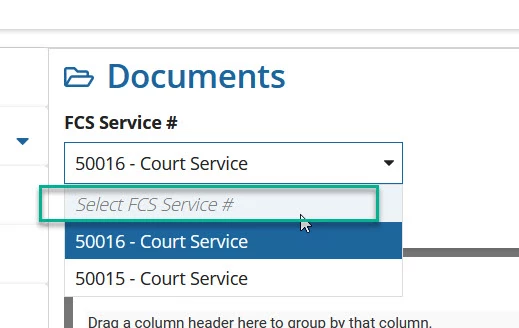
How do you remove the White Space on a DropdownField Component
  • October 20, 2022
  • 4 replies
  • 1 view

How do you remove the White Space on a DropdownField Component

    Best answer by csteward

    The only other option is to allow a placeholder initially, but null it out if the user makes a selection (blocking them from de-selecting it essentially), thus you could not utilize this for optional fields.

    a!localVariables(
      local!options: {"a","b","c"},
      local!selected,
      
      a!dropdownField(
        label: "Dropdown",
        placeholder: if(rule!APN_isBlank(local!selected),"-- Select --",null),
        choiceLabels: local!options,
        choiceValues: local!options,
        value: local!selected,
        saveInto: local!selected
      )
    )

    4 replies

    mikes0011
    Brainy
    October 20, 2022

    As long as you have a Placeholder, that will appear there.  You could always remove the placeholder, but that would mean the dropdown would always have to have a value, and would display an error if its value is null.

    The Expression Guru
    nicholaso0002
    October 20, 2022

    This also worked.

    csteward
    cstewardAnswer
    October 20, 2022

    The only other option is to allow a placeholder initially, but null it out if the user makes a selection (blocking them from de-selecting it essentially), thus you could not utilize this for optional fields.

    a!localVariables(
      local!options: {"a","b","c"},
      local!selected,
      
      a!dropdownField(
        label: "Dropdown",
        placeholder: if(rule!APN_isBlank(local!selected),"-- Select --",null),
        choiceLabels: local!options,
        choiceValues: local!options,
        value: local!selected,
        saveInto: local!selected
      )
    )

    nicholaso0002
    October 20, 2022

    Thanks this worked for me.
