
May 2, 2024
Question

How to check if documents exist?

  • May 2, 2024
  • 15 replies
  • 3 views

Hi there, I am trying to create an expression rule that returns true if a document is not null, and has an ID attached to it. The expression rule is used to determine an XOR node to go to the document deletion node to delete the document if it exists, or to move to the end node if it has already been deleted. Right now, I am using a plugin isObjectExists() and it does work correctly but my supervisor wants me to improve the code to not use that plugin, any ideas for what to do?

Here is the expression rule I created, it currently works how I want it to but I want to avoid using the plugin, any help is appreciated!
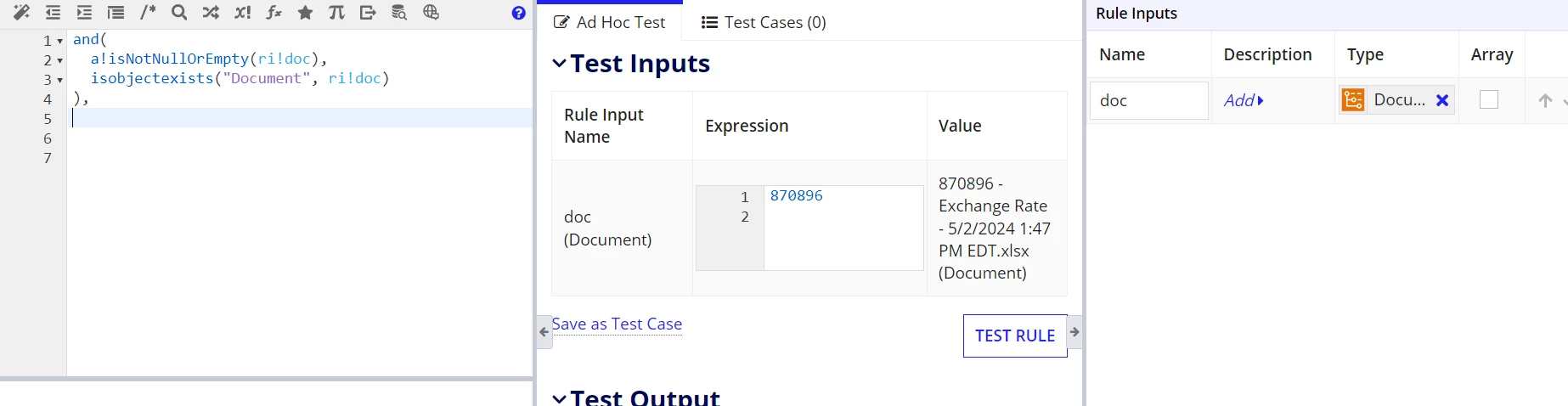
    15 replies

    nickk1385Author
    May 3, 2024

    So those also suggest a plugin which I cannot do.

    mathieud0001
    May 4, 2024

    You have no plugins installed in your environment?

    Content Tools is a pretty common one.

    vinaykumarp8308
    Participating Frequently
    May 5, 2024

    Hello [mention:e86cecfa115d423c935017f8e2db6dd4:e9ed411860ed4f2ba0265705b8793d05] ,

    You can use getcontentobjectdetailsbyid() function to check if the document exists or not.

    If it does not exists, you would see "No object with this ID has been found" as an output.

    csteward
    May 7, 2024

    In my experience, simple works for me - my checks only convert the document object to string which equals "[Document:]" for nulls.  Have not had any issues with this yet.

    or(
      rule!APN_isEmpty(ri!doc),
      tostring(ri!doc)="[Document:]"
    )

    mikes0011
    Brainy
    May 7, 2024

    but what if a nonsense ID is passed in?  wouldn't it still render the same, and return a fake result?

    (This would also apply when a document has already been deleted, but the process instance is still passing around references to its ID, as far as I know.)

    csteward
    May 8, 2024

    In those situations, I seem to have issues in other areas first - such as when a document is stored in a PV, but it is deleted via Related Action and the PV is not updated/cleared - I get forms not loading at all, etc (if they reference the document). 

    Expression evaluation error [evaluation ID = TPWUJ] in rule 'form_xyz' at function a!fileUploadField_17r1 [line 142]: Invalid Content ID

    The string check isn't perfect, but has worked for all my use cases so far [emoticon:c4563cd7d5574777a71c318021cbbcc8]

    davidj137213
    Brainy
    May 7, 2024

    Is an option to create your own plugin?

    Anyway , in the post you can find different options to handle this case.

    shanmathip7466
    Inspiring
    September 12, 2024

    Hi,

    This is working but not sure whether this is good approach. Please give you thoughts. [mention:a11f77a729fb4db2af76b09948583328:e9ed411860ed4f2ba0265705b8793d05] 

    not(
    rule!CSCM_CheckIsNullOrEmpty(
    value: index(
    index(
    a!documentViewerField(document: ri!document),
    "contents",
    null
    ),
    "documentUrl",
    null
    )
    )
    )