Solved
how to create record filters in ui
here am using record to display the grid along for that grid need to add the filters
a!localVariables(
  {
    a!gridField(
      labelPosition: "ABOVE",
      data: 'recordType!{81e1435a-de76-4bff-8b85-6ae5a581d036}Documentation Checklist',
      columns: {
        a!gridColumn(
          label: "CIF",
          value: tointeger(
            fv!row['recordType!{81e1435a-de76-4bff-8b85-6ae5a581d036}Documentation Checklist.fields.{cif_int}cif_int']
          ),
          align: "START",
          width: "NARROW"
        ),
        a!gridColumn(
          label: "Customer Name",
          value: fv!row['recordType!{81e1435a-de76-4bff-8b85-6ae5a581d036}Documentation Checklist.fields.{customerName_txt}customerName_txt'],
          align: "START",
          width: "1X"
        ),
        a!gridColumn(
          label: "Source",
          value: a!linkField(
            links: a!recordLink(
              label: if(
                rule!APN_isBlank(
                  fv!row['recordType!{81e1435a-de76-4bff-8b85-6ae5a581d036}Documentation Checklist.fields.{sourceDetails_txt}sourceDetails_txt']
                ),
                "Collateral - New",
                fv!row['recordType!{81e1435a-de76-4bff-8b85-6ae5a581d036}Documentation Checklist.fields.{sourceDetails_txt}sourceDetails_txt']
              ),
              recordType: 'recordType!{81e1435a-de76-4bff-8b85-6ae5a581d036}Documentation Checklist',
              identifier: fv!identifier
            )
          ),
          align: "START",
          width: "1X"
        ),
        a!gridColumn(
          label: "Issue Description",
          value: fv!row['recordType!{81e1435a-de76-4bff-8b85-6ae5a581d036}Documentation Checklist.fields.{issueDescription_txt}issueDescription_txt'],
          align: "START",
          width: "1X"
        ),
        a!gridColumn(
          label: "Expiry Date",
          value: todate(
            fv!row['recordType!{81e1435a-de76-4bff-8b85-6ae5a581d036}Documentation Checklist.fields.{expiryDate_dt}expiryDate_dt']
          ),
          align: "END",
          width: "1X"
        ),
        a!gridColumn(
          label: "FOL Details",
          value: a!richTextDisplayField(
            value: {
              a!localVariables(
                local!fol_txt: split(
                  fv!row['recordType!{81e1435a-de76-4bff-8b85-6ae5a581d036}Documentation Checklist.fields.{folDetails_txt}folDetails_txt'],
                  "ü"
                ),
                if(
                  not(
                    isnull(
                      fv!row['recordType!{81e1435a-de76-4bff-8b85-6ae5a581d036}Documentation Checklist.fields.{folDetails_txt}folDetails_txt']
                    )
                  ),
                  a!richTextBulletedList(items: { local!fol_txt }),
                  null
                )
              )
            }
          ),
          align: "CENTER",
          width: "1X"
        ),
        a!gridColumn(
          label: "Additional Details",
          value: a!richTextDisplayField(
            value: {
              a!localVariables(
                local!addDetails_txt: split(
                  fv!row['recordType!{81e1435a-de76-4bff-8b85-6ae5a581d036}Documentation Checklist.fields.{additionalDetails_txt}additionalDetails_txt'],
                  "ü"
                ),
                if(
                  not(
                    isnull(
                      fv!row['recordType!{81e1435a-de76-4bff-8b85-6ae5a581d036}Documentation Checklist.fields.{additionalDetails_txt}additionalDetails_txt']
                    )
                  ),
                  a!richTextBulletedList(items: { local!addDetails_txt }),
                  null
                )
              )
            }
          ),
          align: "START",
          width: "1X"
        ),
        a!gridColumn(
          label: "Last Approved Date",
          value: todate(
            fv!row['recordType!{81e1435a-de76-4bff-8b85-6ae5a581d036}Documentation Checklist.fields.{lastApprovedCaDate_dt}lastApprovedCaDate_dt']
          ),
          align: "END",
          width: "1X"
        ),
        a!gridColumn(
          label: "Relationship Manager",
          value: fv!row['recordType!{81e1435a-de76-4bff-8b85-6ae5a581d036}Documentation Checklist.fields.{rmName_txt}rmName_txt'],
          align: "START",
          width: "1X"
        ),
        a!gridColumn(
          label: "Unit Head",
          value: fv!row['recordType!{81e1435a-de76-4bff-8b85-6ae5a581d036}Documentation Checklist.fields.{uhName_txt}uhName_txt'],
          align: "START",
          width: "1X"
        ),
        a!gridColumn(
          label: "Segment",
          value: fv!row['recordType!{81e1435a-de76-4bff-8b85-6ae5a581d036}Documentation Checklist.fields.{businessUnit_txt}businessUnit_txt'],
          align: "START",
          width: "1X"
        )
      },
      validations: {},
      refreshAfter: "RECORD_ACTION",
      showSearchBox: true,
      showRefreshButton: true
    )
  }
)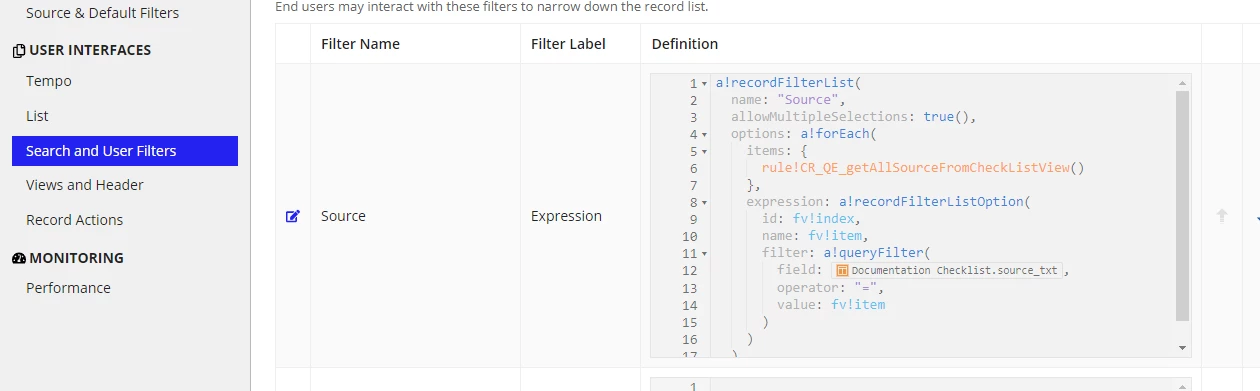
this filter i need to add in the UI
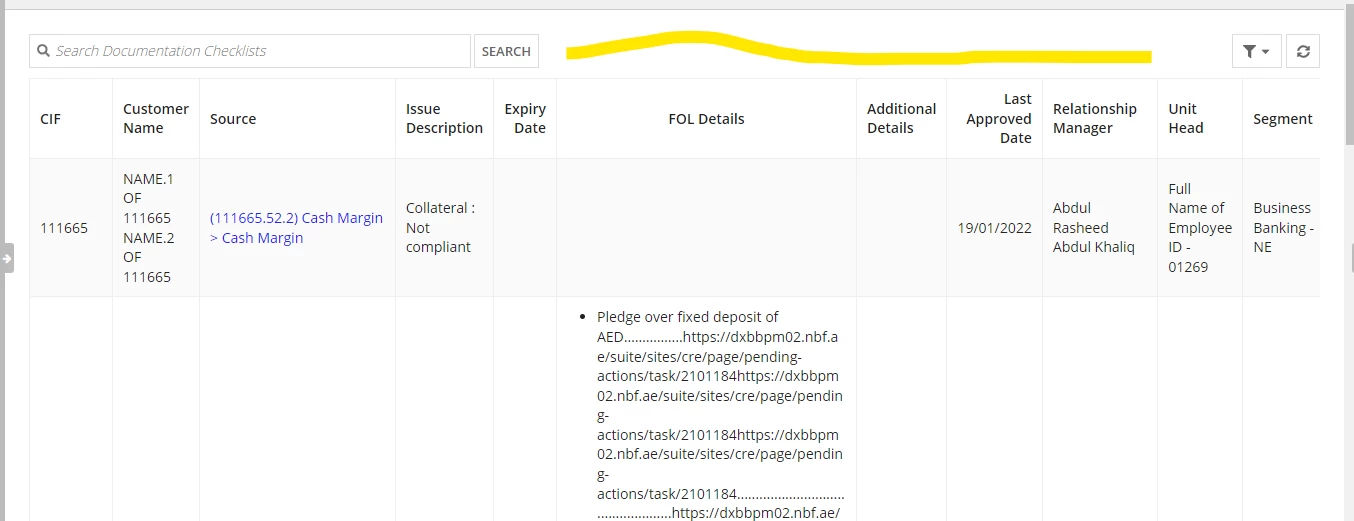
how can i achieve this