
Known Participant
February 25, 2021
Question

How to delete editable grid rows from database

  • February 25, 2021
  • 4 replies
  • 2 views

I have used the remove icon as the last column of each row of the editable grid. When I click on it the respective row gets deleted from the rule input it is storing but not from the database table. I am using the below code:
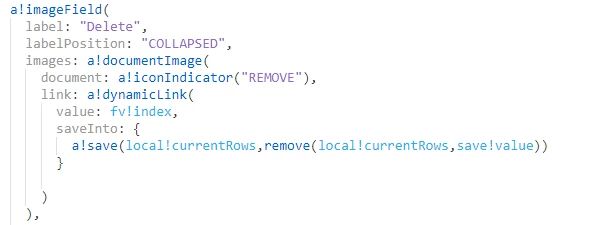
How to delete the specific row from database table as well by clicking on remove icon?

    4 replies

    mikes0011
    Brainy
    February 25, 2021

    Are you really required to delete DB rows?  This is usually not recommended from a data archival perspective, unless strictly required by your use case.  The more common (and much easier to fix) method is to have a column in your table to indicate "active" and/or "deleted" status.  That is, all rows would start out with an "IS_ACTIVE" property of TRUE, or alternatively, an "IS_DELETED" property of FALSE (either would work, it kinda depends on your style and your own project's standards).

    Then when you click the "remove" icon in the editable grid row, you would simply have it flip that flag for that row, and write the results along with the rest of the rows when you next save them.  As an aside, I suggest using the Rich Text component for this rather than Image Field, because the style is more consistent with Appian and it's a lot more flexible in its configuration and behavior.

    a!richTextDisplayField(
      value: {
        a!richTextItem(
          text: {
            a!richTextIcon(
              icon: "remove",
              caption: "Remove (inactivate) this row in the DB.",
              color: "NEGATIVE",
              size: "MEDIUM"
            )
          },
          link: a!dynamicLink(
            saveInto: {
              a!save(
                local!currentRow.isActive,
                false()
              )
            }
          ),
          linkStyle: "STANDALONE",
          showWhen: local!currentRow.isActive
        )
      }
    )

    The Expression Guru
    ayushimAuthor
    Known Participant
    February 26, 2021

    Thank you Mike for your response. 

    Unfortunately, I am unable to implement it correctly yet.

    mikes0011
    Brainy
    February 26, 2021

    Are you able to provide any further detail?

    The Expression Guru