
nicholaso0002
Known Participant
February 16, 2022
Question

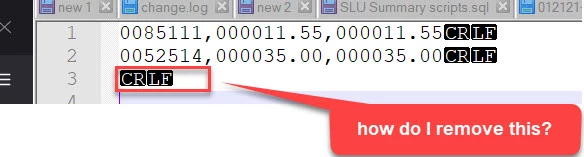
How to remove extra carriage return on a generated text file in Appian

  • February 16, 2022
  • 12 replies
  • 5 views

How to remove extra carriage return on a generated text file in Appian

0085117,000011.55,000011.55CRLF
0052514,000035.00,000035.00CRLF
CRLF
    12 replies

    csteward
    Brainy
    February 16, 2022

    Is this file generated with the Text Doc from Template node?

    nicholaso0002
    Known Participant
    February 16, 2022

    load(
    /*This expression should be 100% - 9-19-19 */
      
      local!lines:if(
        rule!APN_isEmpty(ri!DIRDEP_LINES),
        {"NO DATA,000000.00,000000.00"
        },
        {
        a!forEach(
          /*replace test array with rule input*/
          items: ri!DIRDEP_LINES,
          expression: {
    
           /* Position 1-7 (7) CCDDEP_ACCOUNT_NO */
             substitute(padleft(trim(fv!item.caseId),7)," ",0) & 
    
           "," & 
           
           /* Position 9-17 (9) CCDDEP_AMT */
           if(rule!APN_isEmpty(fv!item.paymentAmt),
               substitute(padleft(trim(fv!item.paymentAmt),9)," ",0),
               substitute(padleft(trim(fixed(fv!item.paymentAmt)),9)," ",0)
            ) &
            
             "," & 
           
           /* Position 19-27 (9) CCDDEP_AMTR */
             if(rule!APN_isEmpty(fv!item.paymentAmt),
             substitute(padleft(trim(fv!item.paymentAmt),9)," ",0),
             substitute(padleft(trim(fixed(fv!item.paymentAmt)),9)," ",0)
             ) 
          
          }
        )
    
      }),
      joinarray(stripwith(local!lines,";"),chr(13)&CHR(10))
    )

    The code looks like this.

    The text file is generated dynamically when the process model runs.

    stefanhelzle0001
    Brainy
    February 16, 2022

    I would start with removing the curly brackets in lines 8, 12, 33, 36. This turns a simple list of strings into a list of list of a single string.
