August 4, 2025
Question

How to Retrieve Data

  • August 4, 2025
  • 5 replies
  • 0 views

Hi Everyone,

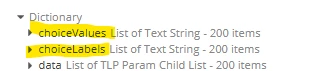
I need to get "choiceLabels" and "choiceValues" list from the dictionary as shown in screenshot. Can anyone please help me how to get it?

    5 replies

    stefanhelzle0001
    August 4, 2025

    We need a bit more context.

    In general, as per the Appian documentation, we use the dot-notation to fetch values from dictionaries.

    August 4, 2025

    Hi Stefan,

    I need both choiceValues and choiceLabels list at the same time.

    harshas2775
    August 4, 2025

    You can try like this

    {
      index(local!data,"choiceLabels",{}),
      index(local!data,"choiceValues",{})
    }

    harshas2775
    August 4, 2025

    Whichever rule or variable this data is coming from, you can get the fields using property(), index() or dot-notation. 

    index(local!data,"choiceValues",{})
    property(local!data,"choiceValues",{})
    local!data.choiceValues
    

    shubhama926776
    August 4, 2025

    If i understood correctly, you need to retrieve choiceValue and choiceLabel from dictionary.

    Use index() for null safe expression
    local!choiceLabels: index(yourDictionary, "choiceLabels", {}),
    local!choiceValues: index(yourDictionary, "choiceValues", {}),

    Check below interface expression for your reference.

    a!localVariables(
      /* Example dictionary similar to yours */
      local!myDictionary: a!map(
        choiceValues: {"001", "002", "003", "004", "005"},
        choiceLabels: {"Option 1", "Option 2", "Option 3", "Option 4", "Option 5"},
        data: {/* your data here */}
      ),
    
      /* Extract both lists */
      local!extractedLabels: index(local!myDictionary, "choiceLabels", {}),
      local!extractedValues: index(local!myDictionary, "choiceValues", {}),
    
      /* Variable to store selected value */
      local!selectedValue: null,
    
      /* Display in a form */
      a!formLayout(
        titleBar: "Dictionary Example",
        contents: {
          /* Use in dropdown */
          a!dropdownField(
            label: "Select an Option",
            placeholder: "Choose...",
            choiceLabels: local!extractedLabels,
            choiceValues: local!extractedValues,
            value: local!selectedValue,
            saveInto: local!selectedValue
          ),
    
        }
      )
    )