sajids0001
January 18, 2024
Solved

How to show date difference in record type based on condition

  • January 18, 2024
  • 9 replies
  • 0 views

Hi,

I want to display the difference between today's date and created date in record type as an integer value. Further, I want to show the value in certain colors based on condition (like if the values is less than 3 then green color; if the values are in between 3 and 5 then yellow; and if the values are greater than 5 then red). This values will only come when the status is not completed.

Can somebody guide me?.

Many thank,

    Best answer by amaans4178

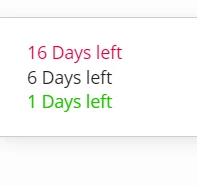
    for color handling ->

    a!localVariables(
      local!data: {
        a!map(id: 1, date: todate("1/02/2024")),
        a!map(id: 2, date: todate("1/12/2024")),
        a!map(id: 3, date: todate("1/17/2024"))
      },
      {
        a!richTextDisplayField(labelPosition: "COLLAPSED", value: {
          a!forEach(
            items: local!data,
            expression: a!richTextItem(
            text: {concat(tointeger(today()-fv!item.date)," Days left"),char(10)},
            color: if(
              tointeger(today()-fv!item.date)<=3,
              "POSITIVE",
              if(
                tointeger(today()-fv!item.date)<=15,
                "STANDARD",
                "NEGATIVE"
              )
            )
          ))
        })
      }
    )

    9 replies

    stefanhelzle0001
    Brainy
    January 18, 2024

    In Appian, you can just subtract the two date values and get a time interval in return.

    sajids0001
    January 18, 2024

    Hi Stefan, 

    Thanks for your reply.

    Is there any way I can achieve this?. I just wanted to show from how many days, a case has been opened (called it as "Days Open"). 

    If not as a integer value, then I am okay with time interval. But how can I show the color on certain conditions (like only when the case is not completed).

    Thank you

    stefanhelzle0001
    Brainy
    January 18, 2024

    With "Days Open", do you mean calendar days or working days? There is the function networkdays that would return the working days.

    https://docs.appian.com/suite/help/23.4/Function_Recipes.html#display-the-number-of-days-before-a-specific-date

    You can turn an interval into the number of days using tointeger().

    Then you can use a richtextdisplayfield and some conditions (if() or match()) to show/hide and color the values in any way you want/need to.

    amaans4178
    January 18, 2024

    for geting the number of days you can use this -> 

    tointeger(today() - todate("1/12/2024"))
     and based on the output you can change the color of the richtext by applying some if conditions

    venkatrea696188
    January 18, 2024

    If you want to use it it in Multiple places Go for a custom record field .

    If it's for single user interface then just  subtract   the two dates and coming to colors part handle it with rich text display field.

    konduruc733182
    January 18, 2024

    Hello sajids0001,

    You can make use of custom record fields for your use case. Have one custom record field where you find the date difference  and in the other you can have your color based on the 1st custom record field. Else have only one field where you get the date difference and then based on the values you can handle the colors in UI.

    Coming to the condition of status you can also handle that in UI or you can create your custom field in Sync-time evaluation using the expression.