
October 31, 2023
Question

How to use "$" as delimiter when export data as CSV

  • October 31, 2023
  • 10 replies
  • 0 views

Hi All,

Currently, I'm working on exporting the data store entity to CSV. I tried to use the "Export DSE to CSV" smart service. and our requirement is to use the $ symbol as a delimiter. However, the smart service only supports the predefined list of delimiters. please refer to the below screenshot.
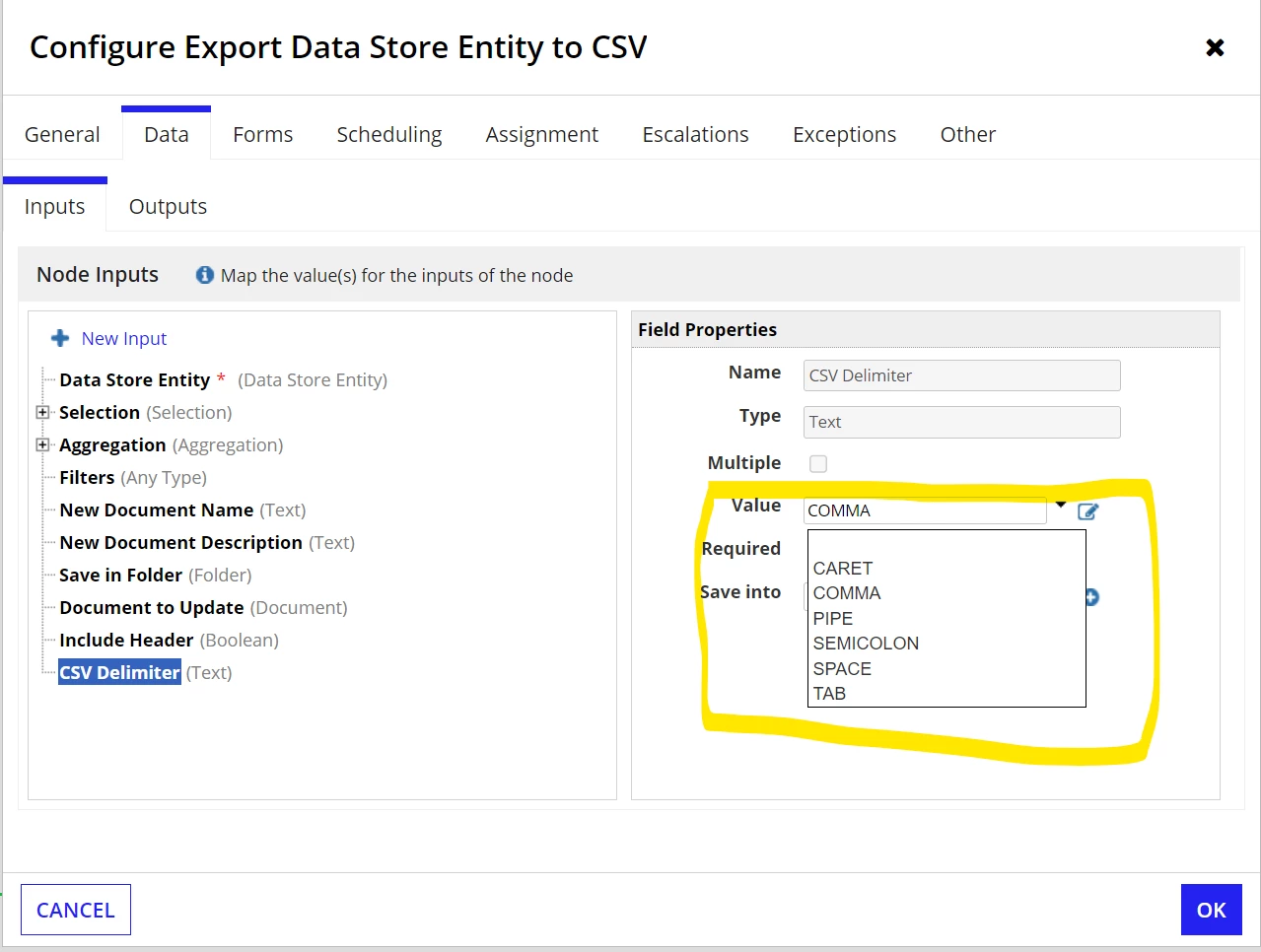
If I try to use other symbols, I get the following error.
"Invalid csv delimiter $. A CSV delimiter must be one of the following values: "TAB", "COMMA", "SEMICOLON", "SPACE",  "PIPE", "CARET" (APNX-1-4505-027)"

Is there a way to use different delimiter other than the predefined list?

Thanks

10 replies

yogendrar0720
October 31, 2023

Hi Karthikr just try to pass $ in an expression rule inside semi colon "$"

October 31, 2023

Hi Yogendra,
Thanks for your reply.
I tried with the $ as well. like below.

But I get the below error.

"Invalid csv delimiter $. A CSV delimiter must be one of the following values: "TAB", "COMMA", "SEMICOLON", "SPACE",  "PIPE", "CARET" (APNX-1-4505-027)"

October 31, 2023

Hi Karthik, Just try to pass name as Dollar_Sign , if not worked out , store it in expression rule and pass it here.

October 31, 2023

Hi Vishnu,

Both options are not working. I tried with Dollar_Sign and also constant. Both options return the following errors.

For Dollar_Sign, Get the following error.

Invalid csv delimiter Dollar_Sign. A CSV delimiter must be one of the following values: "TAB", "COMMA", "SEMICOLON", "SPACE", "PIPE", "CARET" (APNX-1-4505-027)

For constant, Get the following error

Invalid csv delimiter $. A CSV delimiter must be one of the following values: "TAB", "COMMA", "SEMICOLON", "SPACE", "PIPE", "CARET" (APNX-1-4505-027)

Thanks

stefanhelzle0001
Brainy
October 31, 2023

No. The plugin only supports these.

karthikr067273
October 31, 2023

Thanks, Stefan for the confirmation. I'll check for some other workaround.

stewart.burchell
October 31, 2023

It looks like those are the only delimiter options you get with that smart service. So if using $ as your delimiter is a deal-breaker then you'll have to implement a multi-step process:

1. Export to CSV file using one of the delimiter options that the smart service does support. Note: ensure that the character you use isn't used anywhere in the extracted content otherwise the follow steps will change the data as well as the delimiters

2. Read the CSV file into a variable as text - you can use the readtextfromfile() function that comes with the Text File Utilities plug-in. Note that you'll want to set 'preserveLineBreaks' to true to get a multi-line output.

3. use substitute() to replace your the OOTB delimiter with your chosen delimiter e.g. substitute(local!fileText, ";","$") if you chose to use SEMICOLON as the OOTB delimiter option

4. write the updated text to a file. You can use the "Text Doc from Template" smart service and have a very simple template that has a single parameter that gets replaced by the updated text you've generated

I know, it seems like a heap more work. It would be nice to allow you to choose your own delimiter but that's the constraint you currently have to work within.

October 31, 2023

Thanks, Stewart for the workaround.

Let me try this and update you about the outcome.
Thanks

stewart.burchell
October 31, 2023

Of course my first option would be to challenge the "$" delimiter "requirement"...I've never come across this, it's almost always a comma or a space or a tab or a pipe...