

josemanuelo0002
June 12, 2023
Solved

It's anyway to save true or false value in differents columns of database but in one unique checkboxfield?

  • June 12, 2023
  • 3 replies
  • 0 views

Hi,

my trouble here is that I don't know how can I save true or false in differents boolean columns in my database. I tried something like that:

a!checkboxField(
                label: "",
                labelPosition: "ABOVE",
                choiceLabels: { "Limpieza","Plaga","Manipulador" },
                choiceValues: { "Limpieza","Plaga","Manipulador" },
                value: {if(isnull(fv!item.inLimpieza),{},"Limpieza"),if(isnull(fv!item.inPlaga),{},"Plaga"),if(isnull(fv!item.inManipulacion),{},"Manipulador")},
                saveInto:{
                  a!save(
                    fv!item.inLimpieza,
                    if(contains( save!value, "Limpieza" ), true,false)
                  ),
                  a!save(
                    fv!item.inPlaga,
                    if(contains( save!value, "Plaga" ), true, false)
                  ),
                  a!save(
                    fv!item.inManipulacion,
                    if(contains( save!value, "Manipulador" ), true, false)
                  ),
                },
                disabled: ri!readOnly,
                validations: {}
              ),

But It's not wortking correctly.
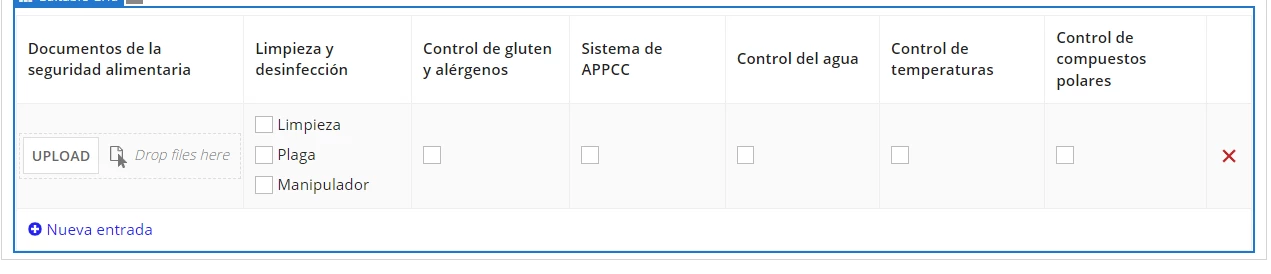
Actually, I have every data of every column in differents checkbox, but I would like to group all my checkbox in only one. Thanks for your help!

Best answer by stefanhelzle0001

The issue you had is that you wrote true/false to the booleans, but checked for null in the value parameter. Make sure to prefill the boolean fields properly. A null-boolean is always a troublesome value. Made this working:

a!localVariables(
  local!item: a!map(
    inLimpieza: false,
    inPlaga: false,
    inManipulacion: false
  ),
  a!checkboxField(
    choiceLabels: { "Limpieza","Plaga","Manipulador" },
    choiceValues: { "Limpieza","Plaga","Manipulador" },
    value: {
      if(local!item.inLimpieza, "Limpieza", {}),
      if(local!item.inPlaga, "Plaga", {}),
      if(local!item.inManipulacion, "Manipulador", {})
    },
    saveInto:{
      a!save(
        target: local!item.inLimpieza,
        value: contains( save!value, "Limpieza" )
      ),
      a!save(
        target: local!item.inPlaga,
        value: contains( save!value, "Plaga" )
      ),
      a!save(
        target: local!item.inManipulacion,
        value: contains( save!value, "Manipulador" )
      ),
    },
  )
)

3 replies

stefanhelzle0001
Brainy
June 12, 2023

The issue you had is that you wrote true/false to the booleans, but checked for null in the value parameter. Make sure to prefill the boolean fields properly. A null-boolean is always a troublesome value. Made this working:

a!localVariables(
  local!item: a!map(
    inLimpieza: false,
    inPlaga: false,
    inManipulacion: false
  ),
  a!checkboxField(
    choiceLabels: { "Limpieza","Plaga","Manipulador" },
    choiceValues: { "Limpieza","Plaga","Manipulador" },
    value: {
      if(local!item.inLimpieza, "Limpieza", {}),
      if(local!item.inPlaga, "Plaga", {}),
      if(local!item.inManipulacion, "Manipulador", {})
    },
    saveInto:{
      a!save(
        target: local!item.inLimpieza,
        value: contains( save!value, "Limpieza" )
      ),
      a!save(
        target: local!item.inPlaga,
        value: contains( save!value, "Plaga" )
      ),
      a!save(
        target: local!item.inManipulacion,
        value: contains( save!value, "Manipulador" )
      ),
    },
  )
)

harshitb6843
June 12, 2023

wrap your empty boolean in or() to make it return false every time it is null or false and true only when it is true. 

Find documentation on how it works (point 7)- appianspace.com/.../