May 25, 2023
Solved

One Radio Select

  • May 25, 2023
  • 8 replies
  • 0 views

I try to selec one radio button with a dinamik link but the value is null in every moment.
    Best answer by mikes0011

    The solution I posted there still works quite nicely [emoticon:ad09a845b95e4cb28c5d9684a032037c]  The code you've pasted here makes fundamental changes to that construct which would prevent it from working in quite the same way.  Most notably, the icon for a given row both bases its appearance on, and saves the value of, that row's identifier - not just a hardcoded "0" or "1" being saved into the row data.
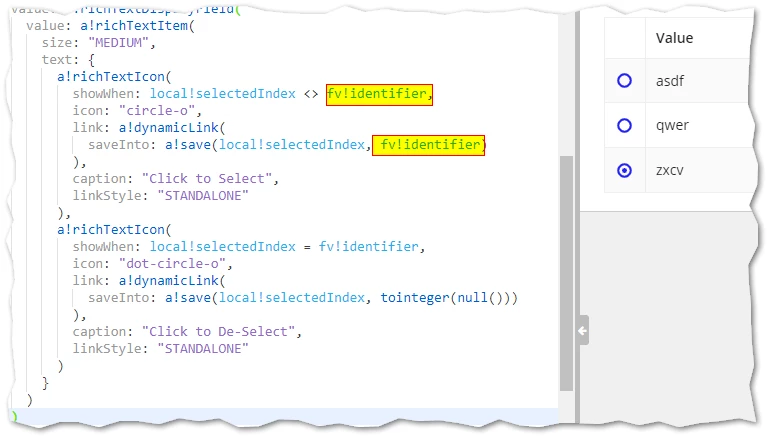
    I'll note that saving a value directly into the row data will probably work fine for selecting rows (like you have it), but will NOT be sufficient for making it do a "radio button" style "single select", i.e. when one row is selected, any other selected row gets de-selected, etc.  Using your approach, you'd need to have the saveInto overwrite the "1" value in any other rows while writing a "1" into the current row, for this approach to work.

    8 replies

    May 25, 2023

    You need to save 1 in fv!item.notificacion in the saveInto of circle-o a!dynamicLink()

    a!save(fv!item.notificacion,1)

    May 25, 2023

    No, this solution do nothing

    stefanhelzle0001
    Brainy
    May 25, 2023

    Is there a specific reason you do not use the selection feature of that grid?

    May 25, 2023

    No, i try this because i see a example and i try it but i have this problem.

    The expample is this community.appian.com/.../radio-button-in-grid

    mikes0011
    mikes0011Answer
    Brainy
    May 25, 2023

    The solution I posted there still works quite nicely [emoticon:ad09a845b95e4cb28c5d9684a032037c]  The code you've pasted here makes fundamental changes to that construct which would prevent it from working in quite the same way.  Most notably, the icon for a given row both bases its appearance on, and saves the value of, that row's identifier - not just a hardcoded "0" or "1" being saved into the row data.

    I'll note that saving a value directly into the row data will probably work fine for selecting rows (like you have it), but will NOT be sufficient for making it do a "radio button" style "single select", i.e. when one row is selected, any other selected row gets de-selected, etc.  Using your approach, you'd need to have the saveInto overwrite the "1" value in any other rows while writing a "1" into the current row, for this approach to work.

    The Expression Guru
    harshitb6843
    May 25, 2023

    I am still not clear about the problem. Can you try pasting the code snippet here?

    May 25, 2023

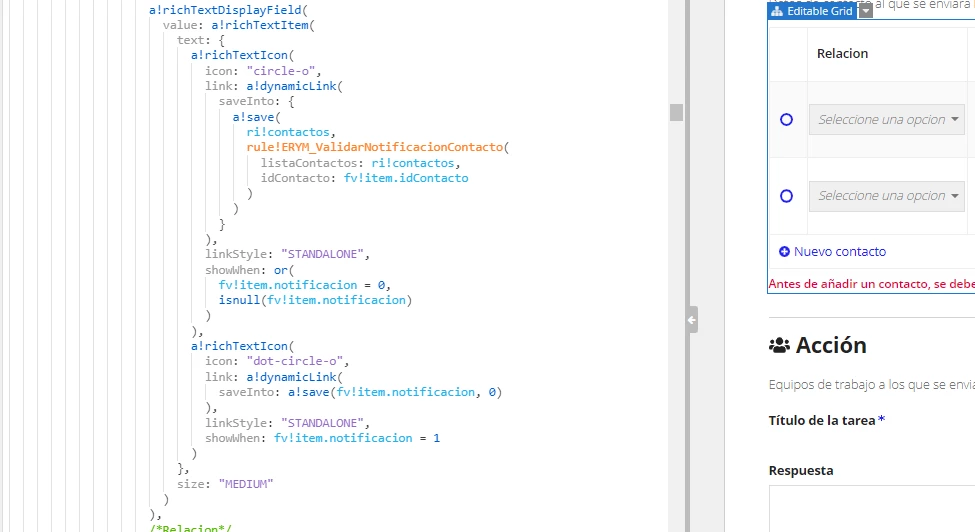
     /*Checkbox*/
                                            a!richTextDisplayField(
                                              value: a!richTextItem(
                                                text: {
                                                  a!richTextIcon(
                                                    icon: "circle-o",
                                                    link: a!dynamicLink(
                                                      saveInto: {
                                                        a!save(fv!item.notificacion, 1),
                                                        a!save(
                                                          ri!contactos,
                                                          rule!ERYM_ValidarNotificacionContacto(
                                                            listaContactos: ri!contactos,
                                                            idContacto: fv!item.idContacto
                                                          )
                                                        )
                                                      },
                                                      
                                                      
                                                    ),
                                                    linkStyle: "STANDALONE",
                                                    showWhen: or(
                                                      fv!item.notificacion = 0,
                                                      isnull(fv!item.notificacion)
                                                    )
                                                  ),
                                                  a!richTextIcon(
                                                    icon: "dot-circle-o",
                                                    link: a!dynamicLink(
                                                      saveInto: {
                                                        a!save(fv!item.notificacion, 0),
                                                      }
                                                    ),
                                                    linkStyle: "STANDALONE",
                                                    showWhen: fv!item.notificacion = 1
                                                  )
                                                },
                                                size: "MEDIUM"
                                              ),
                                              
                                            ),


    /*Expresion Rule*/
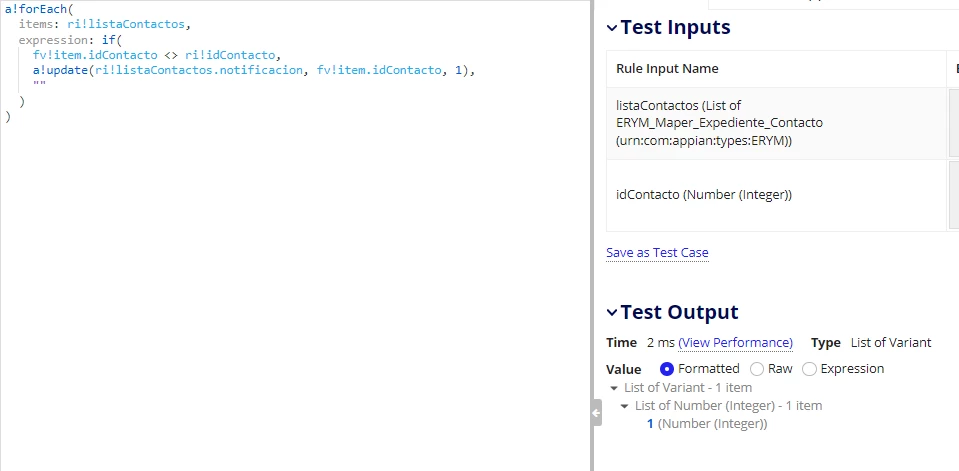
    a!forEach(
      items: ri!listaContactos,
      expression: if(
        fv!item.idContacto <> ri!idContacto,
        a!update(ri!listaContactos.notificacion, fv!item.idContacto, 1),
        ""
      )
    )

    May 25, 2023

    If you are trying to select only a single row then this code differs from the solution Mike gave in the above thread shared by you, change the showWhen condition accordingly.