

pavang5769
March 18, 2024
Question

Query Entity throwing error while retrieving the data for total count

  • March 18, 2024
  • 13 replies
  • 1 view

Hi All,

I am having a weird issue in executing the query entity. I have a query entity rule which returns the totalcount based on the date range(which is ideally current date/day). It is throwing error in some scenarios and testing this rule certain time, we can see the data is being populated.

Any help would be highly appreciated.
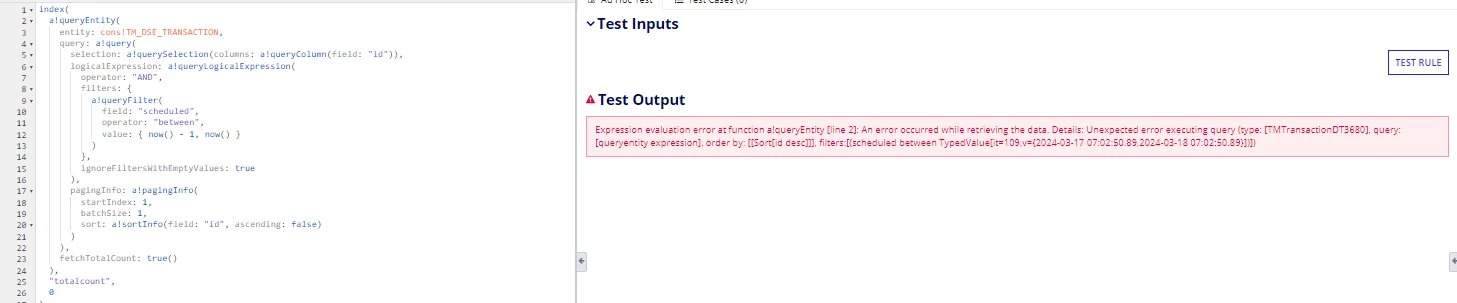
13 replies

karumurua531442
March 18, 2024

Hi [mention:e43de91b303547b280db3d3d5e5bd7e1:e9ed411860ed4f2ba0265705b8793d05]  is field scheduled is a date time field in the database as well?

pavang5769
March 18, 2024

Hi [mention:3510a5189ce1477eaf2e09f5858c87e9:e9ed411860ed4f2ba0265705b8793d05] , Yes it is a datetime field in database as well.

karumurua531442
March 18, 2024

hi [mention:e43de91b303547b280db3d3d5e5bd7e1:e9ed411860ed4f2ba0265705b8793d05]   i think there could be some data issue in the database row for that column, could check whether there is no wrong data stored in that column in database?  And also i wanted to know how many rows of data is stored in database for that table

sarathkumr268295
March 18, 2024

Is the database having more data?

karumurua531442
March 18, 2024

May be there is a possibility? [mention:e43de91b303547b280db3d3d5e5bd7e1:e9ed411860ed4f2ba0265705b8793d05]  could you check the system logs ?

March 18, 2024

Try using adddatetime() funtion for

now() - 1
 

stefanhelzle0001
Brainy
March 18, 2024

Typically this is an indication for a timeout. You will have to speed up that query.

davidj137213
Brainy
March 18, 2024

HOw much does the query takes when executed directly in SQL?

Maybe your filter using dates and between operator is too slow. Do you have an index created in that field?

Try removing the filter or filtering by Pk, in order to check if the problem is related with that field. 

mikes0011
Brainy
March 18, 2024

If you're querying only to get the TotalCount, your PagingInfo should pass in a BatchSize of zero, which will cause the query to return zero rows of data (but it should still return an accurate TotalCount).  I notice you're already passing in a BatchSize of 1, but using 0 will be just one notch more potentially efficient for this use case.

However the fact that you're getting this error even with a batchsize of 1 suggests, as others have pointed out, that your query might be timing out.  What happens when you run a simple SQL query on the data directly in the DB?  I've found that in the case of queries that don't perform well on the Appian side to this extent, there's also an accompanying obvious-to-severe delay when running a SQL query - typically this has been in Views with severe inefficiencies accidentally included, or actual breaking bugs.

The Expression Guru
March 20, 2024

there is a need to optimization view, if it is from view, add the index to the column on which filter is applied can improve the performance, it is 95+ cases is timeout issue