
davinar9817
December 14, 2022
Solved

Radio Button Not Saving after clicking off

  • December 14, 2022
  • 7 replies
  • 1 view

EDIT: Got the value to save but the dropdown box doesn't show up when the correct value (boolean true) is selected

      a!radioButtonField(
              label: "Is Jira Access Required?",
              labelPosition: "ABOVE",
              choiceLabels: {"Yes", "No"},
              choiceValues: {true, false},
              value: ri!record['recordType!{d327a5dc-18d4-4ffd-8bdf-6a22b134677f}DS Contractor.fields.{2463d484-b544-48a5-813c-701935313606}jiraAccess'],
              saveInto: ri!record['recordType!{d327a5dc-18d4-4ffd-8bdf-6a22b134677f}DS Contractor.fields.{2463d484-b544-48a5-813c-701935313606}jiraAccess'],
              required: true,
              choiceLayout: "COMPACT",
              validations: {}
              
            ),
            
             a!dropdownField(
              label: "Which Department Requires Access?",
              labelPosition: "ABOVE",
              placeholder: "--- Select a Value ---",
              choiceLabels: cons!DS_deptChoice1,

              choiceValues: cons!DS_deptChoice1,
              value: ri!deptChoice1,
              saveInto: ri!deptChoice1,
              
              searchDisplay: "AUTO",
              showWhen: ri!radioValues2 = true,
              required: true(),
              
              validations: {}
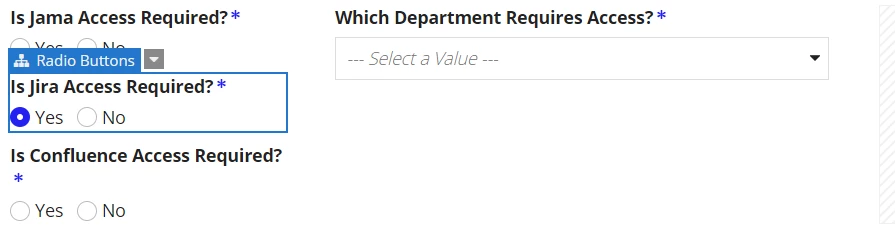
 - working properly

    Best answer by mikes0011

    I'm not clear what you're actually trying here.  Considering your current setup, the code for your dropdown would be changed so that the "showWhen" reflects the save value of your radio button, similar to your previous thread except now referring to the record type data.

    a!dropdownField(
      label: "Which Department Requires Access?",
      labelPosition: "ABOVE",
      placeholder: "--- Select a Value ---",
      choiceLabels: cons!DS_deptChoice1,
      choiceValues: cons!DS_deptChoice1,
      value: ri!deptChoice1,
      saveInto: ri!deptChoice1,
      searchDisplay: "AUTO",
      showWhen: ri!record['recordType!{d327a5dc-18d4-4ffd-8bdf-6a22b134677f}DS Contractor.fields.{2463d484-b544-48a5-813c-701935313606}jiraAccess'],
      required: true(),
      
      validations: {}
    )

    7 replies

    mikes0011
    Brainy
    December 14, 2022
    but the dropdown box doesn't show up when the correct value (boolean true) is selected

    That's because your showWhen in the dropdown field is still referring to "ri!radioValues2", which is no longer the save target of your Radio Button component.

    The Expression Guru
    davinar9817
    December 15, 2022

    How do I use the recordtype! field with showWhen? The save target is a boolean and doesn't seem to want to cooperate

    mikes0011
    Brainy
    December 15, 2022

    What's it doing incorrectly?

    The Expression Guru
