
Solved
Record data does not refresh even refreshOnVarChange is set
I have a record type called "Case", and it has a field called "assignee".
I also have an interface, in the interface, I have
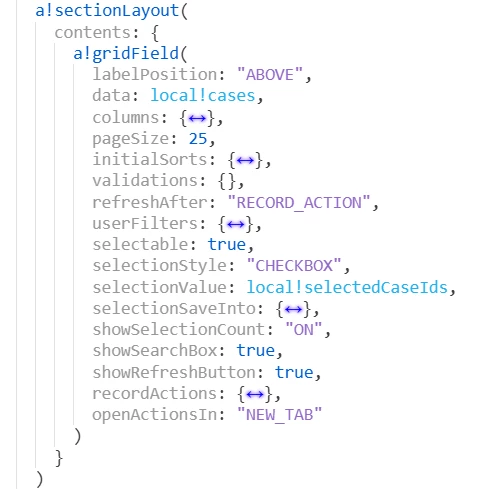
- a grid field that show all cases, with multi-selection enabled
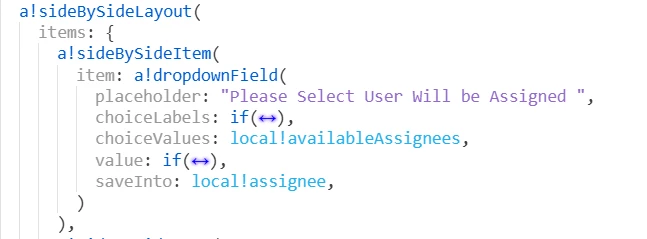
- a dropdown field allow user choose an assignee
- a button, called "Assign Selected Cases in Batch", after user multi-select cases and select assignee from dropdown, allow user to click this button to assign multiple cases to 1 assignee in 1 click
To do so, I created:
- a batch assignment process model (works perfectly)
In the interface, I declared:
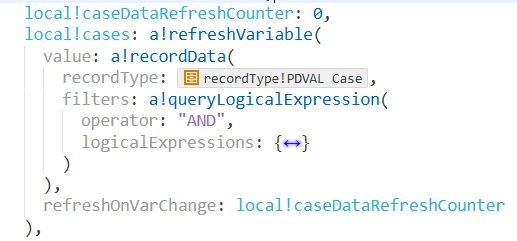
- a refresh counter called local!caseDataRefreshCounter, initialize with 0
- local!cases, as a refresh variable, with refreshOnVarChange set to local!caseDataRefreshCounter, and it is corresponding to the "data" field under my a!gridField
the button widget implementation of "Assign Selected Cases in Batch" is
a!buttonWidget(
  label: "Assign Selected Cases in Batch",
  saveInto: {
    a!startProcess(
      processModel: cons!PDVAL_PM_CASE_ASSIGNMENT,
      processParameters: {
        assignedGroup: null,
        /* Group */
        assignee: local!assignee,
        /* User */
        availableAssignees: local!availableAssignees,
        /* List of User or Group */
        processAction: a!match(
          value: local!availableAssigneeGroup,
          equals: cons!PDVAL_GROUP_PREPARER,
          then: cons!PDVAL_TEXT_PROCESS_ACTION_PREPARER_REASSIGN,
          equals: cons!PDVAL_GROUP_REVIEWER,
          then: cons!PDVAL_TEXT_PROCESS_ACTION_REVIEWER_REASSIGN,
          default: null
        ),
        cases: local!selectedCases/* PDVAL Case */
      },
      onSuccess: {
        a!save(
          local!caseDataRefreshCounter,
          local!caseDataRefreshCounter + 1
        ),
      }
    )
  },
  submit: false,
  validate: false
}
What I expected:
- everytime user click on the button, after the process model is succeeded, the local!cases get refreshed so the latest assignee could show in the gridfield
However, it is not the case, it does not refresh the data at all, user has to manually refresh the page to get the latest data