

shubhama926776
Brainy
October 6, 2022
Solved

Record Object present in package still showing missing precedent Issue.

  • October 6, 2022
  • 10 replies
  • 1 view

Hi Folks,

When i comparing objects with higher environment i am getting below issue as my all objects are part of application.
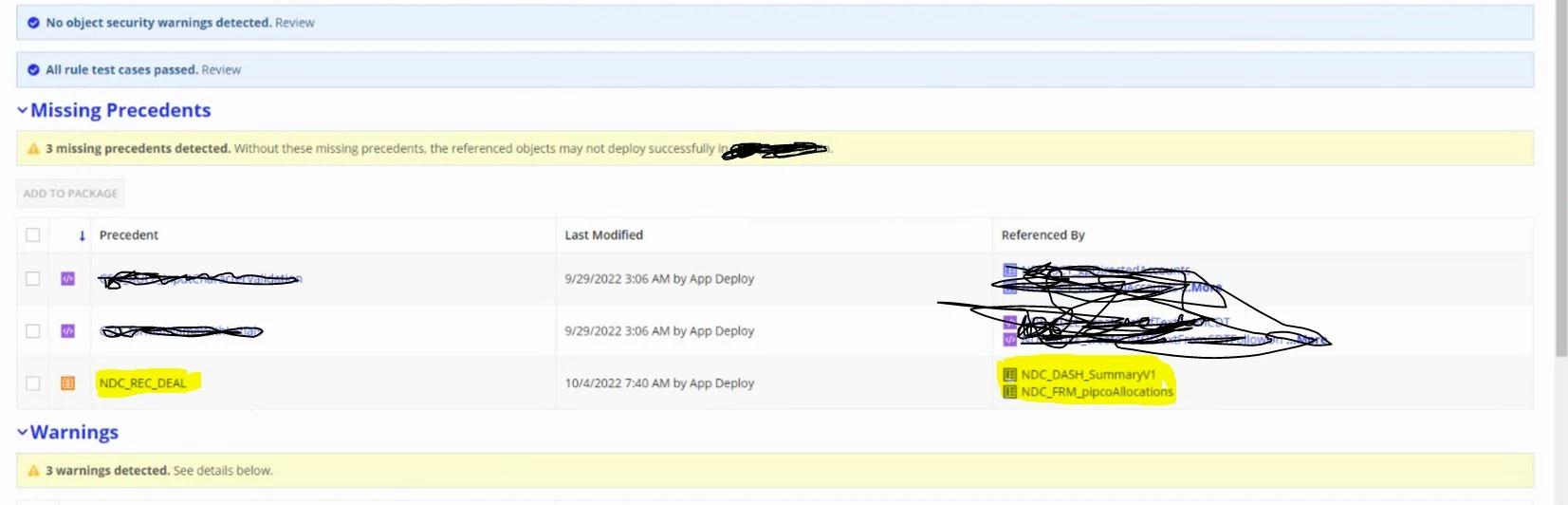
JFYI:-
NDC_REC_DEAL , NDC_DASH_SummaryV1 and NDC_FRM_pipcoAllocations are part of package.


NDC_REC_DEAL :- Already Present at higher environment

NDC_DASH_SummaryV1 and NDC_FRM_pipcoAllocations :- New Objects.

Let me know if you need more info.

    Best answer by shubhama926776

    For me, I was having issue with my record. I would suggest please check record properly.

    10 replies

    abhishekm0007
    October 7, 2022

    Did you try adding these 3 objects to the package and re-inspect?

    harshitb6843
    October 7, 2022

    It happens when there is a problem with the record and all of these objects must be connected with records. 
    What you need to do is, if you made a change in the record's source, then move those changes first in a separate package and then verify those changes there in the data store. Once the DB state is synced, then you should be good with moving the record.

    viraty527193
    October 7, 2022

    Hi Shubham,

    This is one of the know issues with Record Types, as [mention:689961fb58e44dd3a143d9705472c5f3:e9ed411860ed4f2ba0265705b8793d05] suggested trying to move them as a separate package and verify the datastore if this does not work. 
    After verifying the data store rather than compare and deploy download the package from the source environment and deploy it to the destination manually.
    It still might show you a warning but just deploy it and it should work then. Has worked for me.

    Happy to discuss this further, if you need more details.

    jorgez0002
    March 29, 2023

    Ran into this when deploying into the environment for the first time.  All objects being deployed and the DB tables had already been setup.  Five records were reported as Missing Precedents and when they were added they would all reappear after another inspection.  Still looking for a work around.  No CDTs used in the application. 

    shubhama926776
    shubhama926776AuthorAnswer
    Brainy
    March 30, 2023

    For me, I was having issue with my record. I would suggest please check record properly.

    शुभम्
    jorgez0002
    March 30, 2023

    The record was configured correctly and we had been able to deploy between the lower environments without issue.  The only problem was on the initial deployment to the new environement.  In order to get around it, we had to update the STAGE version of the record to not have any precedents, deploy it, then deploy up the correct version to replace it.  After that, we were able to deploy the rest of the app objects. 

    August 23, 2023

    I am facing this exact same issue.

    mathieud0001
    Brainy
    August 23, 2023

    This is a known issue I believe. I believe they are still looking at it.

    gayathris111098
    November 1, 2023

    We got into this when deploying into the environment for the first time.  All objects being deployed and the DB tables had already been setup.  Five records were reported as Missing Precedents and when they were added they would all reappear after another inspection. 
    Solution we found is Manual Deployment.

    June 12, 2024

    I encountered the same issue while deploying a new application. The compare deploy showed that the record types were missing, even though they were present in the package. When I exported the package and inspected it manually, the manual inspect provided detailed error information. After resolving those issues, I retried the import through compare deploy, and it succeeded.