
Question
Required Textfield in the editable grid validation not working properly
Hi All,
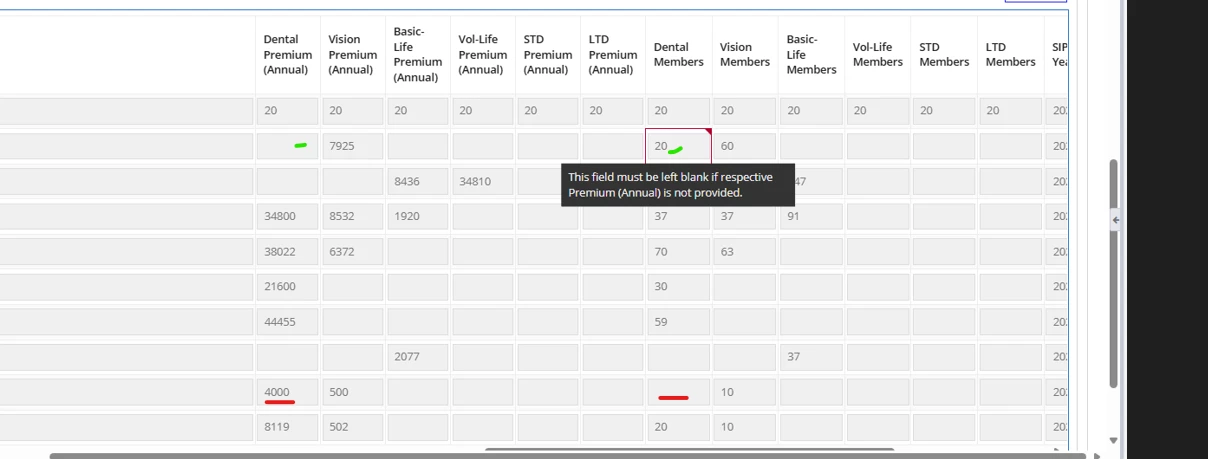
i have editable grid in my ui, on that i have textfield which i marked as required. (note: when page loads grid is disabled based on the button action grid will get enabled).
but i have couple of validation for that textfield that is working but with respective to required condition it is not working. please find below the screenshot and code snippet. Kindly help me on the same.
a!textField(
                          label: "Dental Members",
                          labelPosition: "ABOVE",
                          value: fv!item.dentalEnr,
                          saveInto: {
                            fv!item.dentalEnr,
                            if(
                              contains(
                                touniformstring(index(local!editList, "intakeId", null)),
                                tostring(fv!item.intakeId)
                              ),
                              {
                                a!save(
                                  local!editList,
                                  remove(
                                    local!editList,
                                    wherecontains(
                                      tostring(fv!item.intakeId),
                                      touniformstring(index(local!editList, "intakeId", null))
                                    )
                                  )
                                ),
                                a!save(
                                  local!editList,
                                  append(local!editList, fv!item)
                                )
                              },
                              a!save(
                                local!editList,
                                append(local!editList, fv!item)
                              )
                            )
                          },
                          refreshAfter: "UNFOCUS",
                          showWhen: if(
                            local!region = cons!GSE_SCL_TXT_REGIONS[4],
                            contains(
                              local!showinsureTechColumns,
                              "dentalEnr"
                            ),
                            contains(
                              local!showOtherRegionColumns,
                              "dentalEnr"
                            )
                          ),
                          required: if(
                            a!isNullOrEmpty(fv!item.dentalPremium),
                            false,
                            true
                          ),
                          disabled: if(
                            not(
                              contains(
                                touniformstring(local!editMode),
                                tostring(fv!item.intakeId)
                              )
                            ),
                            true,
                            if(
                              a!isNullOrEmpty(fv!item.dentalPremium),
                              true,
                              false
                            )
                          ),
                          validations: {
                            rule!GSE_SCL_checkNumbersOnlyValidation(
                              searchString: fv!item.dentalEnr,
                              checkMinValue: false
                            ),
                            if(
                              and(
                                a!isNullOrEmpty(fv!item.dentalPremium),
                                a!isNotNullOrEmpty(fv!item.dentalEnr)
                              ),
                              "This field must be left blank if Dental Premium (Annual) is not provided.",

                              if(
                                and(
                                  a!isNotNullOrEmpty(fv!item.dentalPremium),
                                  a!isNullOrEmpty(fv!item.dentalEnr)
                                ),
                                "This field required if dental premium has value ",
                                null
                            ))
                          }
                        ),