September 7, 2022
Solved

Return one value for multiple conditions

  • September 7, 2022
  • 15 replies
  • 0 views

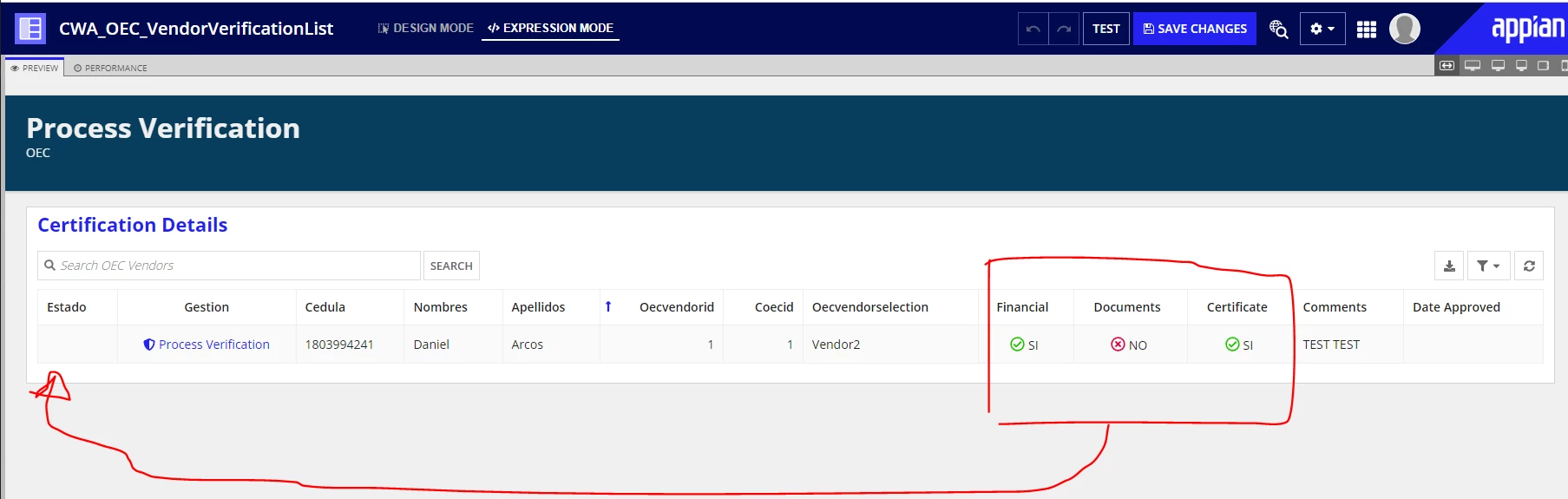
In the image bellow the 3fields in the square come from a dropdown  ("SI" or "NO") in a user interface.

I can see the user responses in a read-only grid (see the image bellow). 

I want IF 3 condition ("Financial", "Documents", "Certificate") in the red square are "SI" then the column "Estado" return a new value "Finalizado"

 IF just one condition ("Financial", "Documents", "Certificate") in the red square are "NO" then the column "Estado" return a new value "Pendiente"

Next i want to store the value of the column "Estado" in my cloud database

    Best answer by mikes0011

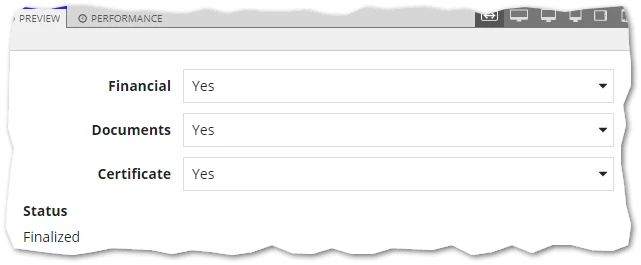
    Here's a standalone example mirroring your values which demonstrates how to do this calculation in a single-nested if() statement as well as how to properly contain the calculation within its own local variable.  Note how the text field does not and should not have a "saveInto" parameter set, as it would never do anything at all since it's read-only.

    a!localVariables(
      local!entry: a!map(
        financial: "",
        documents: "",
        certificate: ""
      ),
      
      /* this value will auto-update as the dropdown values are changed */
      local!calculatedStatus: if(
        or(
          a!isNullOrEmpty(local!entry.financial),
          a!isNullOrEmpty(local!entry.documents),
          a!isNullOrEmpty(local!entry.certificate)
        ),
        "In Processing",
        if(
          and(
            local!entry.financial = "YES",
            local!entry.documents = "YES",
            local!entry.certificate = "YES"
          ),
          "Finalized",
          "Pending"
        )
      ),
      
      {
        a!dropdownField(
          label: "Financial",
          labelPosition: "ADJACENT",
          placeholder: "(none)",
          choiceLabels: {"Yes", "No"},
          choiceValues: {"YES", "NO"},
          value: local!entry.financial,
          saveInto: local!entry.financial
        ),
        a!dropdownField(
          label: "Documents",
          labelPosition: "ADJACENT",
          placeholder: "(none)",
          choiceLabels: {"Yes", "No"},
          choiceValues: {"YES", "NO"},
          value: local!entry.documents,
          saveInto: local!entry.documents
        ),
        a!dropdownField(
          label: "Certificate",
          labelPosition: "ADJACENT",
          placeholder: "(none)",
          choiceLabels: {"Yes", "No"},
          choiceValues: {"YES", "NO"},
          value: local!entry.certificate,
          saveInto: local!entry.certificate
        ),
        
        a!textField(
          label: "Status",
          readOnly: true(),
          /* this field is READ ONLY, so there is **no save-into**, as it wouldn't do anything anyway */
          /* saveInto: "", */
          value: local!calculatedStatus
        )
      }
    )
    15 replies

    September 8, 2022

    To store the data into DB, you have to create a link or button for the action to writeDataintoDatastore but to show the value into Estado column. you can use the below code under value configuration of the grid column of Estado.

    if(
    and(
    fv!row.financial="SI",
    fv!row.documents="SI",
    fv!row.certificate="SI",
    ),
    "Finalizado",
    "Pendite"
    
    
    )

    danna3499Author
    September 8, 2022

    Hi Deepak

    Thanks so much,

    Im trying but now i want to do this:

    IF 3 condition ("Financial", "Documents", "Certificate") in the red square are "SI" then the Text Filed  "Estado de proceso vendedor" return a new value "Finalizado"

     IF just one condition ("Financial", "Documents", "Certificate") in the red square are "NO" then the Text Filed  "Estado de proceso vendedor" return a new value "Pendiente"

    This part is new

     IF 3 or 1 condition ("Financial", "Documents", "Certificate") in the red square are "EMPTY" then Text Filed  "Estado de proceso vendedor" return a new value "En Proceso"

    In the blue square (image bellow) is the value generate by the conditions above, i want that value store in my CloudDatabase after clicking SUBMIT button.

    This is the expresión of the Text Filed  "Estado de proceso vendedor" 

    a!textField(
    label: "Estado de proceso VENDEDOR",
    labelPosition: "ADJACENT",
    value:
    if(and(
    ri!CWA_OECVendor.oecvendorverffinancial ="SI",
    ri!CWA_OECVendor.oecvendorverfdocs ="SI",
    ri!CWA_OECVendor.oecvendorregistroac ="SI"
    ),
    "Finalizado","Pendiente"
    ),
    saveInto:
    a!save(ri!CWA_OECVendor.oecvendorstatus,
    if(and(
    ri!CWA_OECVendor.oecvendorverffinancial ="SI",
    ri!CWA_OECVendor.oecvendorverfdocs ="SI",
    ri!CWA_OECVendor.oecvendorregistroac ="SI"
    ),
    "Finalizado","Pendiente"
    )
    ),
    refreshAfter: "KEYPRESS",
    characterLimit: 55,
    required: false,
    readOnly: false,
    align: "LEFT"
    )

    September 8, 2022

    With the click of a button, you can save the variable value by using the same expression which you are using for visibility. And use that variable while insertion.